
TripWorks' AI assistants can take a complete booking on their own. Both the website chatbot and the phone callbot check your live availability, collect the guest's details, create a draft booking, and text the guest a payment link they pay through your normal TripWorks checkout. The assistant never handles the money itself — it hands the guest to the same secure checkout as any other online booking.
In this article
This page explains what happens under the hood, why it's safe, and how AI bookings show up in your account.
What "an AI booking" actually is
An AI booking is a reservation that a customer starts and completes by talking to an assistant — typing in the website chat, or speaking to the callbot on the phone — instead of clicking through your booking widget.
Both assistants run on the same booking engine, so the mechanics are identical no matter which one the guest uses:
- The assistant reads your live experiences, availability, and pricing straight from your account.
- It creates the reservation as a draft, which is unpaid and not confirmed.
- The guest pays with a link, through your standard checkout.
The only real differences are the channel (web chat vs phone) and how the booking is labeled afterward, covered below.
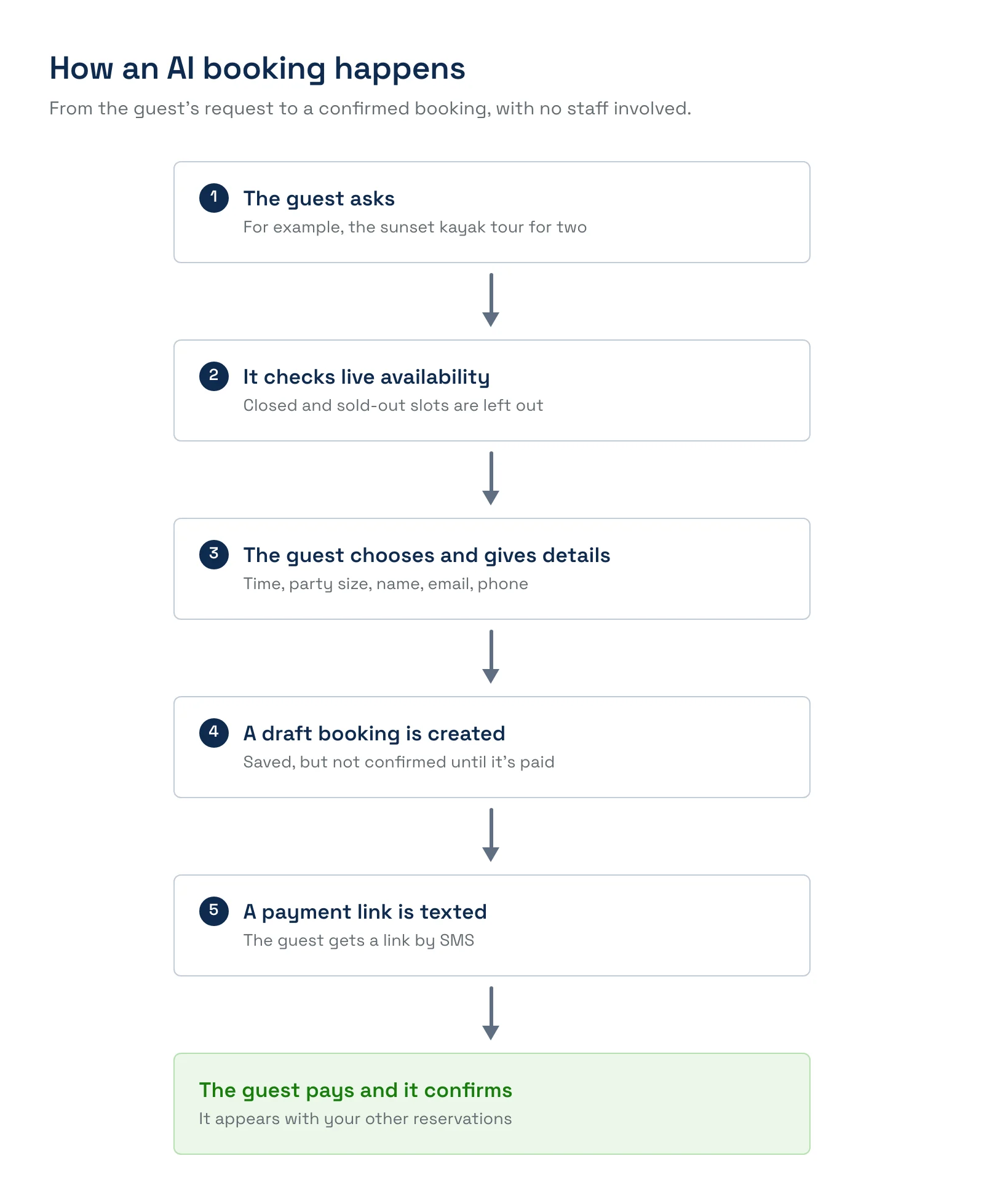
The booking flow, step by step
- The guest states intent. "I'd like to book the sunset kayak tour for two this Saturday."
- The assistant checks live availability. It looks up real times and prices from your account for that experience and date. Closed timeslots, sold-out times, and slots you don't sell online are filtered out automatically, so it only ever offers something a guest could actually book.
- The guest chooses. They pick a time and the number of guests; the assistant confirms what's available at that size.
- The assistant collects details. Name, email, and phone number — the minimum needed to create the booking and send a payment link. The booking can't be created without a valid phone number.
- TripWorks creates a draft booking. The reservation is written to your account in draft status — it isn't confirmed, because no payment has happened yet.
- The guest gets a payment link by SMS. TripWorks texts the guest a link to complete payment.
- The guest pays, and the booking confirms. Payment runs through your normal checkout; on success the booking is confirmed and appears alongside your other reservations.
If the text can't be sent, the draft booking still exists. On a call, the callbot tells the caller the booking is made but the link didn't go out, and offers to try again or send it another way. You can find the draft under the AI Call Bot source and send the guest a payment link yourself. The automatic text also needs the callbot's Send booking payment links via SMS capability turned on.
A worked example
A guest tells the chatbot they want a private fishing charter for four on July 12. The bot checks availability, sees the 7:00 AM charter is open, and confirms the price for four. It collects the guest's name, email, and phone, creates a draft, and texts a payment link. The guest taps it, pays, and the charter is confirmed — with no staff involvement and no back-and-forth email.
Chatbot vs callbot: how the booking differs
The booking flow is the same; three things differ by channel.
| Chatbot (website) | Callbot (phone) | |
|---|---|---|
| How the guest interacts | Types or talks in the chat widget | Speaks on a phone call |
| How the payment link is delivered | SMS to the phone number they give | SMS to the caller's number |
| How the booking is labeled | Source AI Chat Bot | Source AI Call Bot |
Because the two are tagged separately, you can always tell — and report on — which assistant drove a booking. See set up the chatbot and set up the callbot.
Why AI bookings are safe
Letting AI take a booking sounds risky until you see where the guardrails are. The design keeps the assistant away from anything it could get wrong.
- The AI never processes payment. It creates a draft and sends a link; the guest pays through your standard TripWorks checkout. Every protection you already have — CVV, AVS, 3D Secure, and fraud monitoring — applies exactly as it does for a direct website booking. There is no path that bypasses them.
- The final price is calculated at checkout, not by the AI. The assistant quotes from live data, but the amount the guest actually pays is computed by your checkout when they pay — so a stale or misread number can't turn into a wrong charge.
- Live data, never cached. Availability, pricing, and experience details are pulled from your account in real time, so the assistant can't offer a sold-out slot or an old price.
- No made-up answers. The assistants are instructed never to invent pricing, availability, dates, or details. If they don't know something, they say so and point the guest to you.
- Scoped to your account. Every conversation only sees your account's data — never another operator's or another customer's.
When a request doesn't work
The assistant follows the exact same booking rules your website checkout does — it can't offer or create a booking your checkout would refuse.
- Party size limits. If an experience has a minimum or maximum group size and the guest's party doesn't fit, the assistant says so rather than creating a booking your team would have to fix or cancel.
- Booking cutoffs. If a guest asks for a time that's already past your advance-notice cutoff, the assistant treats it as unavailable, the same as your checkout would.
- The right timeslot, not just the right day. The assistant only offers times that are real, open slots for that specific experience — it can't accidentally book a guest into a different experience's schedule.
When a request is turned down for one of these reasons — the slot is full, closed, or past its cutoff — the assistant offers the next available option it can find for that experience, so a "no" still ends with something the guest can say "yes" to instead of a dead end. (Reasons that aren't about the time itself — like an account-level limit or an invalid promo code — aren't paired with an alternative time, since a different time wouldn't fix them.)
Example: A guest asks the callbot to book a family rafting trip for a party of two, but that trip requires a minimum of four guests. The callbot explains the four-person minimum and offers the next timeslot that has room for a smaller group instead of silently failing or booking something that would get cancelled later.
What happens if the guest doesn't pay
Nothing is charged until the guest completes the payment link, so an unpaid booking simply stays a draft. That draft follows your standard abandoned-cart flow, so you can follow up the same way you would with any half-finished online booking. Any contact details the guest shared are attached to it. For the callbot, callers who never book can also be captured as leads in Lead Center (if you enable that capability), so a missed booking still becomes a follow-up opportunity rather than a lost one.
What the AI can and can't do
- Can: answer questions from your Knowledge Base and live experience details, check real-time availability and pricing, and create new bookings with a payment link.
- Can't: modify or reschedule an existing booking. If a guest wants to change a reservation, the assistant directs them to your team. It also can't take payment itself or override your checkout rules.
How AI bookings appear in TripWorks
AI bookings are ordinary reservations in your account, with one extra signal: a source tag of AI Chat Bot or AI Call Bot. That means you can filter, report, and reconcile them like any other booking, while still seeing exactly how much revenue your assistants are generating. Chat conversations are reviewable under chatbot history, and calls under callbot call history.
Frequently asked questions
Does the AI charge the customer's card?
No. The assistant creates a draft booking and sends a payment link; the customer pays through your standard TripWorks checkout. All your normal payment and fraud protections apply, and the final amount is calculated at checkout.
Can the AI oversell or double-book a timeslot?
It pulls live availability and filters out closed and sold-out times, so it only offers real openings. And because a booking isn't confirmed until the guest pays, the spot is only taken when payment completes.
What if availability changes while the guest is deciding?
Availability and price are re-checked live during the conversation, and the final price is computed at checkout — so if something sells out or changes, the guest sees current information rather than a stale quote.
How is a chatbot booking different from a callbot booking in my reports?
They're tagged with different sources — AI Chat Bot for web chat and AI Call Bot for phone — so you can report on each separately.
Can the AI take a deposit instead of the full amount?
The payment link uses your normal checkout, so whatever your activity is configured to collect — full payment or a deposit — is what the guest pays.
Related
Built for attractions, tours & activities
Turn questions into bookings
See how attractions, tours, and activities let TripWorks' AI assistants close bookings safely through their normal checkout. Book a demo and make the switch.