
An event reminder is an automatic message sent before an activity starts — the nudge that keeps guests from forgetting and cuts no-shows. You can send up to two reminders per activity, each with its own timing and template.
In this article
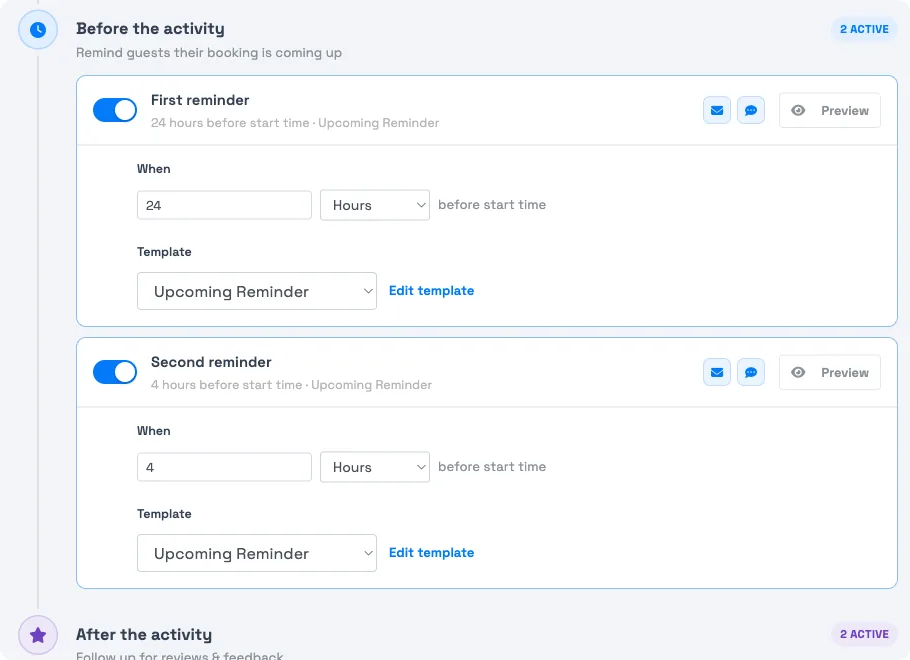
Reminders are set per activity
Reminders have no account-wide switch. You configure them on each activity, so different experiences can remind guests on different schedules. Set them here:
- Go to Setup Build what you sell Activity Settings and open the activity.
- Select the Email Automations tab and find the Before the activity moment.
- Toggle on First reminder, set its timing — a number plus Minutes, Hours, or Days before start — and choose its template.
- Toggle on Second reminder the same way if you want one, then Save.
A common setup is one reminder 24 hours before start and a second 4 hours before. See Customize messages per activity for the full tab.
Reminders skip if the guest books too late
Each reminder is scheduled relative to the event start. If a guest books after a reminder's send time has already passed, that reminder is skipped for them — TripWorks doesn't send it late.
For example, with reminders at 24 and 4 hours out, a guest who books 20 hours before start misses the 24-hour reminder (that moment is gone) but still gets the 4-hour one. The two reminders are independent — missing one doesn't affect the other.
Choosing the template
Each reminder uses a message template. Pick any template suited to reminders — directions, what to bring, arrival time. If you want a template to appear consistently across reminders, confirm its category matches what the picker expects. See Create, edit & manage message templates.
Frequently asked questions
How many reminders can I send?
Up to two per activity. Each has its own enable switch, timing, and template, so you can send one well ahead and one close to start.
Where do I set reminder timing?
On the activity — Setup → Build what you sell → Activity Settings, open the activity, then the Email Automations tab, under Before the activity. There's no account-wide reminder setting.
Why didn't a guest get a reminder?
Most often they booked after that reminder's send time had already passed, so it was skipped. A reminder set 24 hours out won't send to someone who books 20 hours before start — but a later reminder still will.
What's a good default?
A reminder 24 hours before start and another 4 hours before is a common, effective pairing — one to plan around, one on the day.
Related
- Customize messages per activity
- Event follow-up messages
- Automated messages: an overview
- Order confirmation messages
Built for attractions, tours & activities
Cut no-shows with timely reminders
See how attractions, tours, and activities remind guests automatically before every event on TripWorks. Book a demo and make the switch.