
Every conversation your AI chatbot has is saved, scored with an outcome, and searchable, so you can see at a glance what's working, follow up on the conversations that need a human touch, and find the gaps in your Knowledge Base.
In this article
(For phone calls handled by the callbot, see Review AI callbot calls & analytics instead. That's a separate log, built the same way.)
Learn how to manage permission groups
What conversation history is for
Conversation history isn't just a transcript log. It's your chatbot's feedback loop. Every time a visitor chats with your bot, TripWorks records the exchange, an AI-generated summary, how long it ran, and what actually happened as a result: did it lead to a booking, a lead, a message for your team, or nothing at all? That result is the conversation's outcome, and it's the fastest way to answer the questions that matter: is the bot converting, where is it losing people, and which conversations need a human to step in.
Open the conversation history
- Go to Setup → Sell online → Chatbots.
- Find the chatbot and select History.
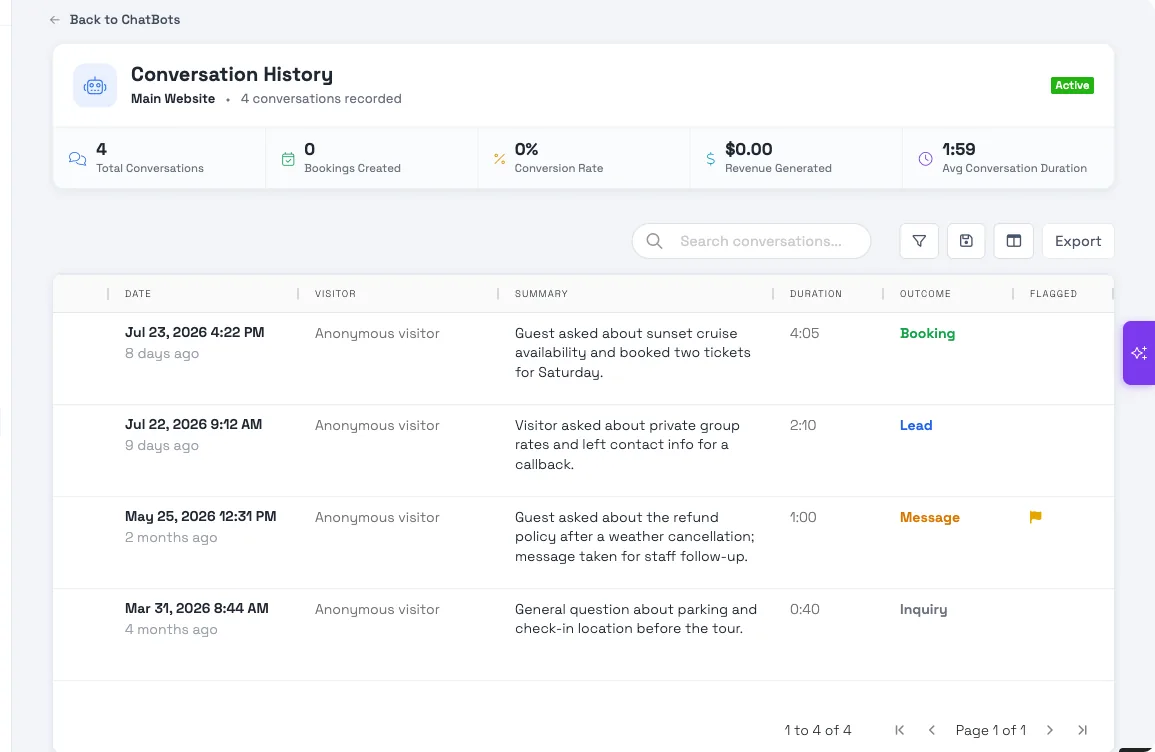
At-a-glance stats
At the top of the page, five cards summarize the chatbot's activity for the selected period:
- Total Conversations: how many conversations it's had
- Bookings Created: how many turned into a completed booking
- Conversion Rate: the share of conversations that ended in a booking
- Revenue Generated: the value of those bookings
- Avg Conversation Duration: how long a typical conversation runs
These recalculate for whatever date range you filter to, so you can compare, say, this month's numbers to last month's.
What each outcome means
Every conversation is tagged with one outcome, so you can sort and filter without reading every transcript:
- Booking: the conversation ended in a completed booking.
- Lead: the bot couldn't close a booking but captured the visitor's contact info as a lead (if lead capture is enabled for the chatbot).
- Message: the bot couldn't help and took a message for your team to follow up on.
- Lookup: the visitor asked a factual question (hours, pricing, availability) that the bot answered without leading to a booking or a lead.
- Inquiry: a general question that didn't fit the other categories, and didn't produce a lead or a message.
- No action: the conversation didn't lead to any of the above, typically a very short or abandoned chat.
The outcome is set automatically once the conversation finishes syncing, so a conversation that's still in progress or hasn't finished processing won't have one yet. See the FAQ below.
Filter, search, and save your view
Above the table, the search box matches on visitor and summary text, and the filter icon opens the full Outcome and Flagged filters (along with date, duration, and summary). Combine filters the way you would in any other TripWorks grid (for example, Outcome = Lead and a date range), then use the save icon to save that combination as a view you can jump back to later without rebuilding it. The columns icon lets you show, hide, or reorder columns to match what you look at most.
Flag a conversation
Select the flag icon on any row (or open the conversation and use the flag button in its header) to mark it for follow-up. Flagging doesn't change anything for the visitor. It's purely an internal marker so your team can filter to Flagged and come back to review a batch of conversations later, the same way you'd flag an email. Select the flag again to remove it.
Export to CSV
Select Export to download every conversation matching your current filters as a CSV, including date, visitor, summary, duration, outcome, and flagged status. This respects whatever you've searched or filtered to, so you can, for example, filter to last month's flagged conversations and export just those instead of the entire history.
Open a conversation
Select any row to open its full detail in a side drawer:
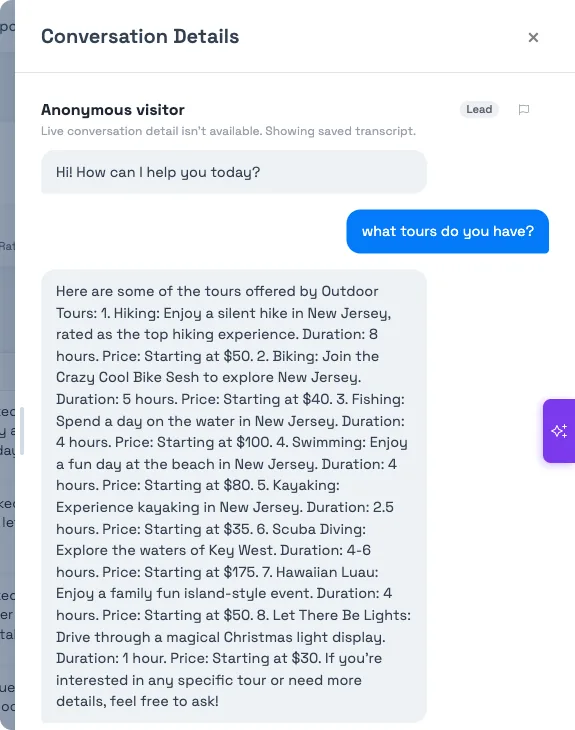
The drawer shows:
- The full transcript: every message, in order.
- The outcome pill: the same outcome shown in the grid, plus a booking reference and total if the conversation resulted in a booking.
- A flag control: flag or unflag right from here.
- Workflow-step labels and Knowledge Base citations inline in the transcript where the bot used a specific step or pulled an answer from your Knowledge Base — see Knowledge Base citations in AI conversations for how those are generated and what they mean.
The "View Lead" action
If a conversation's outcome is Lead and it actually produced a lead record, the drawer shows a Lead created card and a View Lead button in its footer. Selecting it takes you straight to that lead in your Lead Center, so you (or whoever's working leads) can follow up without hunting for the right record. If a conversation shows a Lead outcome but no Lead card appears, the lead record itself may have since been deleted, or the capability wasn't enabled when the conversation happened. The outcome reflects what the bot did at the time, not the record's current state.
Put it to work
- Fill the gaps. If Lookup or Inquiry conversations keep surfacing the same unanswered question, add it to your Knowledge Base — it re-syncs automatically.
- Work the leads and messages. Filter to Lead or Message outcomes to find the people who need a human follow-up, and use View Lead to jump straight to the record.
- Find the drop-offs. Look at Inquiry and No action conversations for guests who showed interest but didn't book. That's where clearer content or pricing can help.
- Check accuracy. Flag anything that looks off and skim transcripts to confirm the bot is representing you the way you want.
Example searches and scenarios
- Filter Outcome to Lead and Flagged to No to find leads nobody's marked as reviewed yet.
- Filter Outcome to Lead created with no matching booking in the same date range to find leads that never converted.
- Save a view filtered to Outcome = Message so your front-desk team can check it each morning for overnight follow-ups.
- Filter to last month and Flagged = Yes, then Export to send a batch of flagged conversations to a manager for review.
- Search a keyword from a Knowledge Base article (like "cancellation policy") to see how the bot is actually answering that question in practice.
- Sort by Duration to find unusually long conversations, which often mean the bot struggled to answer something.
Frequently asked questions
What does each outcome mean? Booking means the conversation ended in a completed booking. Lead means the bot captured contact info instead. Message means it took a message for your team. Lookup and Inquiry are conversations that answered a question without producing a lead or booking (Lookup for a factual answer like hours or pricing, Inquiry for anything more general). No action means none of the above happened, usually a very short or abandoned chat.
Why does a conversation show no outcome? Outcomes are set once the conversation finishes processing after it ends. A conversation still in progress, or one that just wrapped up and hasn't synced yet, will briefly show without an outcome. If it's been more than a few minutes and it still shows nothing, refresh the page. If it's still missing, the conversation may not have processed correctly and it's worth flagging for your team.
Can I export conversations? Yes. Select Export above the table to download a CSV of every conversation matching your current filters. Export everything, or narrow to a date range, outcome, or flagged status first and export just that subset.
What happens when I flag a conversation? Flagging just adds an internal marker visible to your team. The visitor never sees it and nothing changes for them. It's meant for marking conversations that need a second look, whether that's a wrong answer, a promising lead, or a support issue. Filter to Flagged to review them as a batch, and unflag once you've handled it.
What does the "View Lead" button do? It opens the lead record that this conversation created in your Lead Center, so you can review it and follow up without searching for it manually. It only appears when the conversation's outcome is Lead and a lead record actually exists for it.
Do stats and filters affect all my chatbots, or just one? Conversation History is per chatbot. The stats, filters, and export on this page only reflect the chatbot you opened. If you run more than one chatbot, open each one's History separately to see its own numbers.
What are the workflow-step labels and citations I see in a transcript? They annotate a message with the specific step in your chatbot's configured flow that produced it, and any Knowledge Base article the bot pulled its answer from. See Knowledge Base citations in AI conversations for the full explanation of how those are generated and what they mean for trusting an answer.
Can I search conversations by what the guest asked? Yes. The search box matches against the visitor field and the AI-generated summary, so searching a topic (like "refund" or "parking") surfaces conversations about it without opening each one.
Does deleting or archiving a chatbot delete its conversation history? Conversation history belongs to the chatbot it came from. If you need to keep a record of past conversations before making a change to a chatbot, export them to CSV first.
Related
- Review AI callbot calls & analytics
- Knowledge Base citations in AI conversations
- Set up your AI Chatbot
Built for attractions, tours & activities
Learn from every conversation
See how attractions, tours, and activities use TripWorks' AI chatbot conversation history to sharpen their answers and win more bookings. Book a demo and make the switch.