
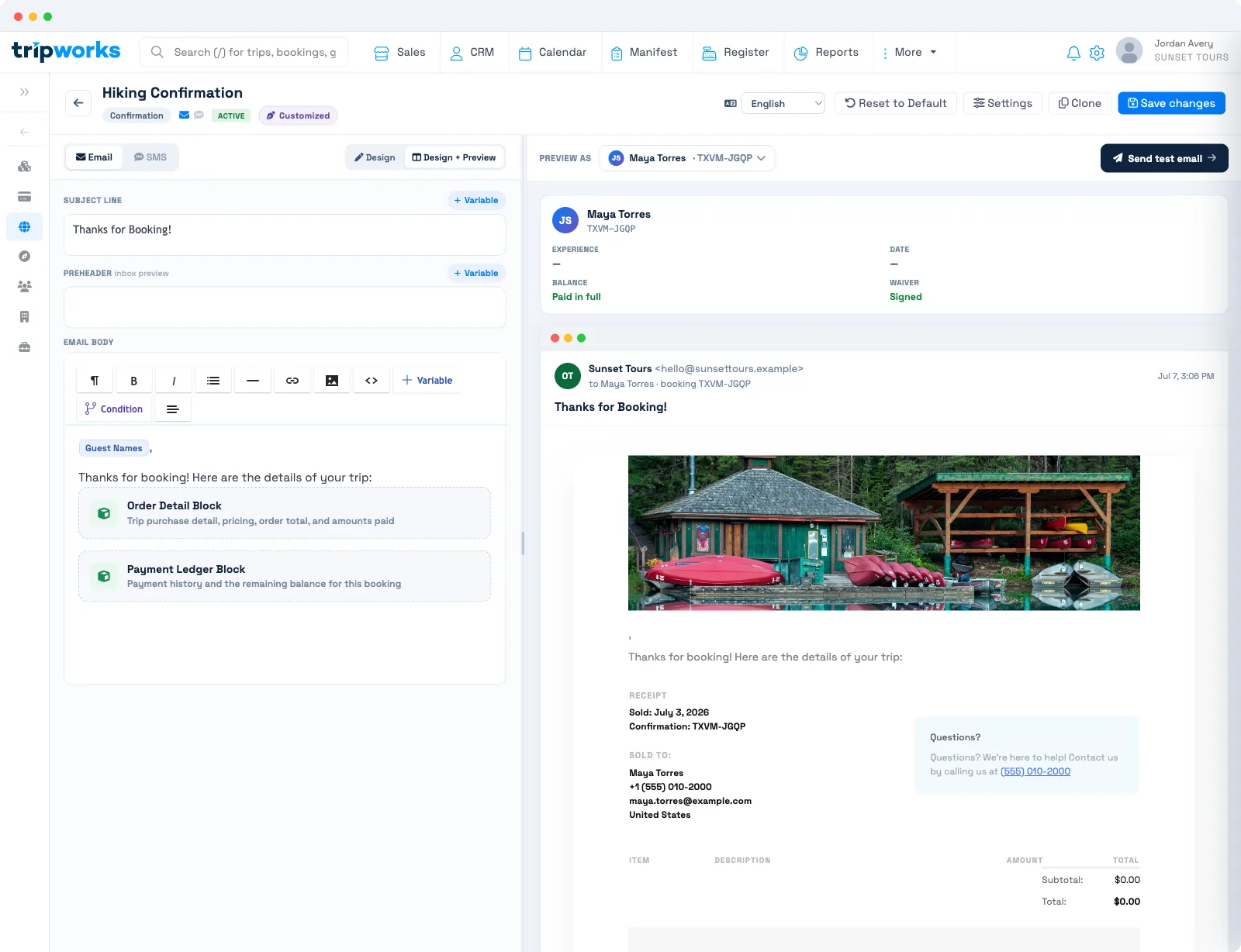
To create a payment receipt email, build a message template with the Order Detail Block and the Payment Ledger Block, or add those blocks to your Confirmation template. TripWorks sends the Confirmation automatically when a booking is reserved. To send a receipt later, open the booking, choose Email, pick the template, and click Send.
In this article
What a payment receipt email is in TripWorks
A payment receipt email is a message template that shows what the guest bought and what they paid. TripWorks has no separate "receipt" template type. Instead, the Order Detail Block and the Payment Ledger Block turn any email template into a receipt.
- The Order Detail Block is headed "Receipt" and shows the sold date, the confirmation code, each ticket with its price, and the totals. The totals include the subtotal, any promo code discount, each tax, the booking fee, any tip, the amount Paid, and the amount Due when a balance remains.
- The Payment Ledger Block lists each successful payment as a sentence, such as a card ending in four digits that was charged an amount on a date. Refunds appear the same way, as "was refunded".
If the booking hides rates from the guest (for example, some reseller bookings), the Payment Ledger Block shows nothing. The block also stays empty until at least one payment has succeeded.
Create the payment receipt email template
The quickest route is your Confirmation template, because TripWorks already sends it for you. Use a User Defined Message template instead when you want a receipt you send by hand.
- Go to Setup Sell online Message Templates and open your Confirmation template, or create a new User Defined Message template.
- Place your cursor in the email body where the receipt detail should appear.
- Insert the Order Detail Block to list the booked items and totals.
- Insert the Payment Ledger Block to list payments and refunds.
- Add merge tags for the details you want in your own words, such as First Name, Confirmation # and Amount Due.
- Use Preview as against a real booking to check the amounts, then set a new template to Live so it appears when you send.
The Studio saves your changes on its own. For the full editor walkthrough, see create, edit & manage message templates.
A merge tag that has no data, such as Last Refund Amount on a trip with no refunds, is removed from the message and flagged during preview. Keep refund tags out of a receipt you also use for first payments.
Sending a payment receipt email
Sending a payment receipt email happens in one of two ways: automatically at booking, or by hand from the trip.
Automatic receipt when the booking is reserved
TripWorks sends the account's Auto Confirmation the moment a trip becomes Reserved, whether the guest pays online or a team member creates the booking as reserved. If your Confirmation template contains the two receipt blocks, that email is the receipt. Gift card purchases use the separate Gift Card Purchase Auto Confirmation template.
Turn the automatic send on or off, and choose its template, under Setup Sell online Email & SMS Automations. An activity can use its own confirmation template instead. See order confirmation messages.
Send or resend a receipt by hand
- Open the booking and click the Email action to open Send a Message.
- Under Choose a template, pick your receipt template.
- Optionally add a note, or send a CC copy to yourself or to all bookings on the trip.
- Click Send.
Each send uses the booking's current payments, so a receipt sent after a second payment shows both. You can send again whenever a guest asks. For the print and save-as-PDF route, see send or print a receipt for a booking.
Examples
- Find a museum guest who paid a deposit online: send your receipt template from the booking, and the ledger lists the deposit while Due shows the balance still owed.
- Do a refund receipt for a canceled kayak tour: send the receipt again after the refund, and the ledger adds a "was refunded" line for the card.
- Find a zoo group booking that wants proof of payment for their accounting team: use the CC option on the Send a Message window to copy the organizer's colleague.
- Do a receipt for a walk-up ticket sold at the desk: create the booking as Reserved, and the Auto Confirmation sends the receipt to the guest's email on file.
- Find a gift card buyer asking for a receipt: the Gift Card Purchase Auto Confirmation covers it. Choose that template under Email & SMS Automations.
- Do a "balance due" receipt for a boat charter: add the Amount Due merge tag next to the Payment Ledger Block so the remaining amount reads in plain words.
Frequently asked questions
Does TripWorks send payment receipt emails automatically?
Yes, through the Auto Confirmation. TripWorks queues it when a trip becomes Reserved, and new accounts have it on by default. It is a receipt only if the template includes the Order Detail and Payment Ledger blocks. You can turn it off under Email & SMS Automations.
Can I resend a payment receipt email?
Yes. Open the booking, click Email, choose the receipt template and click Send. You can do this as often as needed, and each send reflects the payments on the booking at that moment.
Can I customize the wording and logo of a receipt email?
You can edit the wording around the receipt blocks in the Studio, including merge tags such as First Name and Company Name. The email shows your account's header image when one is set. The layout of the Order Detail and Payment Ledger blocks themselves is fixed.
Which payment details can a receipt email include?
The Order Detail Block shows tickets, subtotal, promo discount, taxes, booking fee, tip, amount paid and amount due. The Payment Ledger Block shows each successful payment with its method, card ending, amount and date. The Amount Due merge tag adds the balance in a sentence.
Can I send a receipt for a partial payment?
Yes. The ledger lists the payments made so far and the Order Detail Block shows a Due line while a balance remains. To collect that balance, use a request-for-payment message.
Does the receipt show refunds?
Yes. A refunded payment appears in the Payment Ledger Block as a "was refunded" line. TripWorks can also email a refund confirmation by itself. See refund messages.
Can guests get a PDF receipt?
The receipt email is sent as an email, not a PDF. A template's Attachments option attaches booking confirmation PDFs for activities that use vouchers, which are not receipts. For a PDF receipt, print the booking's Sales Receipt and choose Save as PDF, as described in send or print a receipt for a booking.
How do I print a receipt instead of emailing it?
Open a Reserved booking and click Print in the action row to open the Sales Receipt in your browser's print dialog. The steps are in send or print a receipt for a booking.
Related
- Create, edit & manage message templates
- Order confirmation messages
- Send or print a receipt for a booking
- Send a manual message
- Refund messages
Built for attractions, tours & activities
Give guests a receipt they trust
See how attractions, tours, and activities send clean, itemized receipts and confirmations on TripWorks. Book a demo and make the switch.