
Waivers in TripWorks let you collect a guest's signature — and any information you need — before or when they arrive, and keep every signed copy on file. You build your own waivers, attach them to the activities that need them, and guests sign online, on a tablet, or by scanning a code. This article is the map; each step links to a full how-to.
In this article
Build a reusable library of waivers, collect the guest details you need, and attach up to three waivers to an activity, each scoped to its own ticket types.
The waiver lifecycle
Every waiver moves through the same five steps, from building the template to filing the signed copy. Each step links to its own how-to.
- Build your waivers. Create a waiver template with its title, your legal text, and which guest details to collect. Your library is unlimited, so you can keep separate waivers per activity type or audience. TripWorks doesn't supply the legal language; it comes from your insurer or attorney. See Where can I get a waiver template?, choose what to collect in Collect guest data with waivers, and handle under-18s in Minors & parental consent waivers.
- Assign them to activities. Attach up to three waivers to any activity and scope each to the ticket types it applies to (for example, a minor waiver only on the Minor ticket). See Multiple waivers, additional signers & bulk actions.
- Collect & send. Get the waiver in front of guests the way that fits: a link by email or SMS before arrival, the guest's own portal, a paired iPad/tablet, a self-service kiosk, or a QR code. See Collect & send waivers to guests and nudge stragglers with waiver reminder messages.
- Guests sign. Guests sign online, typed or drawn, from their phone or your tablet; one person can sign for their whole party, and a guardian signs for a minor. See How guests sign a waiver.
- Track & file. Watch each guest's status (an X/3 badge as they complete each waiver), mark paper waivers signed in bulk, and handle guests who signed without a ticket. Then view, download, or print any signed copy.
Why can't I delete a waiver? Archive it instead
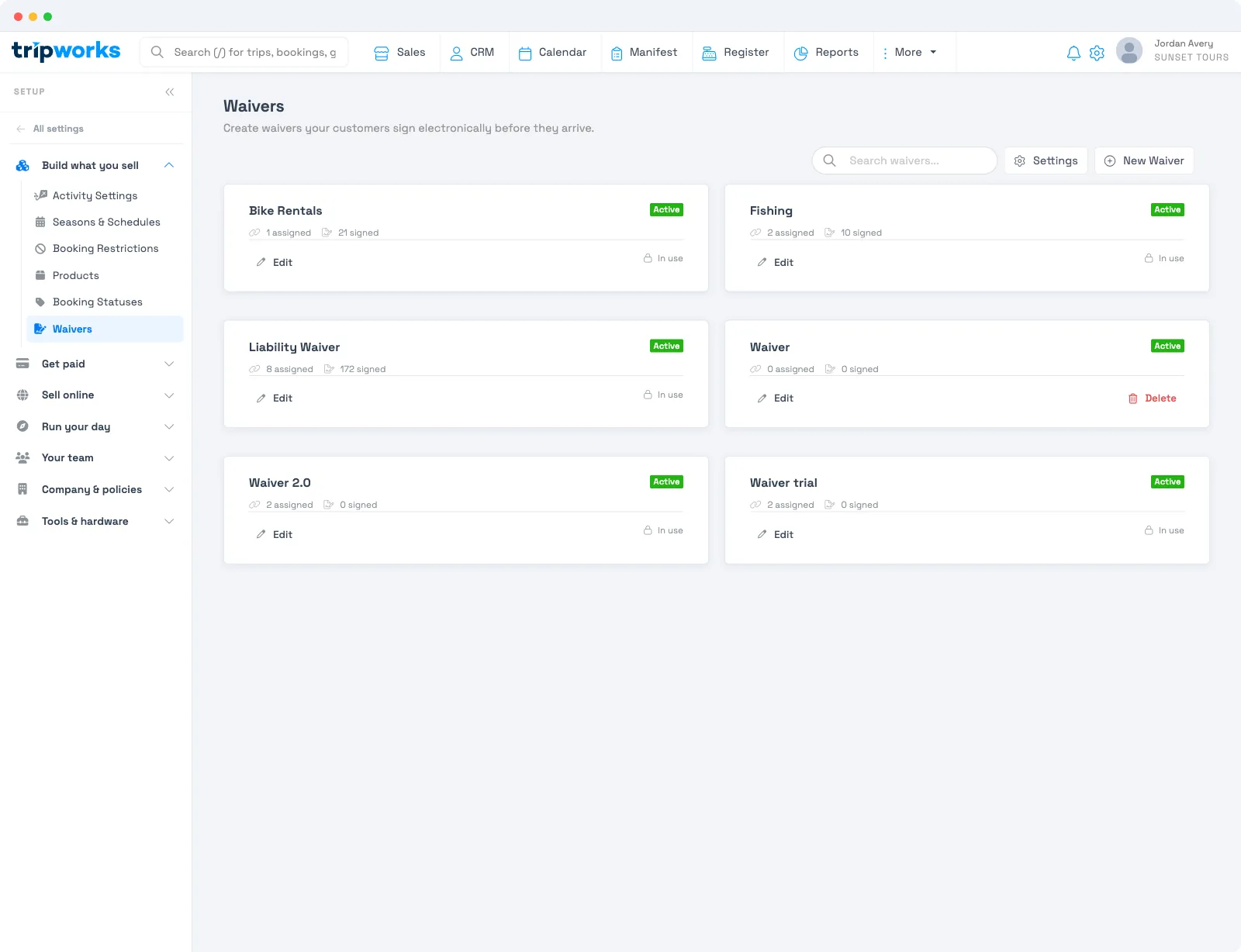
Go to Setup → Build what you sell → Waivers. A waiver template that has never been used can be deleted. A waiver template that has been signed, is attached to an activity, or is required on a booking can't be deleted, and its card shows In use instead. Remove it from its activities first, then open the waiver and set its status to Archived.
Frequently asked questions
Are waivers signed in TripWorks legally binding?
Guests sign electronically (typed or drawn), and TripWorks stores the signed copy with a date and time as your record. Whether a given waiver holds up is a legal question for your jurisdiction and activity — the enforceable language should come from your insurer or attorney, just like the waiver text itself.
Where are signed waivers stored, and for how long?
Every signed waiver is kept in your account under More → Waivers, where you can search, open, download, or print it. They stay on file — TripWorks doesn't auto-delete or expire them. See Viewing signed waivers.
Can I edit a waiver after a guest has signed it?
No — a signed copy is a fixed record of what that guest agreed to. Editing the waiver template changes only what future guests sign; it doesn't alter copies already signed.
Do signed waivers expire?
TripWorks doesn't set an expiration or validity period on signed waivers — each one is tied to its booking and kept on file. If you require a fresh waiver each visit, collect one per booking.
Related
- Where can I get a waiver template?
- Collect & send waivers to guests
- Multiple waivers, additional signers & bulk actions
- Viewing signed waivers
Built for attractions, tours & activities
Every guest signed, before they arrive
See how attractions, tours, and activities collect signed waivers ahead of time and keep them on file with TripWorks. Book a demo and make the switch.