
Conditional custom fields reveal follow-up questions based on how a guest answers an earlier field. Instead of showing every possible question at once, your booking form stays short and only asks what's relevant.
In this article
For example, ask "Do you want to add lunch?" as a checkbox — and only show "Dietary restrictions" and "Food allergies" when the guest checks it.
Before you begin
- The parent field — the one that controls what shows — must be a Checkbox or Dropdown. No other type can trigger conditional logic.
- The child fields — the ones that appear — can be any type.
- The parent and its children must be assigned to the same activity and collected at the same level (both Once per Trip). Cross-level conditions aren't supported.
Create both fields first (see set up custom fields), then add the logic on the parent.
Set up conditional logic
- Open the parent field (the Checkbox or Dropdown) from Setup Custom Fields and go to the Conditional logic section.
- For each answer, select Add fields and choose the child fields to reveal. On a Checkbox, you set fields for When checked and When unchecked; on a Dropdown, you set fields for each option.
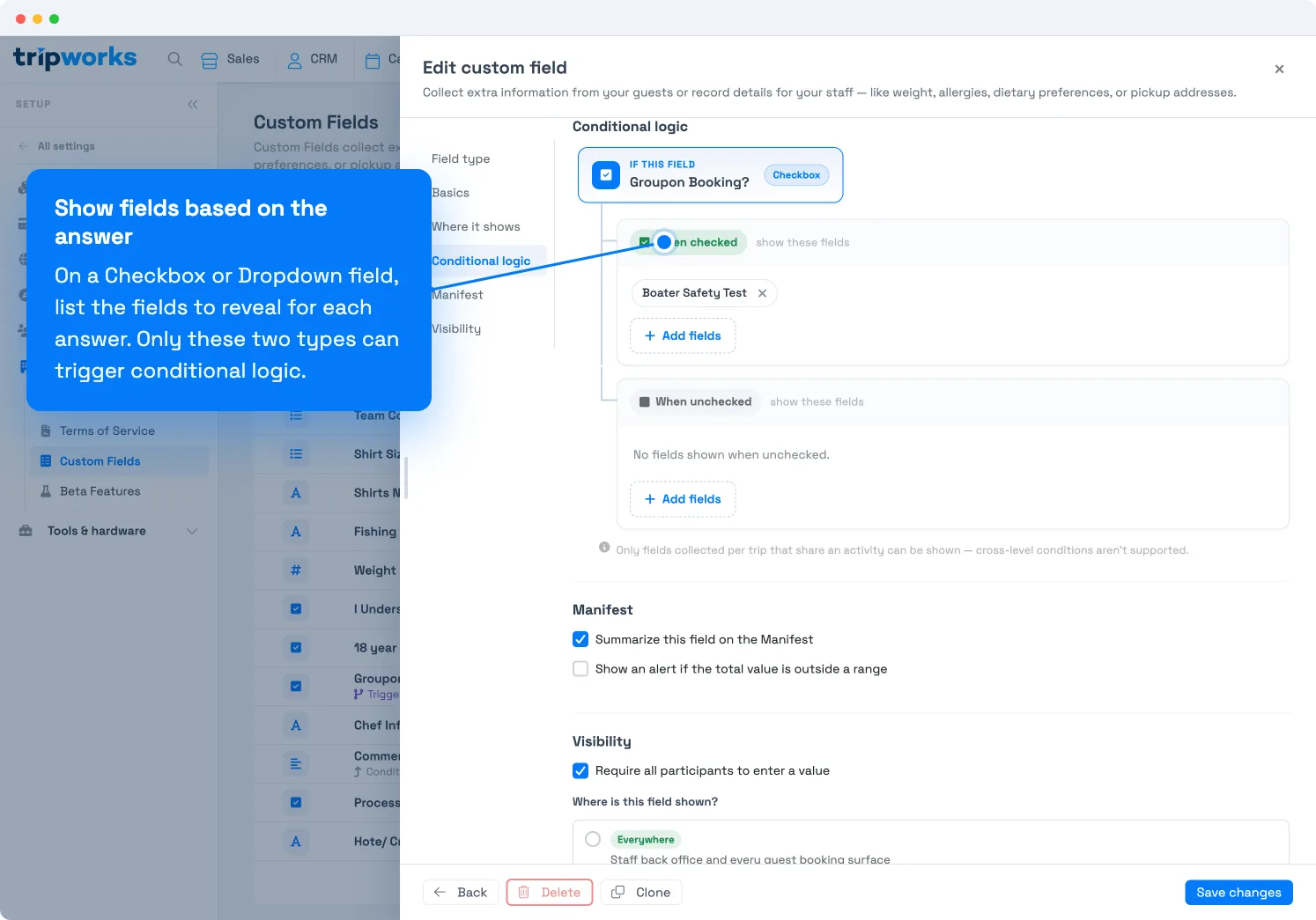
List the fields to reveal for each answer. Here, checking the box shows "Boater Safety Test." - Select Save changes.
Back in the list, the parent field shows a "Triggers N fields" note, and each child shows "Conditional on …", so you can see the relationships at a glance.
How it works at checkout
When a guest reaches the custom fields on your booking form:
- Child fields are hidden until the parent's answer matches.
- When the guest gives the matching answer, the child field appears.
- If the guest changes the parent so it no longer matches, the child hides again and its value is cleared.
This works everywhere guests answer custom fields — the online booking widget, walk-up checkout, and reseller checkout.
Common examples
| Parent field | Answer that reveals | Child field(s) |
|---|---|---|
| "Add lunch?" (Checkbox) | Checked | Dietary restrictions, Food allergies |
| "Need hotel pickup?" (Checkbox) | Checked | Hotel name, Room number |
| "Skill level" (Dropdown) | Beginner | Do you need equipment rental? |
| "Booking for" (Dropdown) | Corporate group | Company name, PO number |
Frequently asked questions
Which field types can be a parent?
Only Checkbox and Dropdown fields. Text, date, and other types can't trigger conditional logic — though any type can be a child field.
Can a child field trigger its own follow-up?
No. Conditional logic is one level deep — a child field can't also be a parent.
Can a required child field block checkout?
A required child is only enforced while it's visible. Guests are never blocked by a required field they can't see.
What happens if I delete a parent field?
Its child fields aren't deleted — they become regular (unconditional) fields and show to everyone. Reassign them to a new parent or leave them as standalone fields.
I don't see my child field as an option — why?
Only fields assigned to the same activity as the parent, and collected at the same level, can be chosen. Check that both fields share an activity and are both set to Once per Trip.
Related
- What are custom fields?
- Set up custom fields
- Add custom fields to an activity
- Add custom field answers to your emails
- View & edit custom field responses
Built for attractions, tours & activities
A checkout that asks only what it needs
See how attractions, tours, and activities keep booking forms short by revealing follow-up questions only when they apply — on TripWorks. Book a demo and make the switch.