
With self-rebooking on, a guest whose booking you cancelled or unscheduled can choose a new date and time from the customer portal, without calling or emailing you. You turn it on once, then send the guest a link to their portal.
In this article
Learn how to manage permission groups
Turn it on
- Go to Setup → Customer Portal and find Cancellations & Rescheduling.
- Turn on Allow Activity Rescheduling.
- Optionally set the Reschedule Window, the number of hours before the start that guests can still reschedule. Leave it blank for no deadline. An individual activity can set its own window.
- Decide on Auto-Update Pricing When Rescheduled. It's off by default. See Price differences.
This one setting also lets guests rebook cancelled and unscheduled bookings. A cancelled booking skips the Reschedule Window, and an unscheduled booking isn't subject to it either. The window only applies to guests moving a booking that's still scheduled.
Cancel the booking and let guests rebook
- Open the trip, select the activity, then Rebook → Cancel All Guests. See Reschedule, unschedule, or cancel a booking.
- In the Cancel Activity window, choose whether to tick Allow guests to rebook to other activities. It's off by default, so guests rebook onto the same activity. Turn it on, for example for a weather cancellation, to let them pick any activity.
- Tick Notify lead guest of cancellation to email them, choose the template, and add a note if you like.
Cancelling never refunds money on its own. The window tells you so.
To unschedule instead, choose Rebook → Clear Date/Time. The booking stays active and the guest can pick a new date from the portal.
Send the guest to their portal
There's no separate rebook link. The guest rebooks from their customer portal, so your cancellation message needs to link to it.
- Open your cancellation message template.
- Add the Customer Portal Url link from the Defined Links list.
- Save, and use that template when you cancel.
The link signs the guest in to their booking, with no password. See Cancellation messages and Create, edit & manage message templates.
What the guest sees
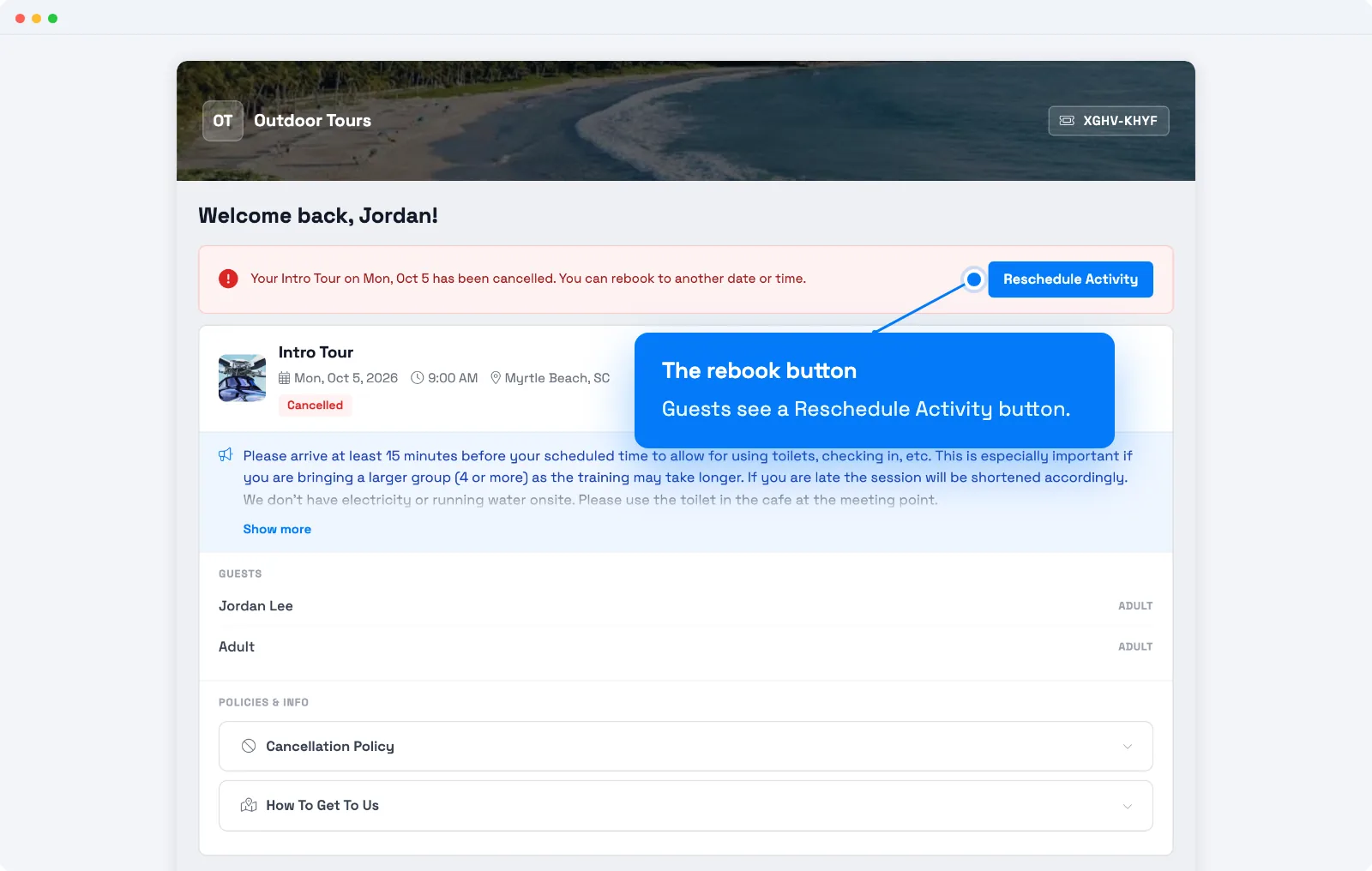
- A cancelled booking shows a notice that says the activity has been cancelled and they can rebook to another date or time, with a Reschedule Activity button.
- An unscheduled booking shows Schedule Activity instead.
- Guests rebook onto the same activity, unless you allowed other activities when you cancelled.
- TripWorks checks that the new time has room for the whole party and that their add-ons are available. Guests can't overbook.
- A booking can be rebooked this way once.
Price differences
- The new price is higher. If Auto-Update Pricing When Rescheduled is off, the guest keeps their original prices. If it's on, they're warned that prices have changed and a balance may be due. A balance shows a Pay Now button when Enable Balance Payments is on.
- The new price is lower. TripWorks doesn't refund the difference automatically. The balance goes negative, and you refund it yourself. See Refund a payment.
Follow up with guests who haven't rebooked
- Cancelled bookings. Go to Reports → Activities → Cancellations and filter by status Cancelled to see who hasn't rebooked. The report also shows your rebook rate. See The Cancellations & Rebookings report.
- Unscheduled bookings. Reports → Activities → Not Scheduled lists booked trips that have no date. It doesn't include cancelled trips. You can export it.
Know when a guest rebooks
- Guest email. Turn on Auto Confirmation on Rebooking to email the guest whenever their date or time changes, including from the portal. It's off by default. See Rebooked trip messages.
- Team alerts. Team members can get a Booking Rescheduled alert by email, SMS, or in the app. See Set up team member alerts.
Guests can't reschedule or cancel bookings made through a reseller or OTA in the portal. They see a note to contact the reseller.
Examples
- Weather cancellation. Cancel all guests, tick Allow guests to rebook to other activities, and notify the lead guest. Everyone picks a new time in the portal.
- A guest asks to move, and you'd rather they do it. Send them the Customer Portal Url from their confirmation. They'll see a Reschedule button if the Reschedule Window allows it.
- Find guests who never rebooked. Run the Cancellations report with the status set to Cancelled.
- Stop last-minute moves. Set the Reschedule Window to 24 hours.
If your guest can't see Reschedule
Frequently asked questions
Why doesn't my guest see a Reschedule button?
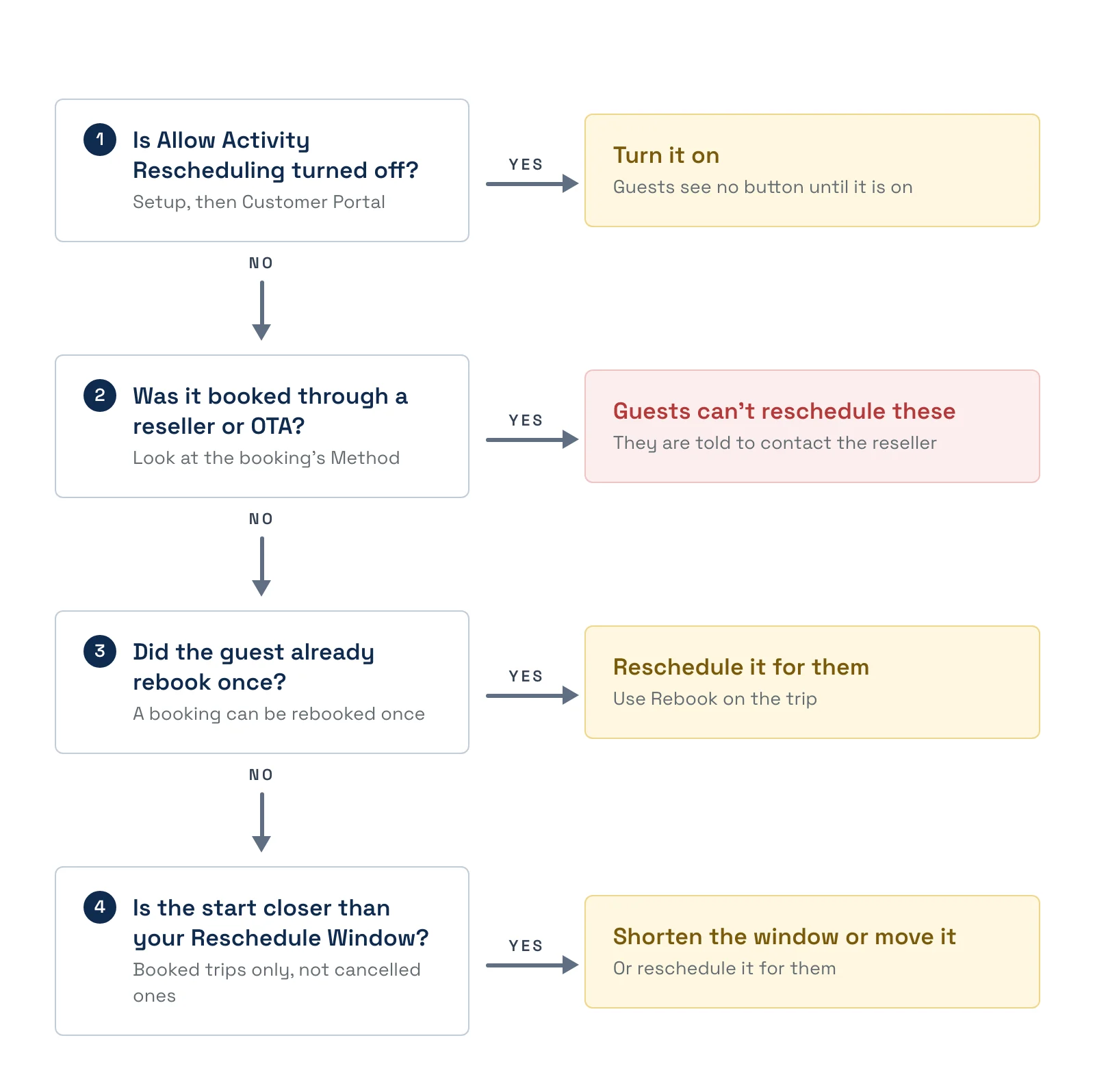
Check these in order and fix the first one that applies.
- Allow Activity Rescheduling is off. Turn it on under Setup, then Customer Portal. Guests see no button until it is on.
- It was booked through a reseller or OTA. Guests can't reschedule these and are told to contact the reseller.
- The guest already rebooked once. A booking can be rebooked this way once. Use Rebook on the trip to reschedule it for them.
- The start is closer than your Reschedule Window. The window applies to booked trips, not cancelled ones. Shorten the window or reschedule the booking for them.
Is there a special rebook link I can send?
No. Add the Customer Portal Url link to your cancellation message. Guests open their portal from it and see the reschedule option on the cancelled booking.
Can guests rebook onto a different activity?
Only if you ticked Allow guests to rebook to other activities when you cancelled. Otherwise they rebook the same activity.
Does the Reschedule Window apply to cancelled bookings?
No. A cancelled or unscheduled booking can be rebooked regardless of the window. The window only limits guests moving a booking that is still scheduled.
What if the new date costs more or less?
With Auto-Update Pricing When Rescheduled off, guests keep their original prices. With it on, they're warned and may owe a balance. If the new price is lower, you refund the difference yourself, because nothing is refunded automatically.
Will the guest get a confirmation email when they rebook?
Only if Auto Confirmation on Rebooking is on. It's off by default. See Rebooked trip messages.
How do I find guests who still need a new date?
For cancelled bookings, run the Cancellations report filtered to Cancelled. For unscheduled bookings, use Reports, then Activities, then Not Scheduled.
Can guests rebook a booking they made through a reseller or OTA?
No. Reschedule and cancel are hidden for those bookings, and the guest is told to contact the reseller.
Related
- Reschedule, unschedule, or cancel a booking
- Set up the customer portal
- Cancellation messages
- Rebooked trip messages
Built for attractions, tours & activities
Let guests fix their own plans
See how attractions, tours, and activities let guests reschedule themselves and keep the booking. Book a demo and make the switch.