
You can't connect Google Voice to TripWorks directly, and that comes from Google, not from TripWorks. Google Voice doesn't send call information to other apps, so there is nothing for TripWorks (or any other tool) to receive. You can still get every call into TripWorks by putting a supported phone provider in front of your Google Voice number, or by moving the number to one.
In this article
Why Google Voice can't be connected
TripWorks connects to a phone system the same way for every provider: when a call ends, the provider sends TripWorks a notification with the recording and call details. See Connect your phone system for how that works.
Google Voice doesn't offer that notification. Google hasn't published a way for other apps to be told when a Voice call happens, so no business tool can listen for those calls, TripWorks included.
Google Workspace customers have a Voice log in the Google admin console that lists calls, with the numbers involved and how long each lasted. It's a report that an administrator reads inside Google's admin tools. It isn't a live feed that another app can subscribe to, so it can't send recordings or call details to TripWorks as calls happen.
Using personal Google Voice or Google Workspace Voice makes no difference here. Neither one sends live call notifications to other apps.
How to get Google Voice calls into TripWorks
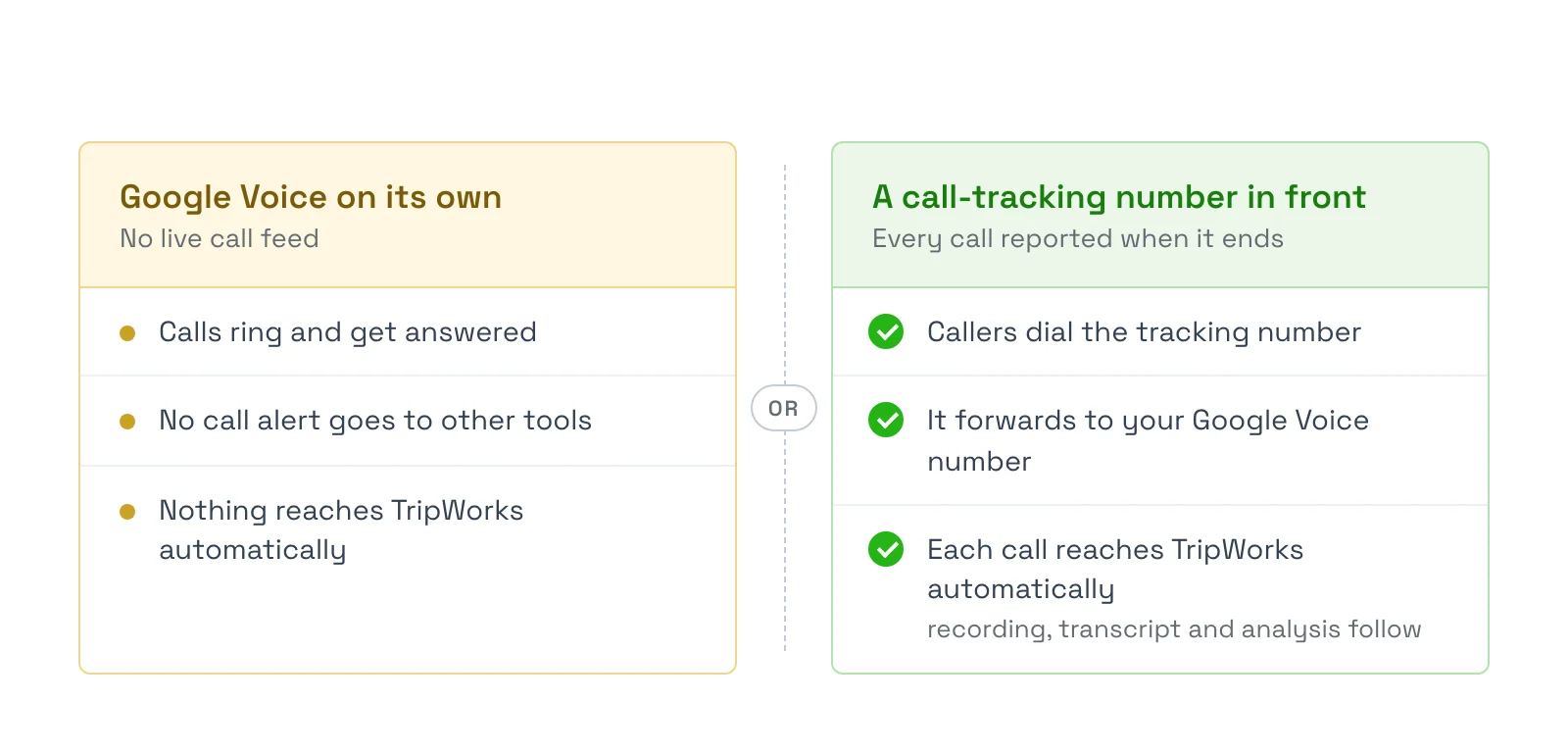
There are two ways to do it, and both put a supported provider between the caller and your team.
Option 1: keep Google Voice and put a tracking number in front
This is the smallest change for your team.
- Get a new number from a supported provider, such as CallRail.
- Set that number to forward to your Google Voice number.
- Publish the new number on your website, ads, and listings in place of the old one.
- Connect the provider under Setup Integrations.
- Place a test call and confirm it appears in your Calls list.
Your team keeps answering in Google Voice as usual. Because the tracking number reports every call, TripWorks records and analyzes them all.
Forwarded calls can show up in Google Voice as coming from the tracking number instead of the guest's own number. TripWorks still receives the guest's number from your provider, but your team may not see it on the Google Voice screen. Check how your provider passes caller ID along before you switch.
Option 2: move your number to a supported provider
If you'd rather not run two services, you can move your existing number out of Google Voice to a provider TripWorks supports, such as OpenPhone or CallRail. Guests keep dialing the number they already know, and you have one phone system to manage.
Google lets you transfer a Voice number to another carrier, and the provider you pick can walk you through its own steps. Allow time for the move, and keep Google Voice active until the transfer finishes so you don't miss calls.
Which providers work with TripWorks
CallRail, RingCentral, Dialpad, OpenPhone, Vonage, Kixie, and CallTrackingMetrics. Once a call reaches TripWorks, the recording, transcript, and analysis are the same whichever provider sent it.
What doesn't work as a substitute
- Voicemail and missed-call emails. Google Voice emails you about missed calls and voicemails. Those emails only cover calls nobody answered and don't include a recording of the conversation, so they can't stand in for a full call record.
- The Google admin Voice log. It's a report for administrators, not a feed TripWorks can receive.
Examples
- Keep your team in Google Voice by getting a CallRail number, forwarding it to your Google Voice number, and putting the CallRail number on your website.
- Track which campaign drives calls by using a different tracking number for each ad, all forwarding to one Google Voice number. TripWorks records which number each caller dialed.
- Simplify to one phone system by moving your number to OpenPhone and connecting it under Setup, then retiring Google Voice.
- Let TripWorks answer instead by setting up the AI CallBot, which logs its calls in the same Calls list. See Set up your AI CallBot.
Frequently asked questions
Can TripWorks connect to Google Voice?
No. Google Voice doesn't send call information to other apps, so there is nothing for TripWorks to connect to. You can still get your calls into TripWorks by forwarding a supported provider's number to Google Voice, or by moving your number to a supported provider.
Is this a TripWorks limitation?
No. It's a Google Voice limitation. TripWorks connects to every supported provider the same way, and Google Voice doesn't offer the call notification that connection relies on.
Does Google Workspace Voice work differently from regular Google Voice?
Not for this purpose. Google Workspace has an admin report of Voice calls, but it's something an administrator reads in the admin console, not a live feed another app can receive. TripWorks can't use it to record or analyze calls.
Do I have to stop using Google Voice?
No. With a tracking number forwarding to your Google Voice number, your team keeps answering in Google Voice. Only the number you publish changes.
Will I see the guest's phone number if I forward calls to Google Voice?
TripWorks gets the guest's number from your call-tracking provider. On the Google Voice side, a forwarded call can show the tracking number instead, depending on how your provider is set up. Ask your provider about caller ID pass-through before you switch.
Can I just use the voicemail emails Google Voice sends?
Those emails only cover missed calls and voicemails, not answered calls, and they don't include a recording of the conversation. They won't give TripWorks a full call record.
Can I move my Google Voice number to another provider?
Yes. Google lets you transfer a Voice number to another carrier. Ask the new provider how to start the move, and keep Google Voice active until it completes.
Which provider should I choose?
Choose on features and price. CallRail suits operators who track ad campaigns by phone number, and OpenPhone suits small teams who want one simple business line. TripWorks treats calls the same way whichever provider sends them.
Related
Built for attractions, tours & activities
Your phone, wired into your bookings
See how attractions, tours, and activities connect their phone system to TripWorks. Book a demo and make the switch.