
Short answer: you can't create a booking on a prior calendar day — TripWorks blocks past dates in the booking screen by design, and that block applies to everyone. There's one exception (a timeslot earlier today), and there are sensible ways to handle a tour that already ran.
In this article
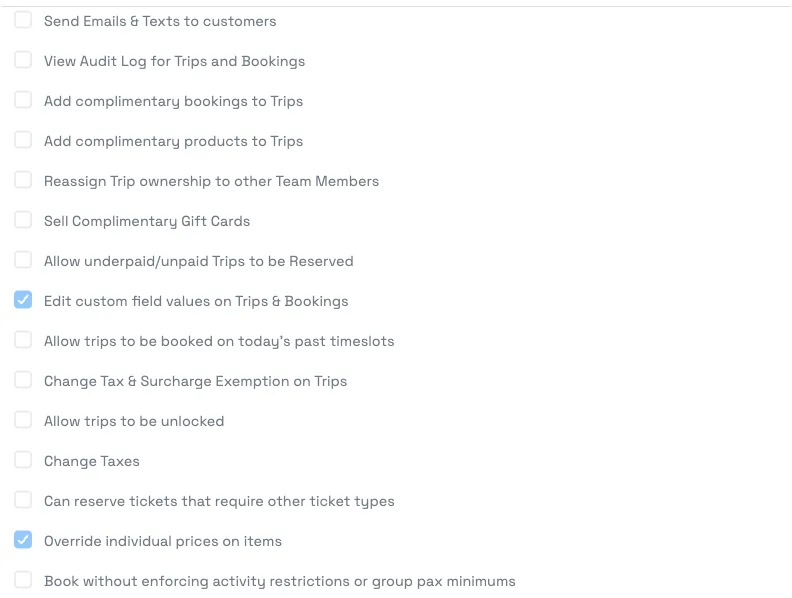
A timeslot earlier today — yes, with a permission
If the slot was earlier the same day, a staff member can book it once they have the right permission:
- Give the staff member's permission group "Allow trips to be booked on today's past timeslots" (under Settings → Team → Permission Groups, in the Trips section) — see permission groups.
- In the booking screen, pick the activity and guests, then click Show times earlier today to reveal the passed timeslots and complete the booking.
This only ever unlocks today's earlier times — not yesterday or any prior day.
A tour on a prior day — not supported directly
There's no way to date a new booking to a previous calendar day. The date picker starts at the next available date and won't go back, even for an admin. If a tour already happened on an earlier day and you need it on the books, here are the real options:
- Book it on the nearest open slot (for example today) to capture the guest, tickets, and payment, and note the true activity date in a trip comment. Keep in mind reports will show the date you booked it on, not the original day.
- Record just the payment on a trip if all you need is the financial record — see recording payments on a trip.
Because the booked date drives your manifest and reports, "book the nearest slot" is a capture workaround, not a true backdate — the trip will read as that slot's date. If accurate historical dates matter for your records, weigh that trade-off.
Frequently asked questions
How do I book a tour that happened a few days ago?
You can't set a booking to a prior calendar day — TripWorks blocks past dates by design. To capture it, book the nearest open slot and note the real date in a comment, or just record the payment on a trip. Only timeslots earlier today can be booked (with a permission).
Why don't past dates show in the booking calendar?
Past timeslots are intentionally not bookable, so the date picker starts at the next available date. This prevents accidental bookings on dates that have already passed.
Can I book a timeslot that was earlier today?
Yes, if you have the "Allow trips to be booked on today's past timeslots" permission. In the booking screen, click "Show times earlier today" to select the passed slot. It only works for today's times.
I have the permission but still can't pick yesterday.
That's expected. The permission only unlocks today's earlier timeslots — it doesn't allow prior calendar days. There's no setting that enables booking a previous day.
Can I book on the nearest date and then move it back to the real date?
No — rescheduling also won't accept a past date; it forces the next available date. So you can't reschedule a trip back to a day that has passed.
How do I just record the money for a tour that already happened?
Create the booking (on the nearest slot) and record the payment on it, or add the payment to an existing trip. See Recording payments on a trip.
Will reports show the real activity date if I book the nearest slot?
No — reports and your manifest use the date you booked it on, not the original day. That's the main trade-off of the "nearest slot" workaround; note the true date in a comment for your own reference.
Related
Built for attractions, tours & activities
Capture every booking, cleanly
See how attractions, tours, and activities manage bookings on TripWorks. Book a demo and make the switch.