
A promo code is a discount code your guests enter at checkout. When you create or edit one (Setup → Sell online → Promo Codes), the Limits tab sets the booking conditions and caps that decide when the code is allowed — how many times it can be used, who can use it, and on what size booking. Each limit is optional; leave it blank for no limit. For the full setup, see promo codes.
In this article
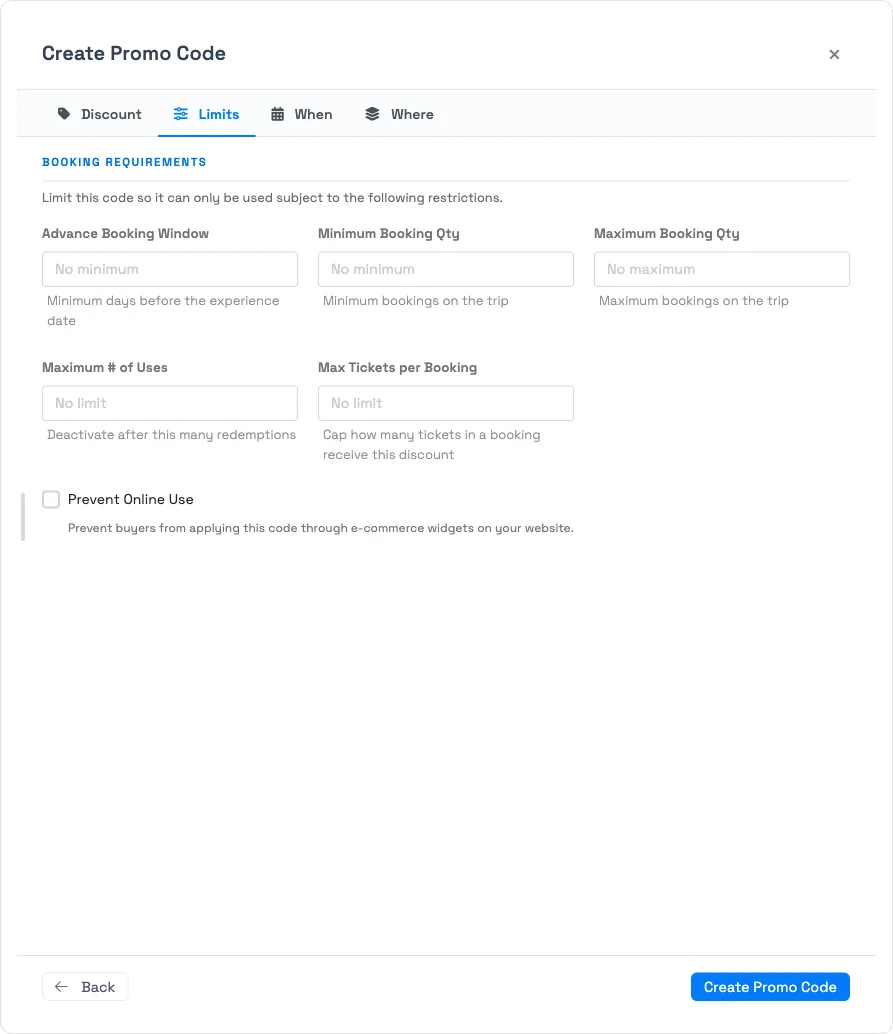
The limits
- Advance Booking Window — require the booking to be made at least a set number of days before the experience date. Good for early-bird pricing; blocks last-minute use.
- Minimum / Maximum Booking Qty — require the trip to have at least, or at most, a number of bookings (for "groups of 4+" style deals, or to keep a deal off large parties).
- Maximum # of Uses — a cap on total redemptions across all guests — not per guest. When redemptions reach the cap, the code automatically becomes Inactive, so a limited campaign shuts itself off.
- Max Tickets per Booking — cap how many tickets within a single booking receive the discount. Tickets beyond the cap pay full price (for "discount up to 2 per order" style deals).
- Prevent Online Use — stop guests from applying the code themselves through your e-commerce widgets, making it a staff-only code for phone and walk-up bookings.
Why a code won't apply
If a valid-looking code is refused, it's almost always one of these:
- The code's Status is Inactive (or it hit its Maximum # of Uses and auto-deactivated).
- The booking is outside the code's dates or falls on a blacked-out weekday — see when and where a promo code applies.
- The trip doesn't meet a Limit here — too few or too many bookings, or booked inside the advance window.
- The trip's experiences or ticket types aren't in the code's scope.
- A guest is trying to self-apply online a discount that exceeds the online cap, or a staff-only code — see how promo code discounts are calculated.
Frequently asked questions
Is the usage limit per guest or in total?
Total. Maximum # of Uses counts total redemptions across all guests, not per guest. When it's reached, the code auto-deactivates.
What happens when a code reaches its maximum uses?
It automatically switches to Inactive and can't be redeemed again. It stays in your Promo Codes list with its reporting intact.
How do I make a code my staff can use but guests can't online?
Turn on Prevent Online Use on the Limits tab. Guests can't apply it through your website widgets, but your team can still apply it to a booking.
Does "Max Tickets per Booking" block extra tickets?
No — the extra tickets are still booked, they just pay full price. Only the number of tickets up to the cap receive the discount.
Built for attractions, tours & activities
Control exactly who gets the deal
See how attractions, tours, and activities cap, schedule, and target discounts so promotions never leak on TripWorks. Book a demo and make the switch.