
A promo code is a code your guests enter at checkout for a discount — a military rate, a seasonal offer, a campaign like SUMMER20. When you create or edit one (Setup → Sell online → Promo Codes), the Discount tab is where you set the code and the price adjustment it makes. This page explains how each discount type actually behaves — the order of operations and edge cases the form doesn't spell out. For the full setup, see promo codes.
In this article
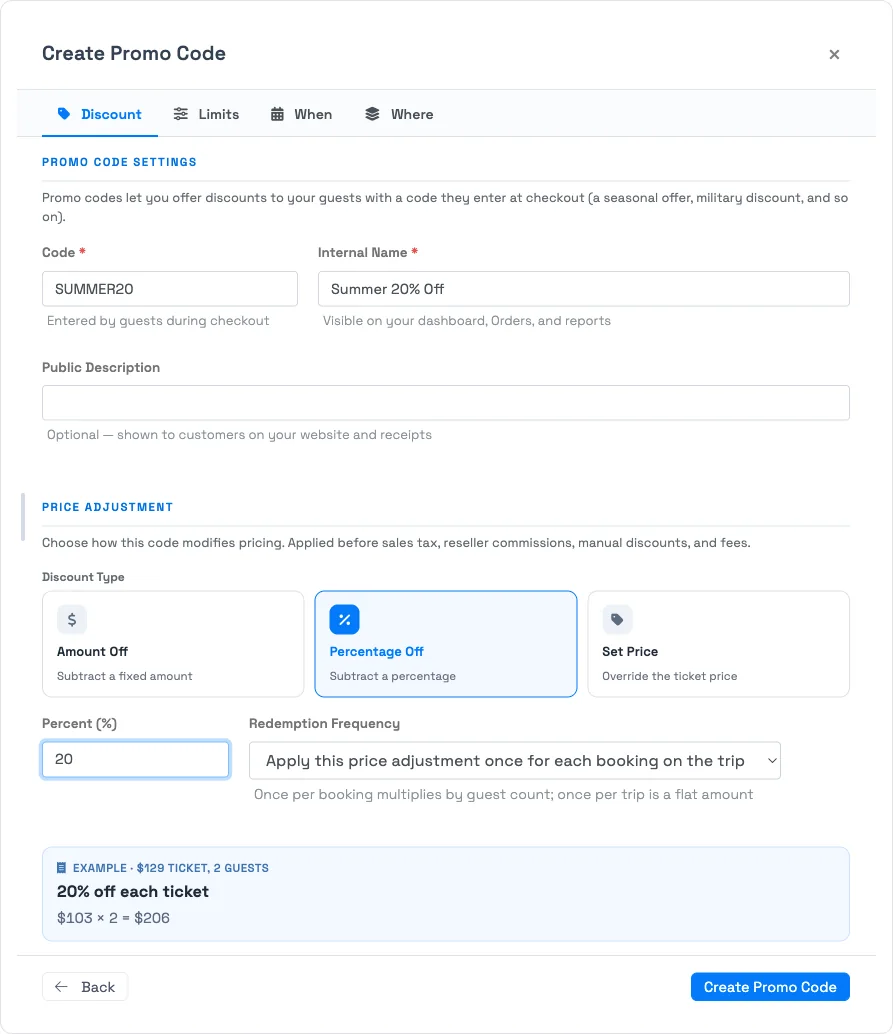
Discount types
- Amount Off — subtracts a fixed dollar amount.
- Percentage Off — subtracts a percentage of the price.
- Set Price — overrides the per-ticket price to a fixed amount. It only ever lowers the price; if the ticket already costs less than the set price, nothing changes — it never raises a price.
When the discount is applied
The discount comes off before sales tax, reseller commissions, manually applied discounts, and fees. So a percentage-off code discounts the pre-tax ticket price, and tax is then calculated on the reduced amount.
Per guest or per trip
Redemption Frequency decides how the discount scales across a multi-guest trip:
- Once for each booking on the trip — the adjustment repeats for each qualifying ticket. A $10-off code takes $10 off every ticket; a Set Price makes each ticket that price.
- Once per trip — a single flat adjustment for the whole trip regardless of guest count. With Set Price, the amount you enter is the trip's total, distributed across its bookings.
The live Example on the Discount tab shows the result for a sample ticket price and guest count as you change these.
The online discount cap (and the Set Price exception)
To stop guests from booking for essentially nothing and bypassing payment processing, Amount Off and Percentage Off codes that a guest self-applies online are capped in how deep they can discount. Set Price codes are exempt from that cap — a Set Price still charges the operator's chosen flat rate through the platform, so you can run a deep flat-rate promotion online on purpose.
There's a related guard on Set Price: if the set price wouldn't actually reduce the trip (its total lands at or above the trip subtotal, producing a $0 discount), TripWorks blocks the code rather than silently accepting one that never shows on the order.
Using more than one code
A trip can carry more than one promo code — each is recorded as its own discount on the order, so you can see exactly what came off and why.
Frequently asked questions
Is the discount applied before or after tax?
Before. The discount comes off before sales tax, reseller commissions, manual discounts, and fees — tax is then calculated on the reduced amount.
Does Set Price ever raise a price?
No. Set Price only lowers the per-ticket price to the amount you enter; if the ticket is already cheaper, it's left alone.
Why is a large discount blocked when a guest tries to use it online?
Amount Off and Percentage Off codes are capped for online self-service to prevent near-free bookings that bypass payment. If you need a deep online promotion, use a Set Price code (exempt from the cap) or apply the code as staff on the booking.
Can two promo codes apply to the same trip?
Yes — a trip can hold more than one promo code, each shown as its own discount line on the order.
Related
Built for attractions, tours & activities
Price your promotions with confidence
See how attractions, tours, and activities run precise, safe discounts across web, phone, and reseller channels on TripWorks. Book a demo and make the switch.