
A promo code is a discount code your guests enter at checkout. When you create or edit one (Setup → Sell online → Promo Codes), the When and Where tabs decide the dates the code is valid and the parts of your catalog it discounts. Leave a tab untouched to keep the code broad. For the full setup, see promo codes.
In this article
When: dates and blackouts
- Date windows — the date range(s) the code is valid in, so a seasonal or campaign code expires on its own with no cleanup. Each window can key off either the activity date (when the experience runs) or the booking date (when the purchase is made) — an early-bird code keys off the booking date; a "valid for summer trips" code keys off the activity date.
- Day-of-week blackouts — block specific weekdays even inside an active window. For example, run a code all summer but exclude weekends. A booking on a blacked-out day won't get the discount.
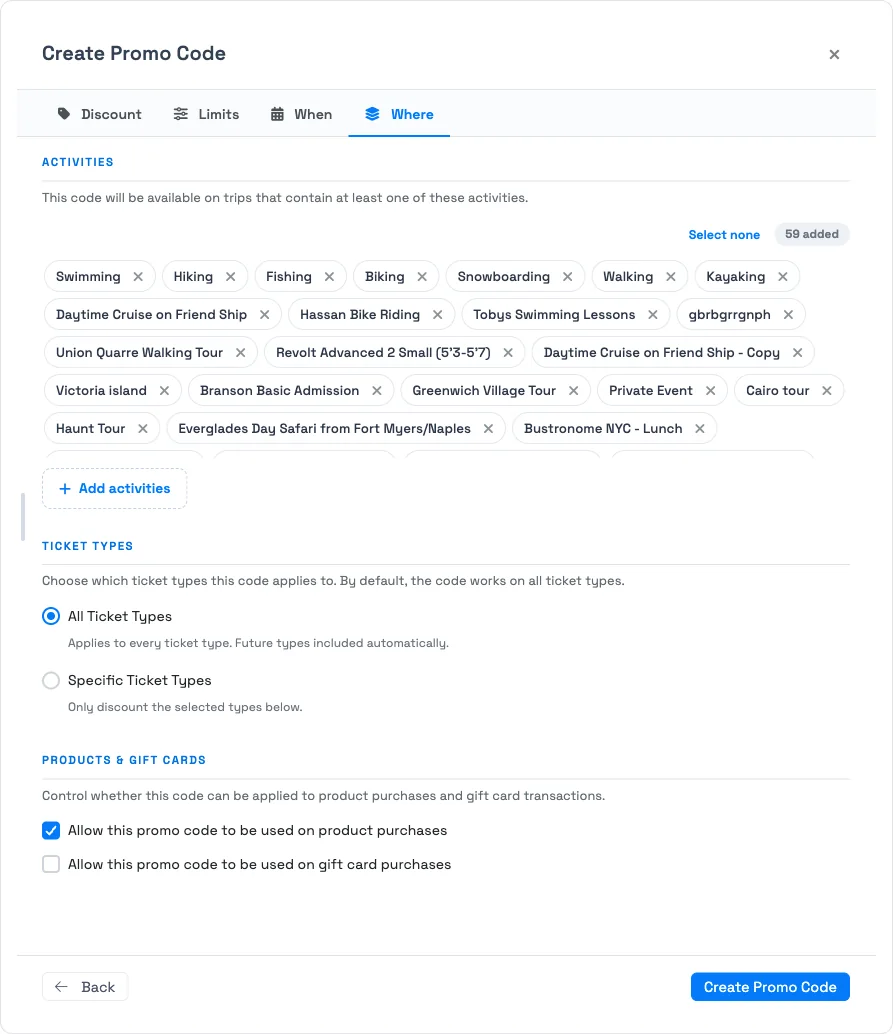
Where: activities, ticket types, products
- Activities — the code works on any trip that contains at least one of the selected activities. All activities are included by default; narrow the list, or clear it with Select none. Because it's "at least one," a mixed-activity trip qualifies as soon as a single selected activity is on it.
- Ticket Types — apply to all ticket types or only specific ones. On "all," ticket types you add later are covered automatically; on "specific," a new type is excluded until you add it to the code.
- Products & Gift Cards — separate toggles for whether the code can be used on product purchases and on gift card purchases. (Gift cards here means buying a gift card — a stored-value product — not redeeming one.)
Frequently asked questions
My trip has several activities — does the code still apply?
Yes, as long as the trip contains at least one of the activities on the code's Where tab. It doesn't require every activity to match.
Will a new ticket type automatically get an existing code's discount?
Only if the code is set to all ticket types — then future types are included automatically. If it's limited to specific types, add the new type to the code first.
Can I run a code every day except weekends?
Yes. Set the date window on the When tab, then add a day-of-week blackout for Saturday and Sunday — bookings on those days won't receive the discount even though the window is active.
Can a promo code be used on gift card or product purchases?
Only if you allow it — the Where tab has separate toggles for product purchases and gift card purchases. This controls buying a gift card, not redeeming one.
Related
Built for attractions, tours & activities
Target every promotion precisely
See how attractions, tours, and activities aim discounts at the right dates, experiences, and channels on TripWorks. Book a demo and make the switch.