
A call almost always relates to a booking — someone asking about their pickup, changing a time, chasing a refund, or calling before they book. In most systems, that conversation vanishes into a phone log with no connection to the trip it was about, so the next person to open the booking has no idea it ever happened. TripWorks keeps the two together by matching calls to bookings by phone number, so the conversation lives right next to the trip it's about — and everyone who touches that booking can see it.
In this article
Calls on a trip
Open any trip and go to its Calls tab to see every call linked to that guest — each with its summary, recording, transcript, and full analysis, exactly as it appears in the main Calls list. The question "wait, what did we tell them on the phone?" now has an answer that's one click away, on the booking itself.
This matters most in the moments that are otherwise messy:
- A guest disputes what they were promised. The call is right there on their trip — play it, read it, settle it.
- A different team member picks up the booking. They can see the whole phone history without asking around or guessing.
- A complaint escalates. The full context — every call, in order, with sentiment and summary — sits on the trip, so whoever handles it starts fully informed.
TripWorks links a call by matching the caller's number to the guest's number, automatically, as calls come in. There's nothing to tag or file by hand.
Screen-pop for incoming calls
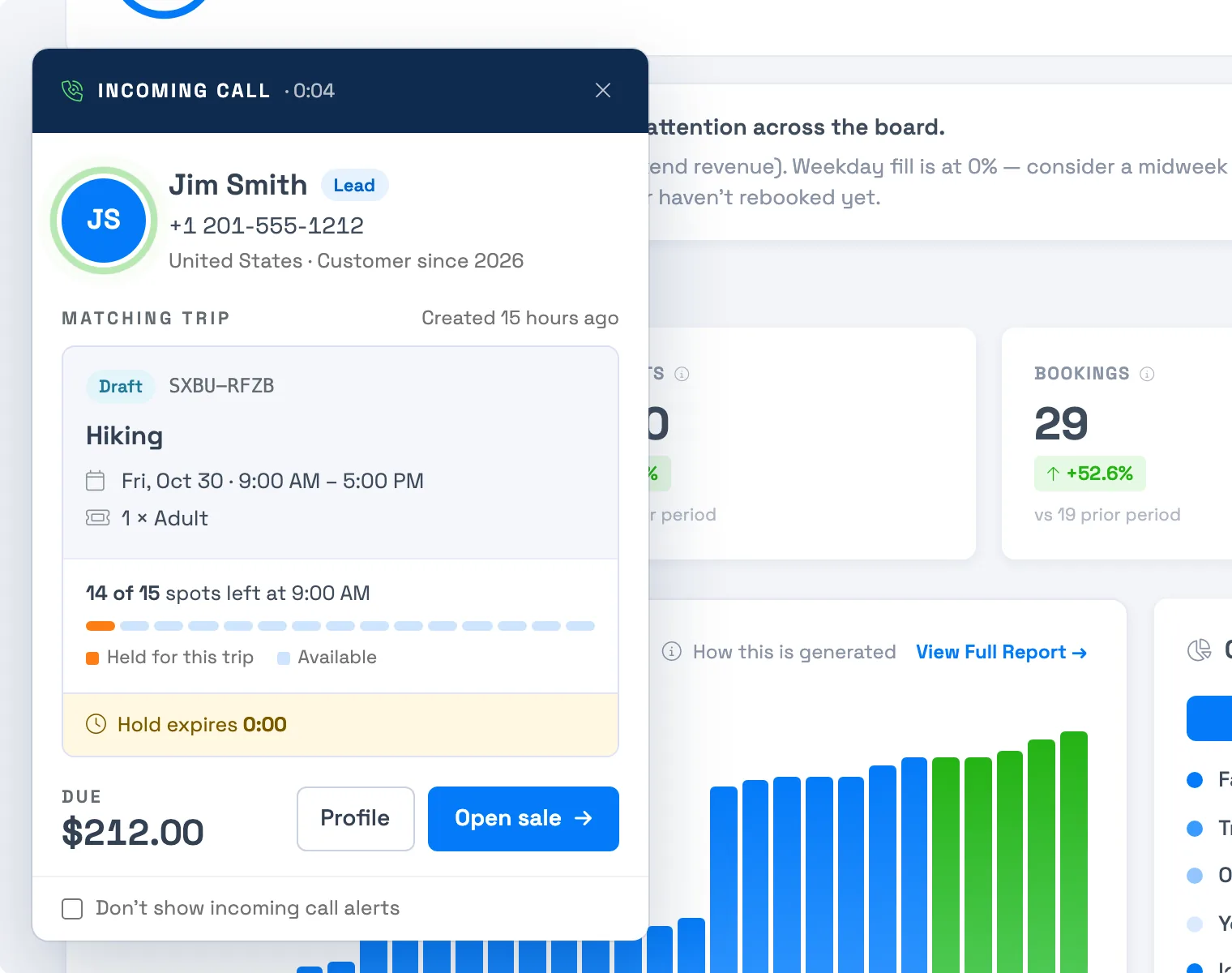
The connection also works before you pick up. When a call comes in from a number TripWorks recognizes, it can pop the caller's details on screen — who they are and their booking — so your team already has the context the instant they answer.
That changes the whole feel of the call. Instead of a cold "how can I help you?" and a minute of looking things up while the guest waits, it's "Hi Maria — calling about your kayak tour on Saturday?" The guest feels known, the call is shorter, and your team looks sharp. For a business where service is the product, that first sentence is worth a lot.
What the pop-up shows
- The caller: their name, phone number, country, and how long they've been a customer.
- The matching trip: its status (for example Draft), confirmation code, activity, date and time, and the tickets on it, such as 1 × Adult. It also shows how long ago the trip was created.
- Spots left: a line like "14 of 15 spots left at 9:00 AM", with a bar showing the spots held for this trip, the spots still available, and spots taken by other trips. It appears for activities with a set capacity, and above 24 spots you see the number without the bar.
- A hold countdown: for a draft trip, how long the hold has left.
- Money: Due with the balance when something is owed, otherwise Total.
- Two buttons: Profile opens the guest, and Open sale opens the trip.
The card takes on the color of the activity, and a Don't show incoming call alerts checkbox at the bottom turns the pop-up off for you.
Frequently asked questions
How does a call get linked to a booking?
By phone number — TripWorks matches the caller's number to the guest on the trip, so the call shows up on that trip's Calls tab automatically.
What if the caller isn't a guest yet?
The call still appears in your main Calls list with its full analysis. If it led to demand worth following up, it may also show up in your Lead Center.
Do I have to link calls to trips myself?
No. TripWorks matches the caller's number to the guest automatically, so linked calls appear on the trip's Calls tab without any manual tagging.
What shows up in the screen-pop?
The caller's name and number, plus the matching trip: its status, activity, date and time, tickets, spots left, and the amount due. Buttons open the guest's profile or the trip. See the list above.
Related
Built for attractions, tours & activities
Know the guest before you say hello
See how attractions, tours, and activities connect calls to bookings on TripWorks. Book a demo and make the switch.