
If you want every guest to leave a tip, rather than hoping they remember to add one, build gratuity as a required, percentage-based add-on. Guests must pick a percentage before they can finish booking, and the tip is calculated automatically off the order total rather than typed in as a flat guess.
In this article
This is different from the optional tip prompt at checkout: a required add-on can't be skipped, so it's the right tool when gratuity is a mandatory service charge rather than a suggestion (common for private tours, large groups, or full-boat charters).
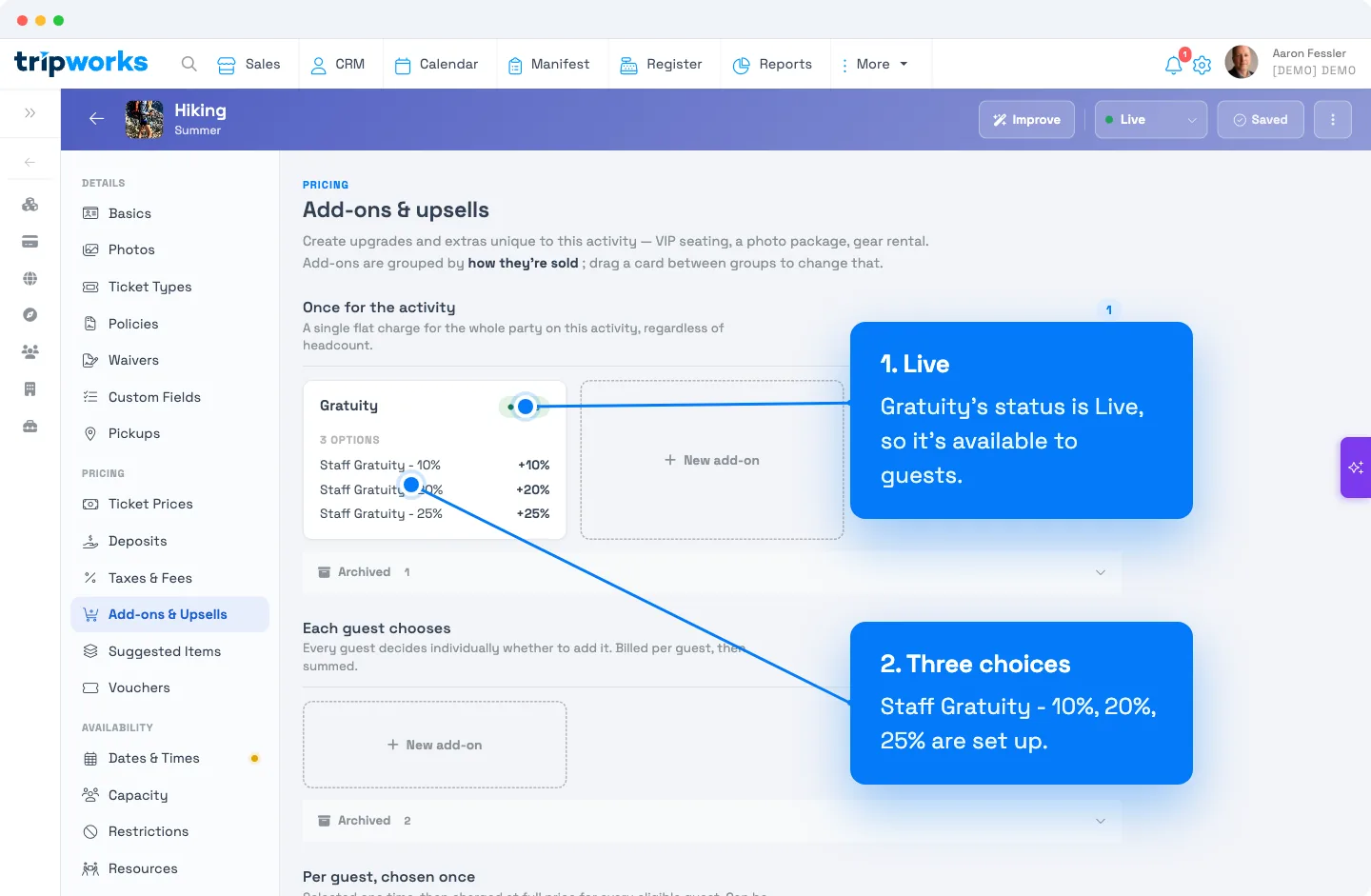
Create the gratuity add-on
- Go to Setup Experiences, pick the activity, then open its Add-ons & Upsells tab.
- Click + New add-on under whichever group matches how you want gratuity charged (see "Where to put it," below; Once for the activity is the common choice for a single tip covering the whole party).
- Set an Internal name (for example,
Gratuity) and a Public title guests will see at checkout (for example,Add gratuity).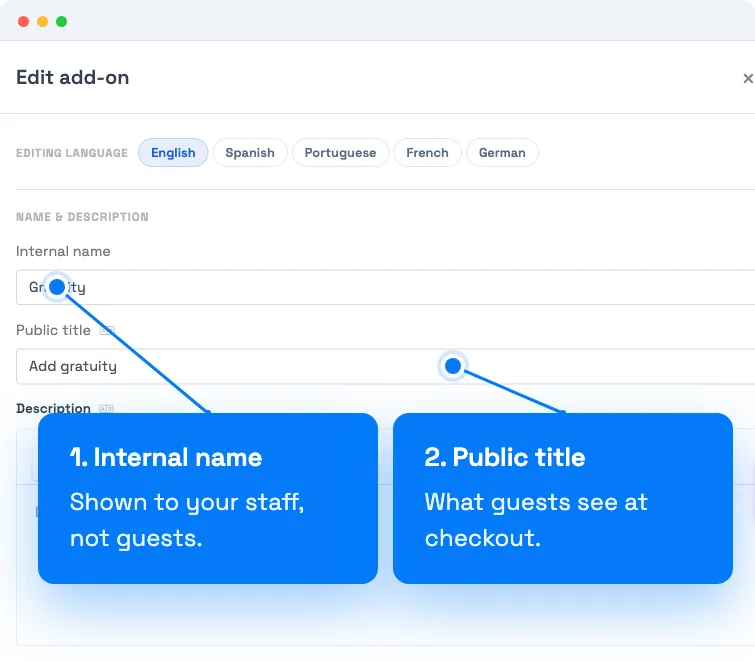
(1) The Internal name is for your team; (2) the Public title is what guests see at checkout. - Under Choices, add one choice per tip tier, labeling each with the add-on name so guests can tell them apart, for example
Staff Gratuity - 10%,Staff Gratuity - 20%,Staff Gratuity - 25%. For each choice, set the price behavior to Increase and the unit to %, then enter the percentage. This adds that percentage of the order total to the price; it does not charge a flat dollar amount. - Under Requirement, choose Required so the guest must pick one of the choices before they can complete the booking.
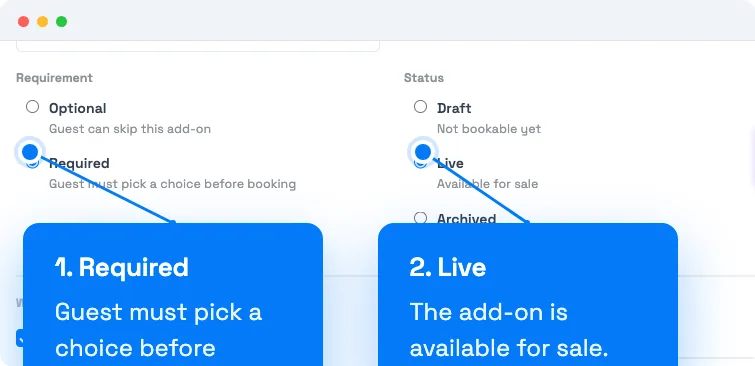
(1) Requirement set to Required so the guest must pick one before booking, with (2) Status set to Live. - Set Status to Live, confirm Online checkout and/or Direct booking are checked depending on where you want it to show, and click Save add-on.
Once live, the guest sees the gratuity choices during booking and must select one. There's no way to check out without picking a percentage.
Where to put it (which group)
The Add-ons & Upsells tab groups add-ons by how they're charged. For gratuity, the group you pick changes who has to answer and how the tip is calculated:
- Once for the activity: one gratuity choice for the whole party, regardless of headcount. This is the most common setup. The lead guest picks a percentage once, and it's applied to the full order total.
- Each guest chooses: every guest independently picks (or skips) a gratuity choice, each charged off their own share. Use this only if you genuinely want per-guest tipping decisions; combined with Required, this means every guest, not just the lead guest, must pick a percentage.
- Per guest, chosen once: one selection that's then applied to every eligible guest at that same rate. Less common for gratuity than the first option.
Most operators requiring gratuity on a shared experience (a tour, a charter, a group activity) want Once for the activity.
Examples
-
Private charters: require gratuity with choices labeled
Staff Gratuity - 10%,Staff Gratuity - 20%, andStaff Gratuity - 25%, since full-boat or full-vehicle charters commonly build in a mandatory service charge. -
Large private groups: require a flat
Staff Gratuity - 20%choice (a single choice, not a range) for private group bookings above a certain size, the way many restaurants handle large parties. -
Multi-day tours: offer
Staff Gratuity - 10%/20%/25%choices but leave gratuity optional instead of required, if you'd rather let guests decide without blocking checkout. See the FAQ below on how to make that change. -
VIP/luxury experiences: pair a required
Staff Gratuity - 20%add-on with a Direct booking prompt so your reservationists remember to mention it when booking guests over the phone.
Frequently asked questions
Can I make gratuity optional instead of required?
Yes. Under Requirement, choose Optional instead of Required. The same percentage-choice add-on still works; guests can just skip it at checkout rather than being forced to pick a value.
Does required gratuity apply per guest or per booking?
It depends on which group you create the add-on in. Put it under Once for the activity and it's a single required choice covering the whole party's order total. Put it under Each guest chooses and every individual guest is required to pick their own gratuity choice, each calculated off their own share of the price. For a typical "the group tips as a whole" setup, use Once for the activity.
Can I set a flat dollar amount instead of a percentage?
Yes, but it's a different choice type. Add-on choices support four price behaviors: Increase or Decrease (by a dollar amount or a percentage), Set to (a fixed dollar price), and No charge. For gratuity, percentage-based Increase choices are almost always what you want, since a tip should scale with the order size. A flat-dollar Increase choice is possible (for example, a flat $25 gratuity choice) but won't scale with party size or trip price the way a percentage does.
How is the gratuity amount actually calculated?
A percentage Increase choice adds that percent of the order's current total to the price. For example, a Staff Gratuity - 20% choice on a $200 order adds $40. If the order total changes later (a ticket-type change, a price override, a rebook), the gratuity add-on automatically recalculates against the new total rather than staying pinned to the original amount.
Is this the same as the "Tips" feature?
No, they're two separate tools. Tips is a lightweight, optional prompt built specifically for gratuity (often used at checkout or point-of-sale). A required gratuity add-on, covered in this article, is the way to make a tip mandatory, something the built-in Tips prompt can't do, with full control over the percentage tiers offered.
Can I limit gratuity to certain ticket types?
Yes. Every add-on has an Apply to all ticket types toggle; turn it off and pick the specific ticket types the gratuity add-on should apply to (for example, only a "Private Charter" ticket type, not standard shared tickets).
Will required gratuity show up on both online checkout and staff-booked reservations?
That's controlled separately. Check Online checkout to require it for guests booking on your website, and Direct booking to prompt your team to collect it when booking directly. You can enable either or both; if only one is checked, the requirement only applies on that channel.
Related
Built for attractions, tours & activities
Collect the tip every time
See how attractions, tours, and activities protect gratuity on every booking with TripWorks. Book a demo and make the switch.