
Suggested items surface extra products and activities to a guest as they check out — merchandise, a photo package, equipment, or another experience. Guests add them to their booking in a couple of taps without starting over, which is one of the easiest ways to lift average order value.
In this article
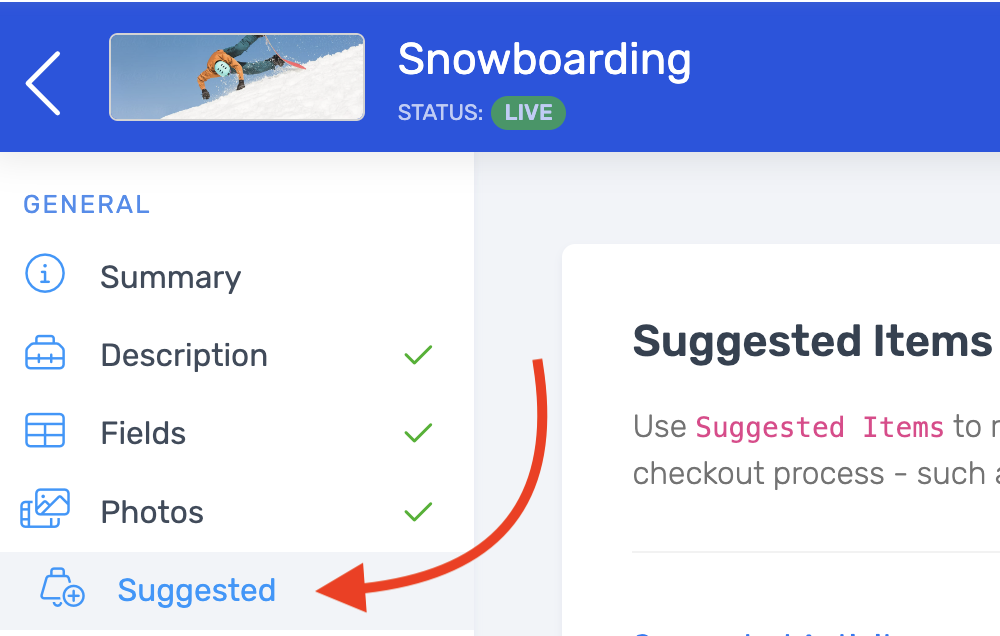
Set up suggestions
Suggestions are configured per activity, so you can tailor what's offered to each experience. Anything you suggest must already exist in your catalog.
- Go to Setup Activities and open the activity.
- Select Suggested in the sidebar.
- Choose the products and/or activities to show as suggestions at checkout.
When a guest books that activity, your suggestions appear on the checkout screen for them to add.
Suggested items vs. add-ons
- Suggested items are cross-sells shown at checkout — other products or activities a guest might also want.
- Add-ons are tied to a specific ticket and priced with it (like a rental or upgrade attached to a seat). Set add-ons up on the activity's Add-Ons tab.
Frequently asked questions
What can I suggest at checkout?
Products (merchandise, photo packages, rentals) and other activities in your catalog. They must already exist before you can add them as suggestions.
Are suggestions the same for every activity?
No — they're set per activity, so you can suggest what makes sense for each experience.
What's the difference between a suggested item and an add-on?
A suggested item is a cross-sell shown at checkout; an add-on is attached to a ticket and priced with it. Use suggestions to surface other things to buy, and add-ons for upgrades that go with a seat.
Related
Built for attractions, tours & activities
Lift every order, automatically
See how attractions, tours, and activities boost order value with checkout upsells on TripWorks. Book a demo and make the switch.