
If you or a guest can't increase the ticket quantity at checkout — even though the timeslot clearly has room — the cause is almost always a booking restriction, not capacity. A restriction caps how many tickets a single booking can add (the party size for one checkout). By default that cap is 25.
In this article
Example. A teacher tries to book 30 opera tickets for her class in one transaction. Your capacity can easily hold 30, but checkout won't let her past 25 — because the activity's booking restriction limits a single booking to 25 guests.
Restriction vs. capacity
They're two different limits, and it's easy to blame the wrong one:
| Booking restriction | Capacity | |
|---|---|---|
| Limits | How many tickets one booking can add | The total a timeslot can sell |
| Feels like | "I can't add more than N tickets in this cart" | "This timeslot is sold out" |
| Set in | Setup → Booking Restrictions | The activity's Capacity tab |
When someone can't add more tickets but the slot isn't full, it's the restriction.
Find the restriction that's capping you
Each activity is assigned one booking restriction. To see and edit the rules, go to Setup Build what you sell Booking Restrictions.
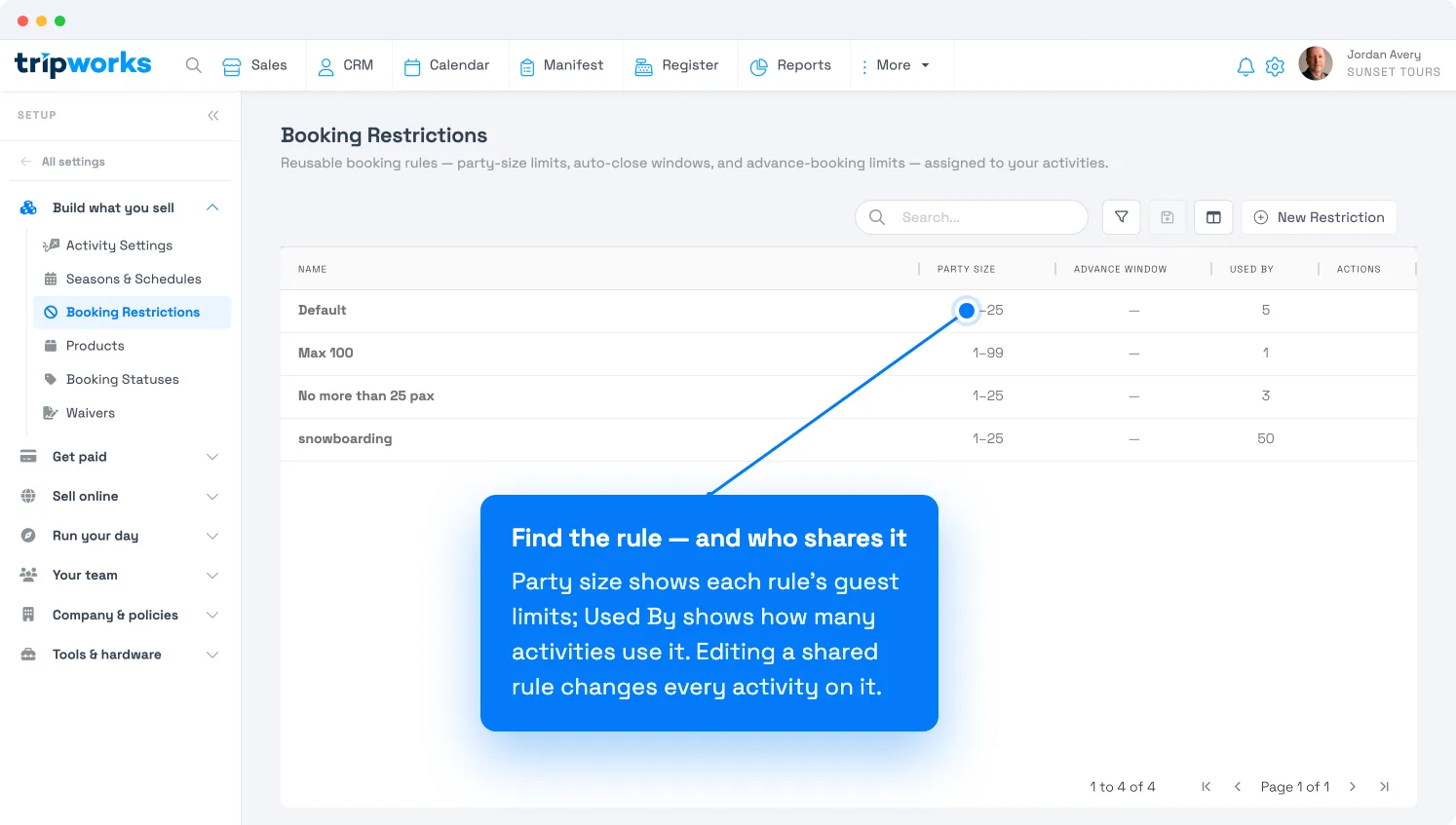
The Party size column shows each rule's guest limits (a default rule reads 1–25). The Used by column shows how many activities share that rule — important, because editing a shared rule changes the limit for every activity on it.
Raise the limit
Open the restriction and look under Booking rules at "Allow bookings between … guests." The second number is your cap — raise it to allow larger bookings.
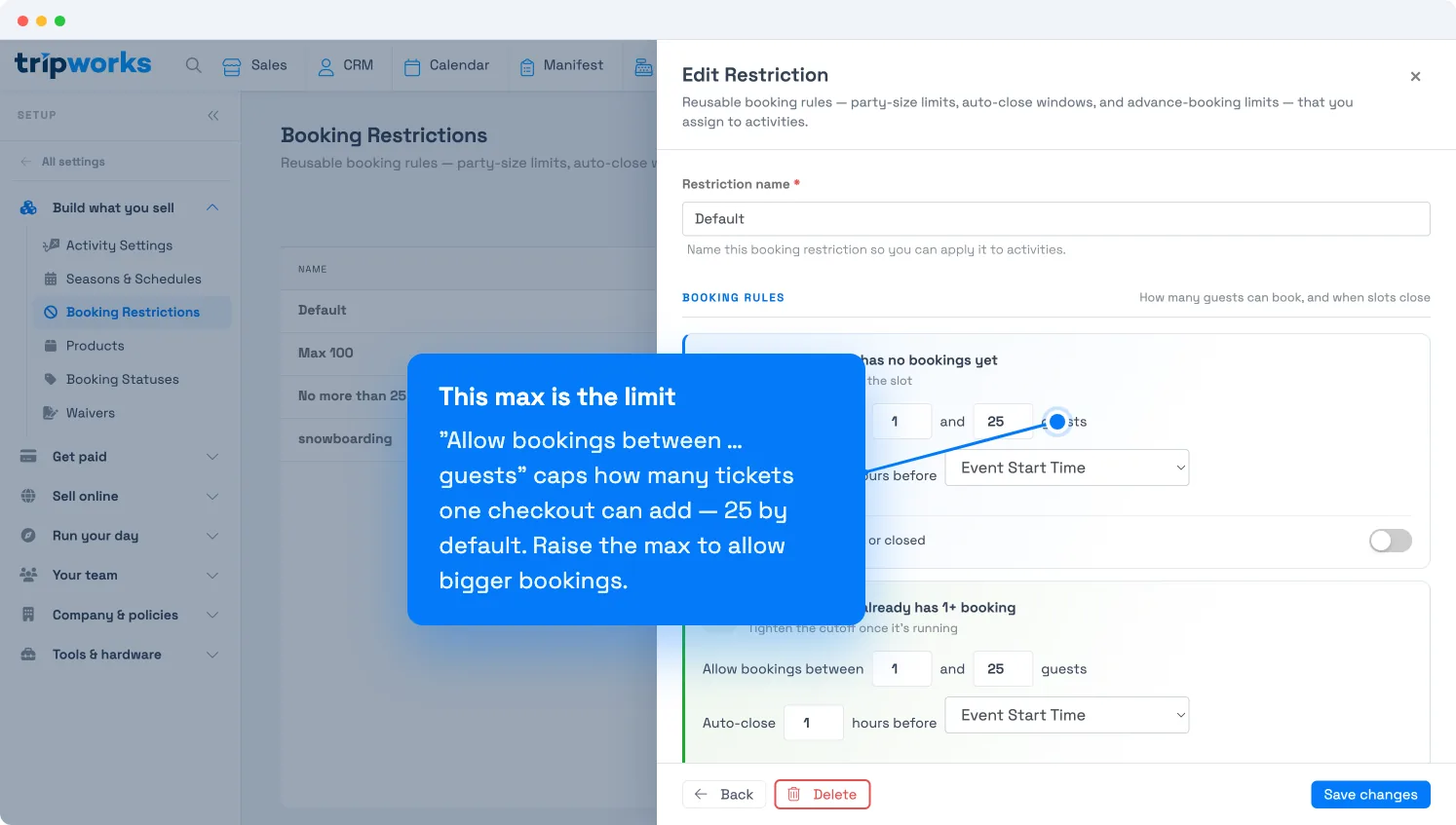
There are two limits, because a rule can treat a fresh slot differently from one that's already filling:
- When a timeslot has no bookings yet — the cap on the first booking that opens the slot.
- When a timeslot already has 1+ booking — the cap once the slot is running.
Set both to cover the largest single booking you want to allow, then select Save changes.
Before you raise (or lower) a shared rule, check its Used by count. If other activities rely on the same rule, your change affects them too. If it shouldn't, create a new booking restriction with the limit you want and assign it to just this activity instead.
Frequently asked questions
Why is 25 the limit if I never set one?
25 is the default party-size cap on a new booking restriction (both for empty and already-booked slots). Raise it on the rule the activity uses.
The slot has plenty of room — is this a capacity problem?
No. If the slot isn't sold out but you still can't add more tickets, it's the booking restriction's party-size cap, not capacity. Capacity controls the slot total; the restriction controls one booking.
I raised the limit but it still won't let me add more.
Confirm the activity actually uses the rule you edited (check the Used by list), and that you raised the number for the right state — "no bookings yet" vs. "already has 1+ booking." Also make sure the activity's capacity can hold the larger number.
Can I let one big group book beyond the cap just once?
Either raise the cap on a rule for that activity, or split the party into multiple bookings. For a truly one-off oversell, an admin can also be allowed to overbook capacity — a separate setting on the Capacity tab.
Related
Built for attractions, tours & activities
Sell the group, not just a slice of it
See how attractions, tours, and activities set the right party-size limits — big group bookings when you want them, sensible caps when you don't — on TripWorks. Book a demo and make the switch.