
Every card payment on TripWorks, online or in person, is processed by Stripe, screened for fraud, and authenticated with 3D Secure when the card's bank asks for it. If a payment is flagged or disputed later, TripWorks alerts you and walks you through the response. This page gives the whole picture in one place, with links to the step-by-step articles.
In this article
In this article
- Guests' card details go straight to Stripe, a PCI DSS Level 1 Service Provider.
- 3D Secure and fraud screening run automatically on online payments.
- In-person payments use TripWorks-certified readers that encrypt the card inside the reader.
- Early fraud alerts and chargeback notices reach your team, so you can act before a dispute grows.
- Messages from Stripe are verified before TripWorks trusts them.
Online payments
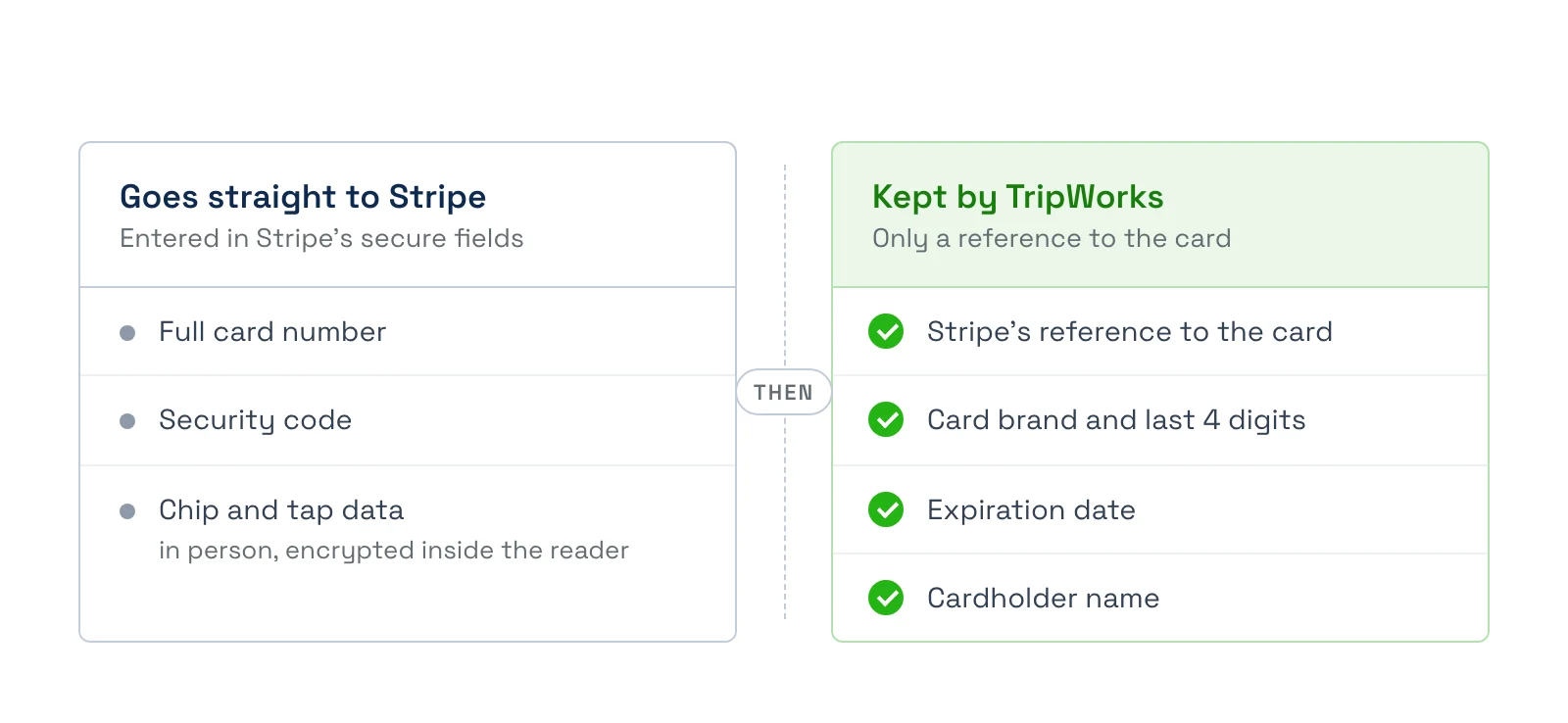
- Stripe handles the card. Guests type their card into Stripe's secure payment fields on your booking widget and customer portal. The details go directly to Stripe, and TripWorks never stores full card numbers or security codes.
- Stripe is certified as a PCI DSS Level 1 Service Provider, the highest level of payment security certification.
- Saved cards store only a reference. For a saved card, TripWorks keeps Stripe's reference to it, plus the brand, last 4 digits, expiration date, and cardholder name. See Is my card saved when I book online?
Authentication with 3D Secure
When a card's bank wants extra proof that the cardholder is the one paying, TripWorks shows the 3D Secure challenge automatically. The guest approves the payment with their bank, often with a code or an app prompt. It works the same way in the booking widget, the customer portal, and at the register, and you don't have to turn it on.
A successful 3D Secure check also shifts liability for fraudulent-card chargebacks to the card's issuing bank. See Does TripWorks support 3D Secure (SCA)?.
Fraud screening at checkout
Every card payment is screened for fraud signals at the moment it's made, using real-time risk scoring from Stripe. Higher-risk payments can be challenged automatically before they go through, so a lot of fraud is stopped before it reaches you.
In-person payments
- Certified readers only. Card readers are provided and certified by TripWorks, built on Stripe Terminal, so every in-person sale lands in the same account as your online bookings.
- Chip, tap, and swipe. Readers take chip cards, contactless cards, Apple Pay and Google Pay, and swipe for older cards.
- Encrypted at the reader. The card is encrypted inside the reader, so full card numbers never reach your TripWorks account or your device.
See Set up card readers.
Early fraud alerts and chargebacks
- Early fraud alerts. When a card's issuer reports a charge as suspected fraud after it cleared, TripWorks shows an alert at the top of the trip. It recommends refunding the payment, which usually avoids a dispute entirely. TripWorks never refunds on its own, so the decision stays with you.
- Alerts for your team. Turn on the Credit card fraud alert notification for the people who should know right away, by email, text message, or in-app alerts. See Set up team member alerts.
- Chargebacks. When a guest disputes a charge, TripWorks emails you the details and the deadline, and manages the process through Stripe. You choose whether to accept or counter, and you supply the evidence. See What happens if a customer disputes a charge?.
For the full detail on fraud alerts, see How TripWorks protects you from fraud & chargebacks.
A verified connection to Stripe
- Signed messages only. Stripe sends TripWorks notices, such as an early fraud alert or a dispute, with a cryptographic signature. TripWorks checks the signature before using a message and rejects any that don't match, so a forged notice can't change your payment data.
- Credentials kept in a secrets manager. The credentials TripWorks uses to run the platform, such as database logins, are stored in AWS Secrets Manager.
What you can do
- Turn on the Credit card fraud alert for the people who handle refunds.
- State your policies where guests see them, such as cancellation, refund, and no-show terms, and use waivers so there's a signed agreement on every booking. That's your best evidence if a charge is disputed.
- Respond to every dispute before its deadline, even if the case is weak.
Examples
- See whether a payment was flagged. Open the trip. An early fraud alert appears at the top, and the Payments tab lets you refund.
- Get told the moment a charge is flagged. Turn on the Credit card fraud alert notification for your manager, by email or text.
- Answer a guest who asks why their bank asked for a code. That's 3D Secure. The bank requested extra verification, and it protects both of you.
- Take a payment at the dock. Use your TripWorks card reader and let the guest tap, insert, or swipe.
- Respond to a chargeback. Open the dispute email, review the deadline, and submit your signed waiver and confirmation email as evidence.
Frequently asked questions
Does TripWorks store my guests' card numbers?
No. Card numbers go straight to Stripe. For a saved card, TripWorks keeps only Stripe's reference plus the brand, last 4 digits, expiration date, and cardholder name. Security codes are never stored.
Do I have to turn on 3D Secure?
No. It's automatic. The challenge only appears when the card's bank requires it, so most payments don't see it. See Does TripWorks support 3D Secure (SCA)?
Is my in-person card reader secure?
Yes. TripWorks card readers are certified, run on Stripe Terminal, and encrypt the card inside the reader. Full card numbers never reach your TripWorks account. See Set up card readers.
What is an early fraud alert?
It's a notice on the trip that a card's issuer has reported a charge as suspected fraud, even though the payment already cleared. Refunding the payment right away usually avoids a dispute. See How TripWorks protects you from fraud & chargebacks.
Will TripWorks refund a flagged payment for me?
No. TripWorks flags the risk and recommends a refund, but never refunds automatically. The decision is yours.
What happens when a guest disputes a charge?
TripWorks emails you the trip, the amount, the reason, and a respond-by deadline, and manages the process through Stripe. You decide whether to accept or counter. See What happens if a customer disputes a charge?
Is TripWorks PCI compliant?
Card data is handled by Stripe, which is certified as a PCI DSS Level 1 Service Provider. Guests enter cards into Stripe's secure payment fields, and TripWorks card readers encrypt the card inside the reader. TripWorks doesn't store full card numbers or security codes.
Can someone fake a message from Stripe to change my payments?
No. TripWorks checks the cryptographic signature on every message from Stripe and rejects any that don't match.
Related
- How TripWorks protects your business
- How TripWorks protects you from fraud & chargebacks
- Does TripWorks support 3D Secure (SCA)?
- Stripe integration
Built for attractions, tours & activities
Payments that just work
See how attractions, tours, and activities take secure card payments on TripWorks. Book a demo and make the switch.