
Yes. TripWorks has a REST API for developers, plus three other ways to connect that fit different jobs: Zapier, AI assistants, and OCTO for resellers. An API is a way for other software to read and change your TripWorks data. You don't need to write code to use one. You can automate with Zapier, ask an AI assistant like Claude to do things for you, hand a developer the REST API, or let a reseller send bookings through an open standard called OCTO.
In this article
- Which way in is right for you?
- How does TripWorks let other software in?
- Automate with Zapier (no code)
- Ask and act in plain English with an AI assistant
- Build your own with the REST API
- Connect as a reseller or OTA with OCTO
- How do the four options compare?
- How are access and security handled?
- What are the limits?
- Examples
- Frequently asked questions
This article helps you pick. Start with what you want to get done, not with the technology, and follow the flowchart.
Learn how to manage permission groups
In this article
- Which of the four ways to connect fits what you want to do
- How TripWorks lets other software in, and why the rules stay the same
- What each option does, side by side
- How access, keys, and permissions are handled
- Practical examples and answers to common questions
Which way in is right for you?
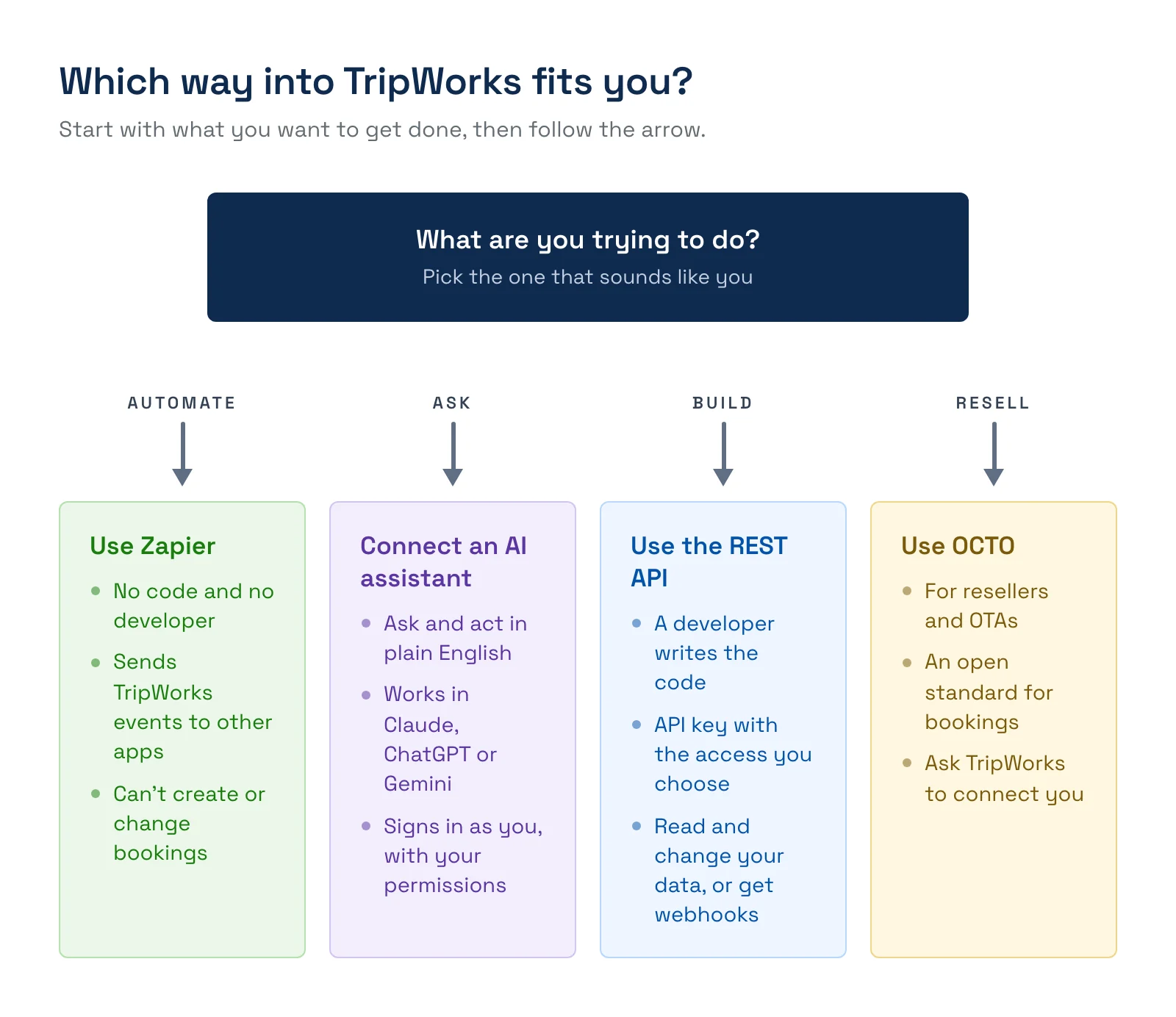
In one sentence each:
- "I want my booking data to show up in my other tools, and I don't have a developer." Use Zapier.
- "I want to ask questions about my business, or have things done, in plain English." Connect an AI assistant.
- "My developer is building our own system, report, or website feature." Use the REST API, with webhooks if you want TripWorks to push events to you.
- "I'm a reseller or OTA and want to send bookings to TripWorks operators." Use OCTO.
You can use more than one. Many operators use Zapier for simple handoffs and an AI assistant for questions and reports, and bring in a developer only when they need something custom.
How does TripWorks let other software in?
TripWorks is the system that holds your business rules: how many seats are on the 2:00 departure, how many guests can check in per hour, who still owes a waiver. It also holds your payments, manifests, and reports, so TripWorks works like an engine for your business. Zapier, AI assistants, the REST API, webhooks, and OCTO are the ways other software, and the people using it, reach that engine.
Because they all reach the same system, a change follows the same rules whichever way it arrives. A booking added through the REST API goes through the same checks as one your team adds on the calendar: whether the trip is locked, whether there is capacity, whether the ticket type is valid. An AI assistant can only do what the person who connected it is allowed to do in TripWorks. An API key can only do what its scopes allow.
This has a practical consequence for developers. When a request needs a choice from a person, TripWorks asks instead of guessing. For example, if the price of a ticket has changed since the original booking, or a voucher needs to be reapplied, the REST API replies that a decision is required and lists the choices. Your code answers and sends the request again. See What happens when TripWorks needs a decision? below.
Automate with Zapier (no code)
Zapier connects TripWorks to thousands of other apps without code. When something happens in TripWorks, such as a trip being reserved, a payment landing, or a waiver being signed, Zapier passes the data to the tools you already use: Slack, Google Sheets, your email platform, your CRM, your accounting software.
- Best for: simple "when this happens, do that" handoffs by someone who isn't a developer.
- What it can do: start an automation from a TripWorks event and send the data to another app.
- What it can't do: create or change anything in TripWorks. TripWorks is a trigger-only Zapier app, so Zapier can't make bookings for you. To send events to your own server as raw data, use webhooks.
- How you connect: with an API key from the Zapier card in TripWorks. TripWorks doesn't charge for the integration. Zapier has its own plans, including a free tier.
Set it up in Set up your Zapier integration. See every event you can use in Zapier trigger events and data fields.
Ask and act in plain English with an AI assistant
AI assistants such as Claude, ChatGPT, and Gemini can connect to TripWorks through MCP, an open standard for linking assistants to the tools you use. Once connected, you type a request and the assistant reads your live account data, or makes a change, and tells you what it did. Ask "Who's on the manifest today?" or "Which of tomorrow's bookings still have unsigned waivers?" and the answer comes from your real data.
- Best for: owners and managers who want answers, reports, and everyday desk work done by asking, without building anything.
- What it can do: read and change things such as booking notes, booking statuses, waivers, and schedules, and turn live data into dashboards, heat maps, and reports.
- What it can't do: more than you can. The assistant signs in as you, with your TripWorks login, so it is limited by your permission group. When you connect, you can choose read-only, which blocks every change.
- How you connect: turn on Enable AI assistants on the AI Assistants card, copy the connection URL, and add it to your assistant. You approve the connection by signing in to TripWorks.
Set it up in Connect TripWorks to your AI assistant (MCP), or go straight to Claude, ChatGPT, or Gemini.
AI assistants (MCP) are for you and your team. They are different from the TripWorks Chatbot and Callbot, which talk to your guests. See AI assistants for your business for those.
Build your own with the REST API
The REST API is a standard way for a developer's code to read and change your TripWorks data. It is organized by object, such as bookings, customers, activities, gift cards, and locations, with the usual create, read, update, and delete operations. It is described in the open OpenAPI format, so most developer tools can read it directly.
- Best for: a developer or agency building your own system, report, dashboard, or website feature on top of TripWorks.
- What it can do: read and change the objects listed in the API reference, within the scopes you grant. It also supports filtering, sorting, and cursor-based paging for lists.
- How it signs in: with an API key that isn't tied to a person, sent as a bearer token. You choose, per object, whether the key can read or can read and write.
To create a key, go to Setup Integrations, open the REST API card, and create a key on the Keys tab. The page also has Limits, Logs, and API reference tabs. The API reference lists every object and operation, with a playground where you paste your key and send a real request.
A new API key is shown exactly once. TripWorks stores it securely and can't show it again or recover it. Copy it when it appears. If you lose it, create a new key.
For the full walkthrough, see Get started with the REST API. Your developer can also read the public reference without logging in at api-docs.tripworks.com, or load the machine-readable OpenAPI document straight into their tools.
Push events to your server with webhooks
The REST API answers when your code asks. Webhooks work the other way: TripWorks sends a JSON message to a URL you choose the moment something happens, such as a trip being reserved, a payment landing, or a waiver being signed. Use them to avoid asking over and over whether anything changed. Set them up in Set up webhooks.
Connect as a reseller or OTA with OCTO
OCTO is an open standard that resellers and online travel agencies (OTAs) use to exchange products, availability, and bookings with suppliers. TripWorks follows the OCTO specification and answers OCTO requests for your supplier details, products, availability, bookings, and notifications. That gives a reseller one standard way to sell your activities, instead of a custom connection for every operator.
- Best for: a reseller or OTA that wants to send bookings to TripWorks operators.
- If you are an operator who wants to sell through OTAs: you don't need to know any of this. Add the reseller and TripWorks connects it. See How OTA and reseller bookings connect to TripWorks and Set up a reseller.
- If you are a reseller who wants to connect: contact TripWorks. OCTO access is set up with TripWorks, not by creating an API key. Bookings arrive as normal trips, recorded with the Reseller method and the reseller's name.
To learn what OCTO is and how TripWorks is certified, see What is OCTO?. For the details of connecting, see Connect as a reseller or OTA with OCTO. TripWorks connects you to a marketplace of OTAs and resellers. If a channel you sell through isn't connected yet, ask support, and in the meantime see Import your data.
How do the four options compare?
| Zapier | AI assistant (MCP) | REST API | OCTO | |
|---|---|---|---|---|
| Best for | Simple automations without code | Asking questions and getting things done in plain English | Custom systems built by a developer | Resellers and OTAs sending bookings |
| Needs a developer | No | No | Yes | Yes, on the reseller's side |
| Signs in as | Your account's API key from the Zapier card | You, with your TripWorks login | An API key not tied to a person | A token tied to your account, set up with TripWorks |
| What it can do with your data | Send TripWorks events to other apps | Read and change data, within your role | Read and change data, within the key's scopes | Share products and availability, and exchange bookings |
| Limited by | The events you choose | Your permission group, or read-only if you choose | The scopes on the key | How you set up the reseller |
| Where you set it up | Setup → Integrations, Zapier card | Setup → Integrations, AI Assistants card | Setup → Integrations, REST API card | More → Resellers, with TripWorks |
| Where you see what happened | In Zapier's task history | The audit log, under your name | REST API → Logs | On the trip, as a reseller booking |
How are access and security handled?
- API keys belong to your account, not to a person. A key can read, or read and write, only the objects you chose when you created it. A request with no key or a malformed key is refused, and a request outside the key's scopes is refused too.
- Keys are shown once. If a key is lost or exposed, create a new one and delete the old one.
- AI assistants ride on a person's login. Connecting sends you to the normal TripWorks sign-in. The assistant can never do more than that person can, and a user with narrow permissions gets the same narrow access through the assistant.
- Changes through an AI assistant are credited to the person. In the audit log, a change made through Claude shows under the name of the person who connected it, as if they had made it in the web app.
- Turning off a person's access turns off their assistant. Turn off their sign-in under Team Users and their next request fails. Nothing else needs cleaning up.
- Each account opts in. An account must switch on Enable AI assistants before anyone can connect to it.
- Limits protect your account. Requests are rate limited, which stops runaway code from flooding the system. See What are the limits?.
What are the limits?
These limits apply to the REST API and to AI assistants. If your code hits them, it usually needs to fetch less often, for example by not checking every few seconds.
| Limit | Per minute | Per hour |
|---|---|---|
| REST API reads, per key | 200 | 3,000 |
| REST API writes, per key | 65 | 1,000 |
| REST API, all keys on one account | 400 | none |
| AI assistant requests | 60 | none |
Examples
- Find out who is on the manifest today. Ask your AI assistant: "Using the TripWorks MCP, who's on the manifest today?" It reads your live manifest and answers.
- Chase unsigned waivers. Ask an AI assistant which of tomorrow's bookings still have unsigned waivers, with each guest's email and phone, then draft the reminder.
- Add a late-arrival note. Tell your assistant a guest is running late for the 9:00 departure. It adds a note that appears in the manifest's notes column.
- Build a fill-rate view. Ask for guests per departure for the next 28 days as a heat map, built from live data.
- Send every new reservation to Slack. In Zapier, use the Trip Reserved trigger and post to a channel so your guides see bookings as they happen.
- Add new leads to your CRM. In Zapier, use the New Customer Lead trigger and create a contact in HubSpot, Salesforce, or Pipedrive.
-
List your gift cards from code. Send
curl https://your-account.tripworks.com/rest/gift-cards -H "Authorization: Bearer tw_xxxxxxxxxxxxxxxxxxxx"with your own key and read the list in the response. - Push payments into your accounting system. Point a webhook at your endpoint for the payment event so each payment arrives the moment it lands.
- Let a reseller sell your activities. A reseller connects over OCTO, reads your products and availability, and sends bookings that arrive as normal trips.
Frequently asked questions
Does TripWorks have an API?
Yes. TripWorks has a REST API for developers, and you can create a key under Setup → Integrations on the REST API card. It also offers three other ways to connect: Zapier for no-code automation, AI assistants for plain-English requests, and OCTO for resellers and OTAs. Which one to use depends on what you want to do, as described above.
What can I do through the API?
The REST API and AI assistants work with core objects such as bookings, customers, activities, gift cards, and locations. The API reference lists every object and operation and is always current, so check it for the full list.
Where do I get an API key, and what if I lose it?
Go to Setup → Integrations, open the REST API card, and create a key on the Keys tab. The key is shown once. TripWorks can't show it again or recover it, so if it is lost, create a new key with the same access and delete the old one.
Is it safe to give an AI assistant access to my account?
An AI assistant doesn't get new access. It signs in as the person who connects it and can only do what that person's permission group allows. You can also choose read-only when you connect, which blocks every change. Changes it makes appear in the audit log under that person's name, and turning off a person's sign-in stops their assistant on its next request.
Can I stop my team from letting an AI assistant make changes?
There isn't an account-wide switch for this yet. Each person chooses read-only, or read and write, when they connect, and the assistant can never exceed their permission group. To limit what someone's assistant can do, adjust their permission group, and ask them to connect read-only.
Can Zapier create or change bookings in TripWorks?
No. TripWorks is a trigger-only Zapier app: it starts Zaps when something happens, but Zapier can't use TripWorks as an action. To create or change data from another system, use the REST API, or ask an AI assistant. To send TripWorks events out as raw data, use webhooks.
What is the difference between webhooks and the REST API?
The REST API is for asking: your code requests data or makes a change when it chooses to. Webhooks are for being told: TripWorks sends your URL a message the moment something happens, so you don't have to keep checking. Many integrations use both: webhooks to learn that something changed, and the REST API to read the details or make a change.
What happens when TripWorks needs a decision?
Some actions need a choice before they can finish, such as whether to keep the original price or the current price, or whether to reapply a voucher. When that happens, the REST API replies with a 409 status and the code decision_required, and lists each decision. Send the same request again with your answers in decisions. Add dry_run: true to run every check without saving anything. AI assistants handle the same decisions by asking you.
Is the AI assistant connection the same as the TripWorks Chatbot or Callbot?
No. The Chatbot and Callbot are TripWorks assistants that talk to your guests on your website and phone line. An AI assistant connection (MCP) lets you, or your team, use Claude, ChatGPT, or Gemini to ask questions about your account and make changes. See AI assistants for your business for the guest-facing ones.
Does TripWorks support OCTO?
Yes. TripWorks follows the OCTO specification and answers OCTO requests for supplier details, products, availability, bookings, and notifications. Resellers and OTAs connect over OCTO instead of using an API key, and the connection is set up with TripWorks. Bookings arrive as normal trips with the reseller's name.
Why is my code getting rate limited?
Each API key can make up to 200 read requests and 65 write requests a minute, and all keys on one account share a limit of 400 requests a minute. This usually means the code checks for changes too often. Fetch less frequently, filter your requests, or use webhooks so TripWorks tells you when something changes. The Limits and Logs tabs on the REST API card show your usage.
Related
- What is OCTO?
- Get started with the REST API
- How TripWorks data fits together
- How API keys and access work
- Monitor and troubleshoot API activity
- Connect as a reseller or OTA with OCTO
- Set up your Zapier integration
- Connect TripWorks to your AI assistant (MCP)
- Set up webhooks
- How OTA and reseller bookings connect to TripWorks
- Integrations
- Permission groups
Built for attractions, tours & activities
Build on top of your booking data
See how attractions, tours, and activities connect their booking data to the tools they already use with TripWorks. Book a demo and make the switch.