
Connecting your Meta (Facebook) Pixel to TripWorks lets you measure the bookings your Facebook and Instagram ads generate. Once connected, TripWorks reports booking activity to Meta automatically, so you can see conversions and let Meta optimize your campaigns. Setup is a single field, your Pixel ID. There's no pixel code to install on your booking flow.
In this article
What TripWorks sends to Meta
When your pixel is connected, TripWorks fires two standard Meta Pixel events directly on your booking pages:
- PageView: when a customer opens your booking page.
- Purchase: on the confirmation page after a booking is completed. Includes the booking's value, currency, and confirmation code, so Meta can attribute revenue to your ads.
TripWorks uses the browser-based Meta Pixel. It does not use Meta's server-side Conversions API (CAPI), and it does not send other events such as InitiateCheckout or AddToCart.
Before you start
- A Meta Business account with a Pixel created in Meta Events Manager.
- Your Facebook Pixel ID (a numeric ID from Events Manager).
- Access to Integrations in TripWorks.
Step 1: Find your Pixel ID in Meta
- Open Meta Events Manager (business.facebook.com/events_manager).
- Select your data source (your Pixel), or create one if you don't have it yet.
- Copy the Pixel ID, the numeric ID shown at the top of the page.
Step 2: Add your Pixel ID in TripWorks
- Open Facebook Ads.
- Paste your Facebook Pixel ID into the field.
- Turn on Enable Facebook Ads.
- Select Save.
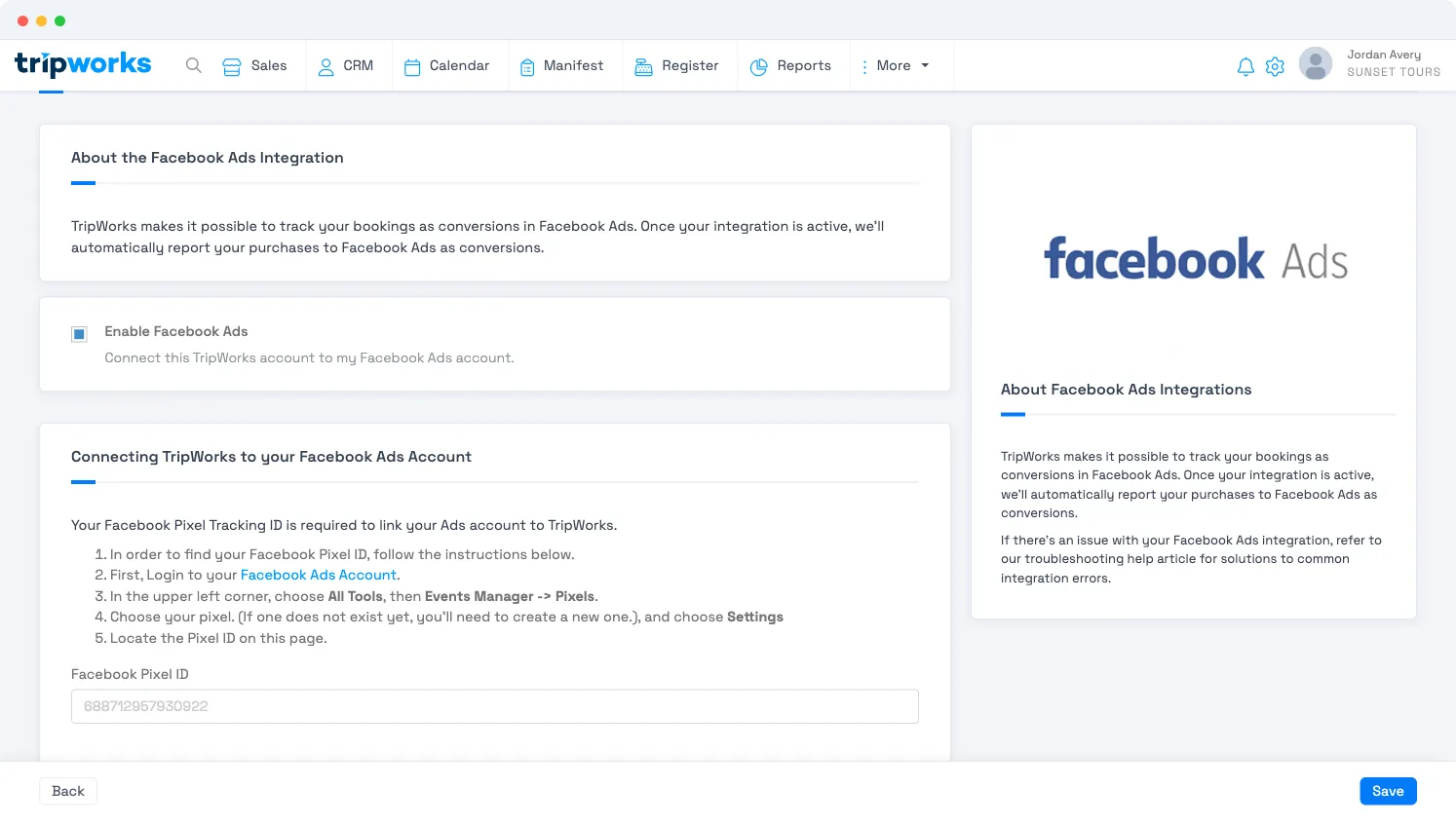
Both are required. Tracking only runs when the Pixel ID is entered and the Enable Facebook Ads toggle is on. Entering the ID without enabling the toggle is the most common reason nothing is tracked.
You don't install the Facebook pixel yourself for TripWorks bookings. Entering the Pixel ID is all it takes. TripWorks loads the Meta Pixel on the booking widget and fires the events for you. (Tracking on the other pages of your own website is separate and still up to you.)
Verify your setup
The Meta Pixel runs only for real customers on your live booking site, so test it the way a customer would:
- Install the Meta Pixel Helper Chrome extension.
- Open your live booking page in an incognito window (so you're not logged into TripWorks).
- Accept the cookie / consent prompt if one appears.
- Check that the Pixel Helper shows a PageView event on the booking page.
- Complete a test booking, and check that the Pixel Helper shows a Purchase event with a value and currency on the confirmation page.
In Meta Events Manager, events may take a short time to appear under your Pixel's activity.
Troubleshooting: conversions aren't tracking
Work through these in order. Most cases come down to one of the first three.
- Confirm the integration is enabled. In Facebook Ads, check the Pixel ID is correct and Enable Facebook Ads is on.
- Test as a customer, not while logged in. The pixel does not fire for logged-in TripWorks users (operators/staff), and it does not run on preview links. Always test in an incognito window on your live booking site, signed out.
- Check cookie / ad consent. Depending on your account's consent setup, the pixel may wait until the visitor allows advertising cookies. If you use a consent management platform, make sure it's integrated with TripWorks so advertising consent passes through.
- Confirm which event is missing. With the Pixel Helper, note whether PageView fires but Purchase doesn't. Purchase fires only when a booking reaches the confirmation page, and only once per booking.
- Confirm expectations with your marketing team. If your team or agency expects events beyond PageView and Purchase, or a server-side (Conversions API) connection, those aren't part of the TripWorks Meta integration.
Advanced: fire your own Meta events
The built-in integration covers standard PageView and Purchase tracking. To fire additional Meta events or track custom steps, add your own JavaScript with custom widget JavaScript.
Frequently asked questions
Do I need to add the Meta Pixel code to my website?
No. Enter your Pixel ID in Facebook Ads and turn on Enable Facebook Ads. TripWorks then loads the Meta Pixel on your booking widget and sends the PageView and Purchase events for you. Tracking on the other pages of your own website is separate and still up to you.
Which bookings are reported to Meta?
Bookings that guests complete themselves on your live online booking widget. Each one is reported once, as a Purchase, when the guest reaches the confirmation page. Bookings that come in through resellers, OTAs or imports never pass through that page, so they aren't reported. A guest booking also isn't reported when an ad blocker or privacy setting in the guest's browser stops the pixel.
Does it track bookings made by my staff or at the register?
No. The Meta Pixel doesn't load for anyone signed in to TripWorks, so bookings your team enters, including point-of-sale sales at the register, are never sent to Meta. That keeps your Meta results focused on the online sales your ads can influence.
Why don't I see my test purchase in Meta?
The most common reason is that the test booking was made while signed in to TripWorks, which never sends events. Sign out or use an incognito window, book on your live booking site, and watch the Meta Pixel Helper or the Test events tab in Events Manager. Each booking is reported only once, so reopening the same confirmation page won't send it again; make a new test booking instead. If events still don't show, work through the troubleshooting steps above.
What value is sent with the Purchase event?
The booking's customer total, in your account's currency: tickets, products and add-ons, less any promo code, plus taxes, before guest fees. It's the full booking total even when the guest pays only a deposit. TripWorks also includes the booking's confirmation code, but not individual product names or IDs. The value is sent once at checkout and isn't updated in Meta if the booking is later changed, canceled or refunded.
Does it work with Meta's Conversions API?
No. TripWorks reports bookings from the guest's browser with the Meta Pixel only. There's no server-side Conversions API connection, so a booking isn't reported when the guest's browser blocks the pixel. If your agency expects a Conversions API setup, let them know the TripWorks integration covers browser-based PageView and Purchase events.
Can I use more than one Meta pixel?
The Facebook Ads integration holds one Pixel ID per TripWorks account, and every PageView and Purchase goes to that pixel. If more than one ad account or an agency needs the data, share that pixel with them in your Meta Business settings instead of creating a second one.
Does the Meta Pixel respect cookie consent?
Meta Pixel tracking depends on your account's consent setup. See Consent, CMP & privacy for how consent works in TripWorks and what to set up on your own site. If you have questions about how consent applies to your booking widget, contact TripWorks support.
Can I see in TripWorks which bookings came from my Facebook ads?
Yes. When a guest arrives from a Facebook or Instagram ad link that carries Meta's click ID, TripWorks saves that click ID on the booking and records Facebook as the booking's source, as long as Facebook is in your Trip Sources. This works whether or not the pixel is connected. In Sales, you can show the Facebook Click ID column to see it. See Marketing attribution & UTM tracking for how sources are decided.
Why do my Meta numbers differ from my bookings in TripWorks?
Meta counts only the purchases it can credit to your ads within its attribution window, while TripWorks counts every booking. Staff, reseller and OTA bookings never reach Meta, and ad blockers or browser privacy settings can stop some guest bookings from being reported. Revenue can differ too, because Meta receives the customer total before guest fees at the moment of booking and isn't told about later changes, cancellations or refunds.
Related
- Set up your Google Ads integration
- Custom widget JavaScript
- Marketing attribution and URL tracking
- Third-party integrations
Built for attractions, tours & activities
Turn ad clicks into tracked bookings
See how attractions, tours, and activities measure their Meta and Google ad spend against real bookings on TripWorks. Book a demo and make the switch.