
When a booking comes from an OTA like Viator or GetYourGuide, that customer is the OTA's — not yours — and the OTAs' terms are strict about it. They prohibit suppliers from emailing those customers to ask for reviews or send marketing/follow-ups, and from using their customer data for anything beyond delivering the booked experience. So the automated review requests and follow-ups that work great for your direct bookings can put you offside with the OTA if they fire on OTA bookings.
In this article
TripWorks handles this for you: it can hold back the customer emails it would normally send on a reseller's bookings.
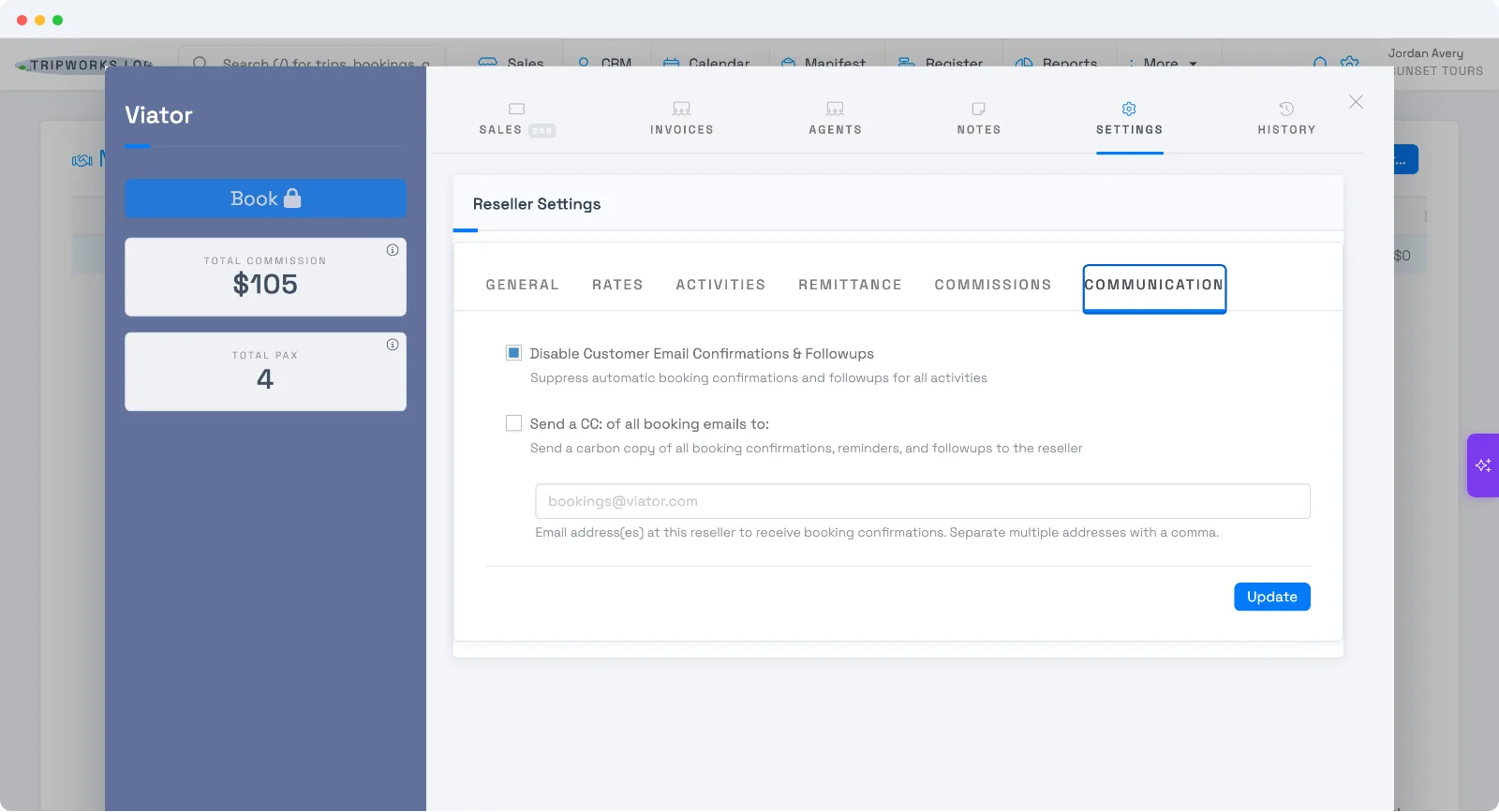
What gets suppressed
With Disable Customer Email Confirmations & Followups turned on for a reseller, TripWorks stops sending that reseller's customers:
- Booking confirmations
- Post-activity follow-ups
- Review requests — the ToS-sensitive one
What still goes out: pre-trip reminders (logistics like where to meet and what to bring) — those aren't marketing, so guests still get them.
It's already on for your OTAs
Here's the reassuring part: when you connect an OTA/channel like Viator or GetYourGuide, TripWorks turns this setting on automatically. So out of the box, your OTA customers aren't getting review requests or follow-ups from you — you're compliant by default. The setting appears on reseller/OTA connections so you can confirm or adjust it.
Retail or manually-created resellers are different: they default to off, so those customers receive your normal emails unless you turn the setting on.
Where to find it
- Go to Settings Resellers and open the reseller (e.g. Viator).
- Open Settings → Communication.
- Check or uncheck Disable Customer Email Confirmations & Followups, then Update.
Send a copy to the reseller instead
If the OTA or partner wants to receive the booking emails themselves, enable Send a CC: of all booking emails to: and enter their address (separate multiple addresses with commas). A carbon copy of confirmations, reminders, and follow-ups then goes to the reseller.
This is per reseller, so each OTA or partner connection has its own setting. It doesn't affect your direct (online, walk-up, phone) bookings — those keep sending your normal messages.
Frequently asked questions
Will my OTA customers get review requests?
No — not by default. OTA/channel connections have "Disable Customer Email Confirmations & Followups" turned on automatically, which suppresses review requests and follow-ups for that reseller's bookings, in line with OTA terms.
Do reminders still go out to OTA guests?
Yes. Only confirmations, follow-ups, and review requests are suppressed. Pre-trip reminders (logistics) still send, since they're needed to deliver the experience.
Does this affect my direct bookings?
No. The setting is per reseller and only affects that reseller's bookings. Your direct online, walk-up, and phone bookings keep sending your normal emails.
Can the OTA get a copy of the booking emails?
Yes — enable "Send a CC: of all booking emails to:" on the reseller's Communication tab and add their email address.
Related
Built for attractions, tours & activities
Stay compliant with your OTAs, automatically
See how attractions, tours, and activities manage OTA bookings on TripWorks. Book a demo and make the switch.