
The Daily Executive Summary is a performance snapshot of your business, delivered for each day so you can keep a pulse on sales and payments without digging through reports. It's the fastest way to see whether you're up or down and where your business is coming from.
In this article
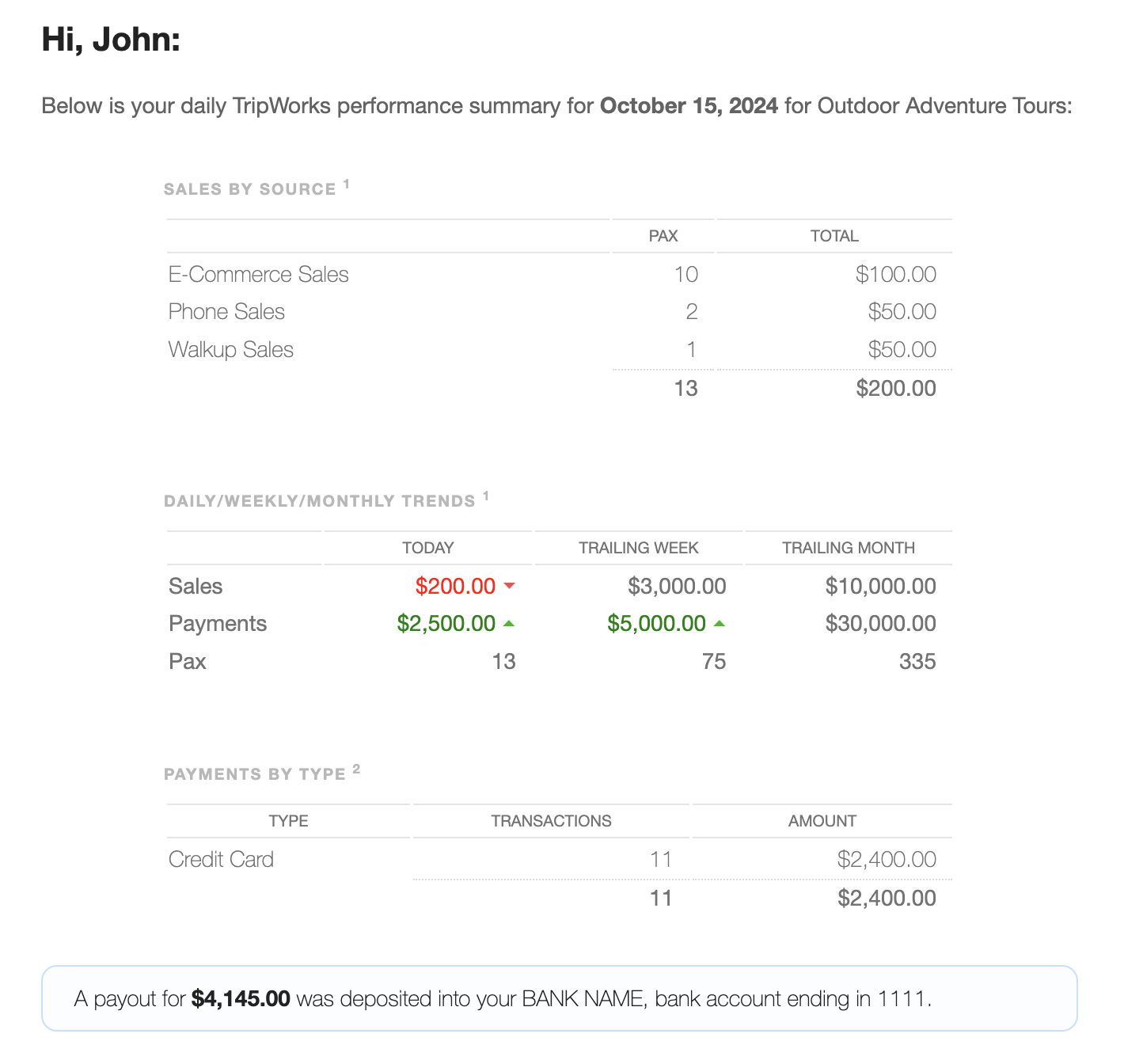
What's in the report
- Sales by source — your total sales and where they came from (for example, online bookings versus in-person sales).
- Sales trends (daily, weekly, monthly) — performance over each timeframe, based on the activity date, so they reflect activities scheduled for the period regardless of payment status.
- Payments by type — payments received by method (cash, credit card, voucher, and so on), based on the date the payment was applied — so this includes payments for future bookings, and reflects any refunds.
Color-coded trends
To make movement easy to spot:
- Red with a down arrow — a decrease compared to the previous day, week, or month.
- Green with an up arrow — an increase, highlighting where you're growing.
Turning it on
You can toggle this daily email on or off per user. By default it's sent only to account owners. To add other team members, manage their notifications — see Enable alerts. For the full set of reports available in the dashboard, see the Reports overview.
When it's sent (and fixing the time)
The summary goes out early each morning — around 1 AM in your account's timezone — so it's waiting for you at the start of the day. You can't pick a specific send time; the timing follows your account timezone.
So if it's arriving at an odd hour (say 2 AM), your account timezone is set incorrectly. Fix it once:
- Go to Setup General.
- Set Timezone to your business's actual local timezone.
- Update. The next day's summary lands in the early-morning window for that timezone.
Frequently asked questions
Why does my summary arrive at 2 AM — can I change the time?
There's no setting to choose a send time — it's always around 1 AM in your account's timezone. If it's arriving at the wrong hour, your account timezone is off. Set it correctly at Setup → Company & policies → Company Info & Branding → General → Location & hours → Timezone and the next summary will land in the right early-morning window.
Does everyone on my account get it at the same time?
Yes — the send time follows the account's timezone, so all recipients get it at roughly the same early-morning hour, regardless of where each person is.
Is this the same as an end-of-day or "Z" report?
It's the daily version of the Executive Summary — comparable to an end-of-day report, delivered automatically. The Executive Summary report in Reports lets you run the same kind of snapshot for any date range.
Who receives it?
By default, account owners. You can enable it for other team members through their alert settings — see Enable alerts.
Related
Built for attractions, tours & activities
Start every day knowing your numbers
See how attractions, tours, and activities stay on top of performance with TripWorks. Book a demo and make the switch.