
Booking widgets let you sell directly on your own website — no commissions, no redirects to a third party. You build them in a visual builder with a live preview, then drop a snippet on your site. Find them under Setup Tools & hardware Booking Widgets.
In this article
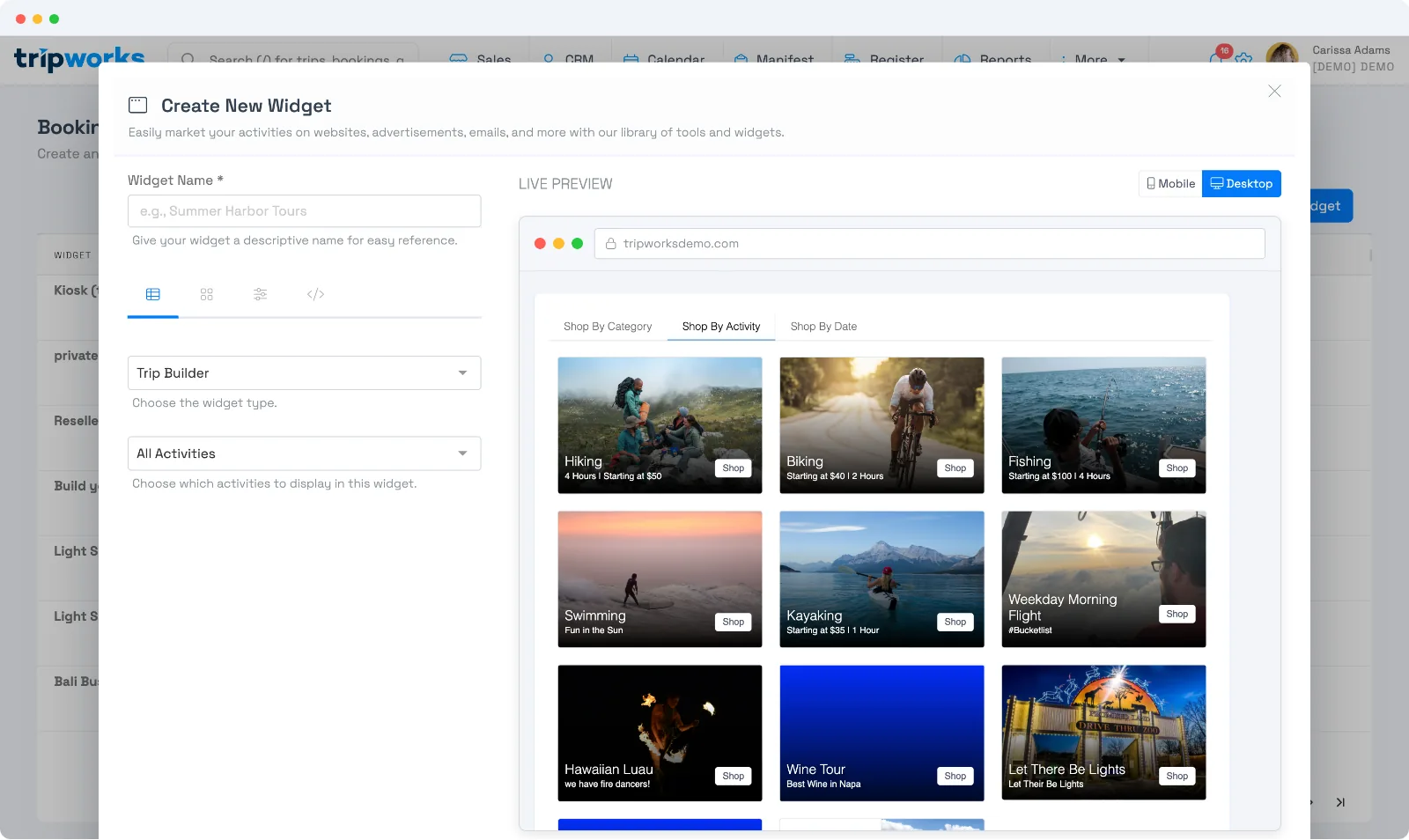
Choose a widget type
- Trip Builder — your full booking flow: a catalog of activities that guests browse, select, and check out from. The everyday choice for a website "Book Now" page.
- Calendar — an availability calendar that opens into booking, great when guests shop by date.
- Kiosk — an on-site, self-service widget for a tablet at your location. (Available on request — ask your account manager to switch it on.)
Decide what it shows
Pick which of your activities appear:
- All activities — your whole catalog.
- Individual activities — hand-pick specific ones (use one activity for a single-activity "book this tour" widget).
- Categories — everything in the categories you choose, so new activities in those categories appear automatically.
Activities display in one order across every widget: the order set for your whole catalog under Setup Experiences. See the FAQ below.
Shape the experience
Fine-tune how the widget looks and behaves:
- Default view — Catalog, Calendar, Agenda, Categories, or Gift Cards.
- Display mode & layout — Full Details or a Compact view; catalog item layout.
- Prices — show dynamic pricing and time-slot prices, or keep it clean.
- Default to flex booking — let guests book now and choose their date later.
- Default language — the language the widget loads in (see multiple languages).
The live preview (mobile and desktop) updates as you change these.
Manage your widgets
The Booking Widgets list shows every widget with its type, and how it's performing — embeds, clicks, and interactions. From each row you can edit, install (get the embed code — see Embed your booking widget), or clone it.
Widgets for a reseller
To give a reseller their own widget or link, open the reseller (More → Resellers) and go to the Widgets tab. You build the same widget types there, and bookings made through them are attributed to that reseller automatically.
Group and track bookings by website
If you run more than one website, brand, or domain under the same account, for example a main site plus a few separately-branded partner sites, the way to keep their traffic separate isn't a distinct grouping feature. It's one widget per site. Build a widget for each site (see Choose a widget type above) and install it only there (see Embed your booking widget). Because every widget already tracks and reports on its own, that alone gives you traffic broken out by site, in two places:
- Aggregate, per site. The Booking Widgets list reports embeds, clicks, and interactions separately for each widget, so as long as each site has its own widget, you can compare site-to-site performance at a glance.
- Per booking, per site. Every trip records exactly which widget the guest used. Open the trip and check the More tab: you'll see a Widget field with that widget's name (select it to jump back to the widget) and its widget ID.
Frequently asked questions
Why isn't my activity showing up on my widget?
Two things to check: the activity must be published (bookable), and it must be included in that widget's selection — either the widget shows all activities, or the activity is in one of the widget's chosen categories or its individual-activities list.
Can I change the order activities appear in on a widget?
Yes. Go to Setup Build what you sell Activity Settings, select Reorder, and drag activities into the order you want.
This order is set once for your whole catalog, not per widget. Every widget that includes an activity shows it in that same position relative to your other activities, so there's no separate order to set for just one widget. A new activity you create is added to the end of this order automatically; drag it into place once it's ready to feature.
Can I have more than one widget?
Yes — create as many as you need. A common setup is one full-catalog widget for your main booking page plus single-activity widgets for individual tour pages.
Do I need a developer?
No. You build the widget here and paste a small snippet onto your site — see Embed your booking widget. Most site builders let you paste it into an embed/HTML block.
We run bookings through more than one website — can we tell which site a booking came from?
Yes. Create a separate widget for each site (or brand) and install it there (see Embed your booking widget). Every booking records which widget the guest used, so you can always trace it back: open the trip and check the More tab for the Widget field.
Does TripWorks have "business groups" for organizing bookings from different sites or brands?
Not as a separate feature to configure. The practical equivalent is giving each site or brand its own widget: since every widget already reports its own embeds, clicks, and interactions, and every booking records which widget it came through, one widget per site gets you the same grouping without any extra setup.
Related
- Embed your booking widget
- Deep-link your widget with URL parameters
- Marketing attribution & UTM tracking
Built for attractions, tours & activities
Sell direct, straight from your own website
See how attractions, tours, and activities take commission-free bookings with TripWorks widgets. Book a demo and make the switch.