
Reviews and phone calls hold the most honest feedback you get, and almost nobody has time to read all of it. Your AI assistant can. Ask it to read both, group what it finds into themes, count each one, and quote a real example, so you know what to fix first.
In this article
Learn how to connect your AI assistant
See it in action
The AI Assistants page in TripWorks shows this request as a sample. The themes, counts, and quote below are sample data, not a real account.
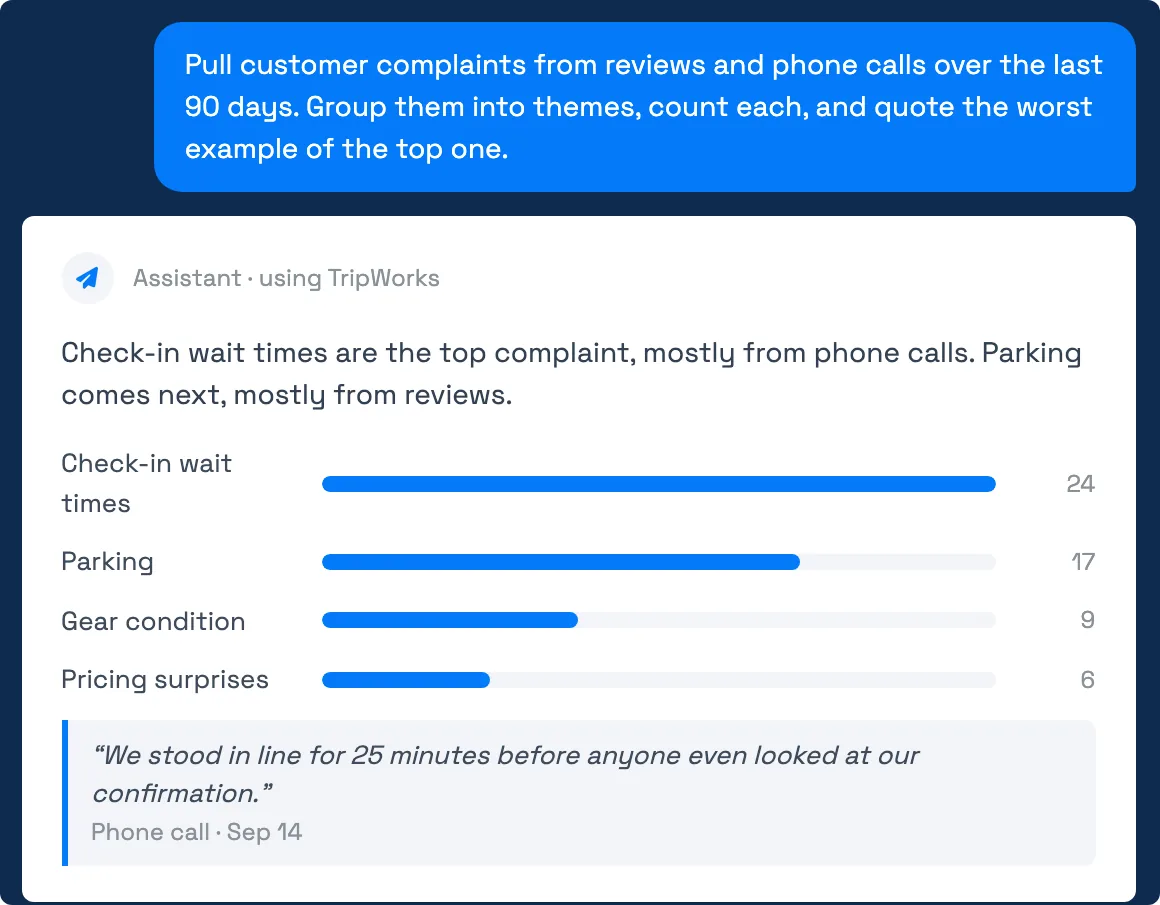
Try the prompt with your own time frame:
Pull customer complaints from reviews and phone calls over the last 90 days. Group them into themes, count each, and quote the worst example of the top one.
What your assistant can read
- Reviews. The star rating, the written comments, and what the guest said could be improved. Reviews come from your guest review form and from imported sources such as Google, TripAdvisor, and Yelp, and each is tied to the activity it's about. TripWorks also scores each review's sentiment (positive, negative, neutral, or mixed), so your assistant can start with the harshest ones.
- Phone calls. The summary and transcript of each call TripWorks recorded, including AI callbot calls, plus the questions and tips found in the calls. Your assistant can also count calls by day, by how they ended, and by average length.
Your assistant does the grouping itself, so the themes reflect what it reads, not a fixed list.
Example requests
- Summarize this month's reviews. Gives the average rating, what guests love, and what keeps coming up.
- List every review under four stars from the last 60 days, newest first, with a suggested reply. You get a to-do list with a draft response for each.
- Rank my activities by average review rating over the last 90 days. Shows what to promote and what to fix.
- Find reviews that mention parking. Searches the comment text and quotes each match.
- What are callers asking about most this month? Reads the questions found in recent calls and summarizes the themes.
- Summarize yesterday's call from the number ending in 4471. Tells you what the caller wanted and what happened, without listening to the recording.
- How many voicemails did we get last week, and on which days? Counts voicemails by day so you can see when callers can't reach anyone.
- Which complaints show up in both reviews and calls? Finds themes that repeat across both, which are the ones guests feel most strongly about.
Ask for quotes. A theme with a real sentence behind it is much easier to take to your team than a bare count.
Turn what you learn into action
Once you have the themes, keep going in the same conversation:
- "Draft a reply to each review under three stars. Keep each under 60 words and don't make promises about refunds."
- "Write a short note for the front-desk team about the top complaint."
- "Which activity gets the most complaints about gear?"
Your assistant drafts the text. You review it and post it yourself, because it can read reviews but can't reply to them for you.
Limits to know
- Counts are approximate. Your assistant reads the records it's given and groups them by judgment. Treat counts as a strong signal, not an audit, and ask it to show the reviews or calls behind a theme.
- Large periods may be sampled. If a range holds thousands of reviews or calls, your assistant may read them in pages. Ask for a shorter window or one activity to get a more thorough read.
- Only recorded calls appear. It can read calls that TripWorks recorded and summarized, such as AI callbot calls and connected phone systems. Calls outside those systems aren't there.
- Guest details are private by permission. If your permission group can't open a call, your assistant can't either.
- Read-only. It can't reply to reviews or call guests back.
Frequently asked questions
Does it read the actual call, or only a summary?
It can read the AI-written summary and the transcript of a call. It doesn't listen to the audio. To hear a recording, open the call in TripWorks.
Can it reply to reviews for me?
No. It can draft replies for you to copy, but it can't post to Google, TripAdvisor, Yelp, or your review form. See Collecting guest reviews for how reviews reach TripWorks.
Which review sites does it cover?
Reviews that exist in TripWorks: those from your guest review form and any imported from Google, TripAdvisor, or Yelp. Your assistant can filter by source or by activity.
How do I find only the negative reviews?
Ask for reviews with a rating of three stars or less, or for reviews with negative sentiment. You can combine either with a date range or an activity.
Can it analyze AI callbot calls?
Yes. Callbot calls are recorded with a summary, an outcome, and a transcript, so your assistant can count them, summarize them, and read the questions callers ask. See Review AI callbot calls and analytics for the same data in TripWorks.
Why did my assistant say it can't see any calls?
Either your permission group doesn't include call access, or the period you asked about has no recorded calls. Ask an account admin to check your permissions, and try a wider date range.
Is it safe to ask about guest complaints?
Your assistant reads reviews and calls the same way you can, under your permissions, and passes what it reads to your AI provider to answer you. See How security and permissions work before you connect.
Built for attractions, tours & activities
Ask your booking data a question
See how attractions, tours, and activities look up guests, check numbers, and update their catalog in plain English with TripWorks. Book a demo and make the switch.