
A rate sheet is a pricing rule you layer on top of your base rate to charge differently by date, season, channel, or group size. You can add as many as you need — your base rate always stays underneath as the fallback.
How pricing is decided
Bookings are priced top-down: the highest-priority rate sheet that matches a booking wins. If none match, the base rate for that channel applies. On the Ticket prices tab your rate sheets are a numbered list — drag to set priority, with the one nearest the top winning when more than one matches.
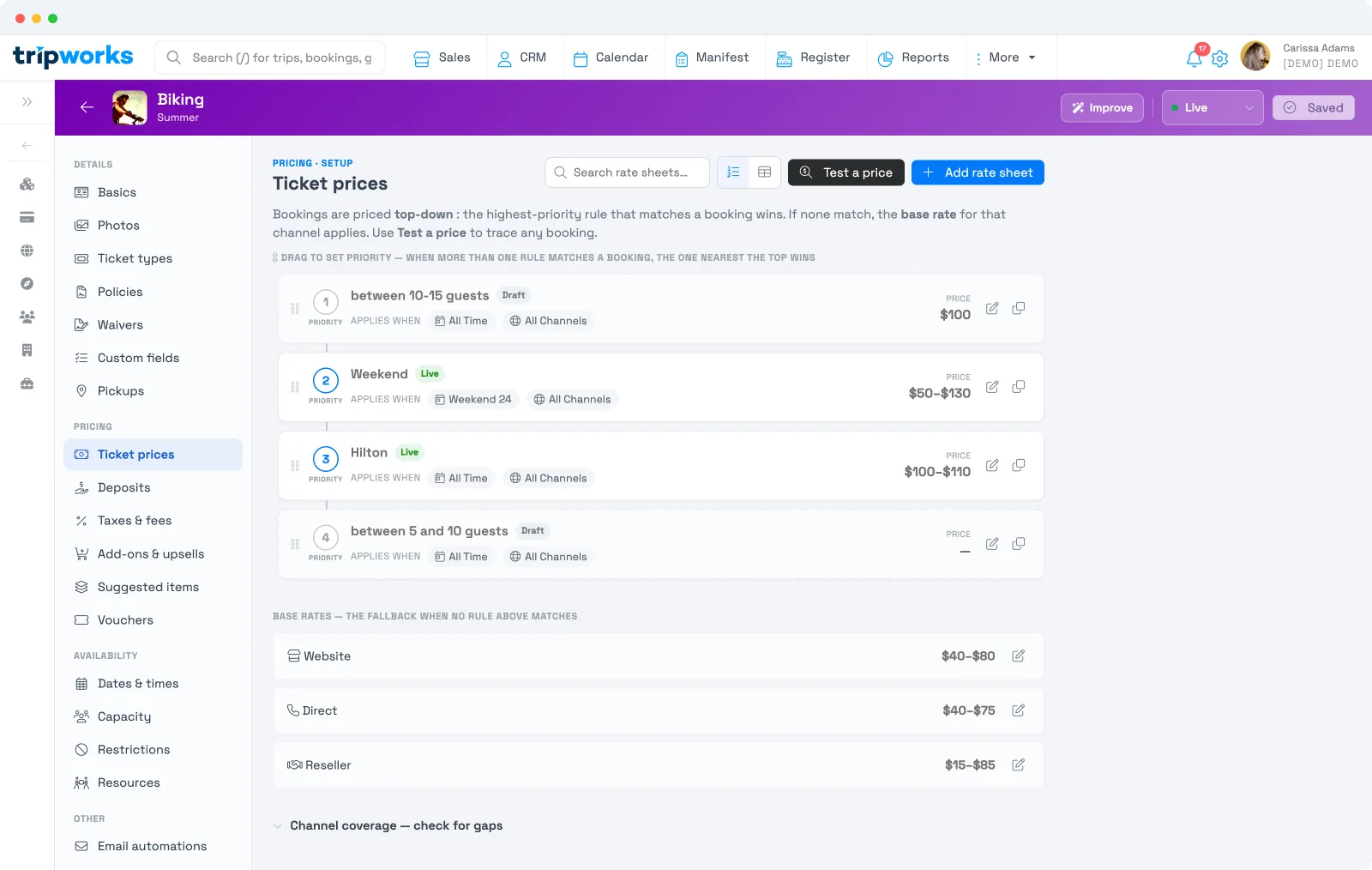
Add a rate sheet
Select Add rate sheet and build it across three tabs:
- Settings — name the rate sheet and set its price for each ticket type.
- Criteria — when it applies: a season or schedule, a guest-count range, an advance-purchase window, and availability conditions.
- Channels — which channels it applies to (website, direct, reseller), or all of them.
A rate sheet stays a Draft until you set it Live, so you can build and fine-tune it before it affects real bookings — and you can Archive one you no longer want to apply without deleting it. Or start from a preset — Weekend & holiday uplift, Seasonal pricing, Group / large-party rate, Channel or reseller net rate, Last-minute / fill the gap, or Advance-purchase discount — and adjust from there.
Seasonal pricing is simply a rate sheet tied to a schedule for your busy and off seasons.
Check your work
- Test a price traces any booking through your rate sheets and base rate so you can see exactly which rule wins — see Test a price.
- Channel coverage — check for gaps flags any channel a rule leaves unpriced.
Frequently asked questions
What happens when two rate sheets match the same booking?
The higher-priority one wins — the one nearest the top of the list. Drag to reorder them. If none match, the base rate for that channel applies.
Will adding a rate sheet break my existing prices?
No. Your base rate is always the fallback, and a new rate sheet stays a Draft until you set it Live. Use Test a price to confirm before you go live.
How do I price differently for weekends or my busy season?
Add a rate sheet with a schedule or season in its Criteria — start from the Weekend & holiday uplift or Seasonal pricing preset. See Seasonal pricing.
Can I move the base rate up in priority?
No — the base rate isn't part of the prioritized list. It sits underneath as the catch-all that applies whenever no rate sheet matches, so there's no priority to set. Rate sheets always take precedence over it when their criteria match.
Can I give resellers a different rate?
Yes — set a rate sheet's Channels to reseller (or set a reseller base rate). Use the Channel or reseller net rate preset as a starting point.
Related
Built for attractions, tours & activities
Charge the right price for every booking
See how attractions, tours, and activities run dynamic pricing without spreadsheets on TripWorks. Book a demo and make the switch.