
You can ask your AI assistant to line up this season against last season and tell you what changed. It reads your live TripWorks numbers, works out the difference for each month, and explains the biggest movers in plain English. That replaces an afternoon of exporting reports and building a spreadsheet by hand.
In this article
Learn how to connect your AI assistant
See it in action
The AI Assistants page in TripWorks shows this exact request as a sample. The numbers below are sample data, not a real account.
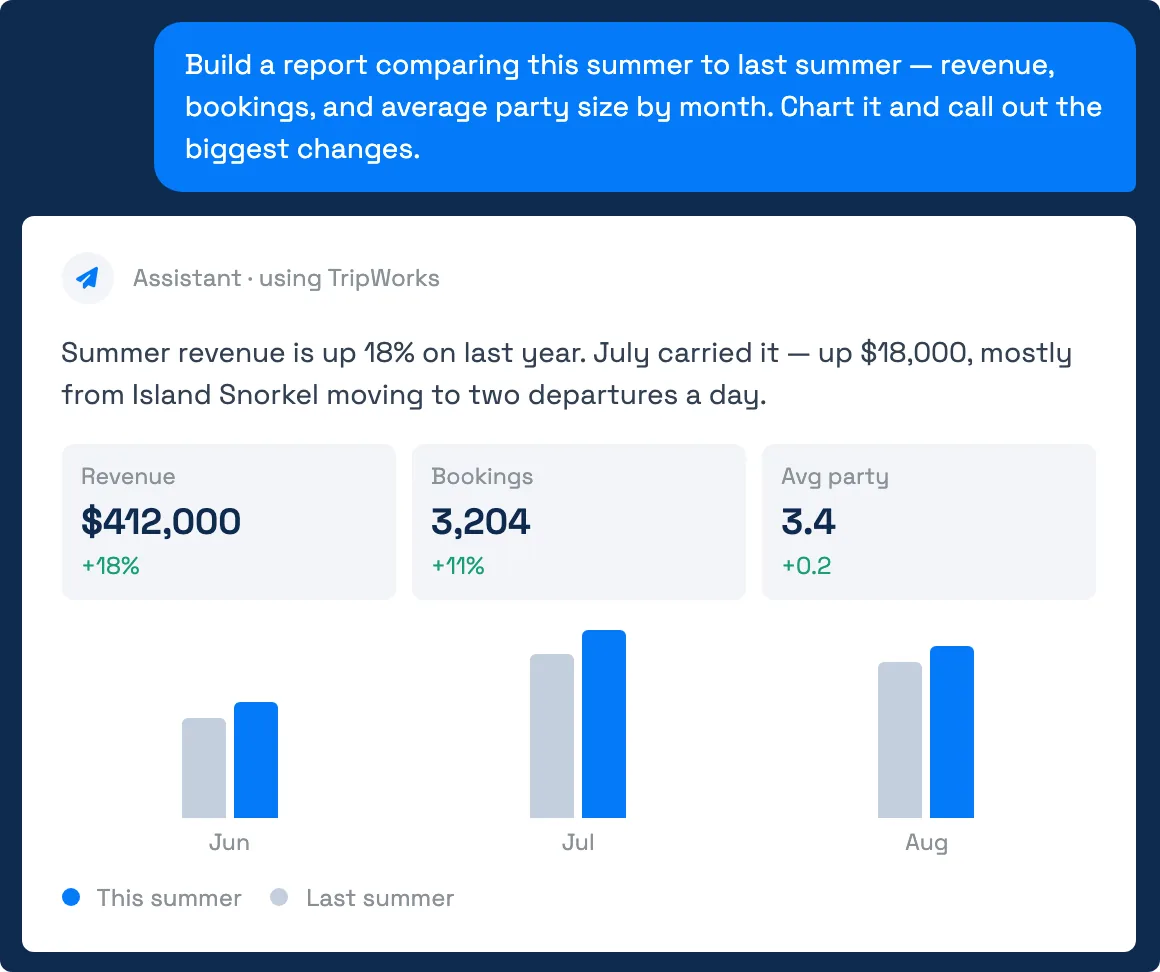
Copy the prompt, swap in your own season and the details you care about, and paste it into your assistant:
Build a report comparing this summer to last summer: revenue, bookings, and average party size by month. Chart it and call out the biggest changes.
What your assistant works out
Your assistant can add up your sales and compare any period with the same period a year earlier, or with the period right before it. For a season comparison it typically gives you:
- Revenue. Total sales, which is net revenue after discounts, tips, fees, commissions, and taxes. Ask for "customer totals" if you want what guests paid instead.
- Reservations and guests. It can count reservations (each one is a trip) and guests separately. Say which you mean. "Bookings" in TripWorks means one row per guest, so a family of four is four bookings but one trip.
- Average party size. Guests per reservation, for each month.
- The biggest changes. Which months or activities moved the most, with a short explanation.
Figures are dated by activity date by default, which is the day the guest does the activity. Ask it to use date booked instead if you want to see when sales came in, which is useful for judging whether a promotion worked.
Example requests
- Compare this summer to last summer. Revenue, reservations, and average party size by month, with the biggest changes called out.
- How is next month pacing against this time last year? Looks ahead at activities already booked for next month and sets them beside the same month a year ago.
- Which activities grew the most year over year? Ranks your activities by change in revenue and shows the top and bottom five.
- Did the spring promotion bring in more bookings? Compares reservations booked during the promotion with the same weeks last year, using date booked.
- Show revenue by weekday for last month. Finds your busiest and slowest days of the week so you can plan staffing.
- What was our average lead time this season, and how does it compare to last? Shows how far ahead guests book, in days.
- Compare revenue at each location. Splits the same comparison by location when you run more than one.
- Chart the last 12 months and mark the three best. Month-by-month revenue with the peaks pointed out.
Say how you want the answer shaped: "a table," "a chart," or "three bullet points for my owner's meeting." Assistants follow that closely.
Tips for better answers
- Name your dates. "This summer" is clear to you, but "June 1 to August 31" leaves nothing to guess.
- Say what you mean by revenue. If you track a different measure, such as ticket sales before tax, say so.
- Ask a follow-up. "Why was July up?" and "Break that down by activity" work in the same conversation.
- Check the date range. Your assistant tells you which dates it used. If a season spans a year end, confirm it picked the right ones.
Limits to know
- Charts depend on your assistant. Some assistants draw charts in the chat, and some give tables. If you don't see a chart, ask for one or ask for a table.
- It reads, it doesn't edit. Comparing numbers never changes anything in your account.
- Totals match TripWorks, not other tools. If your accountant's report uses a different cutoff or definition of revenue, the numbers can differ. Ask your assistant which fields it used.
- Sample numbers are illustrative. The screenshot shows sample data. Your answer reflects your own account.
Frequently asked questions
Do I need to build a report in TripWorks first?
No. Your assistant reads your sales directly and does the math as you ask. If you want a saved, repeatable report instead, see Reports overview.
Why is my assistant's revenue different from my dashboard?
Usually the date or the definition. Dashboards and reports can be dated by activity date or by date booked, and revenue can mean total sales, ticket price, or what the guest paid. Ask your assistant to tell you which date and which measure it used, then ask it to switch to match.
Can it compare more than two years?
Yes. Ask for the last three years by month, or compare any two periods you name. The automatic comparison uses the previous period or the same period last year, and your assistant can run separate queries for other ranges.
Does a bookings count mean guests or reservations?
In TripWorks analytics, bookings are individual guests and trips are reservations. A good assistant tells you which it counted. If it doesn't, ask: "Is that guests or reservations?"
Can it look at future dates?
Yes. Ask about tomorrow, next week, or next month to see how busy a period is and how it compares with the same time last year.
Is it safe to ask these questions?
Yes. These are read-only questions, and your assistant only sees what your own permission group allows. See How security and permissions work.
Where can I find more ready-made prompts?
The AI Assistants page under Setup Integrations AI Assistants has a Recipes library you can search and copy from. Some recipes describe tasks your assistant can't do yet, so reword or skip those.
Built for attractions, tours & activities
Ask your booking data a question
See how attractions, tours, and activities look up guests, check numbers, and update their catalog in plain English with TripWorks. Book a demo and make the switch.