
TripWorks sends a webhook for 13 kinds of events: trips, guest bookings, add-ons, notes, payments, waivers, payouts, and customers. This page lists each event, when it fires, and what the JSON looks like, so you can build your receiver before the first real event arrives.
In this article
To turn webhooks on and add your URL, see Set up webhooks. To see how a delivery is sent and what your server must answer, see How webhook delivery works.
Sample data you can copy
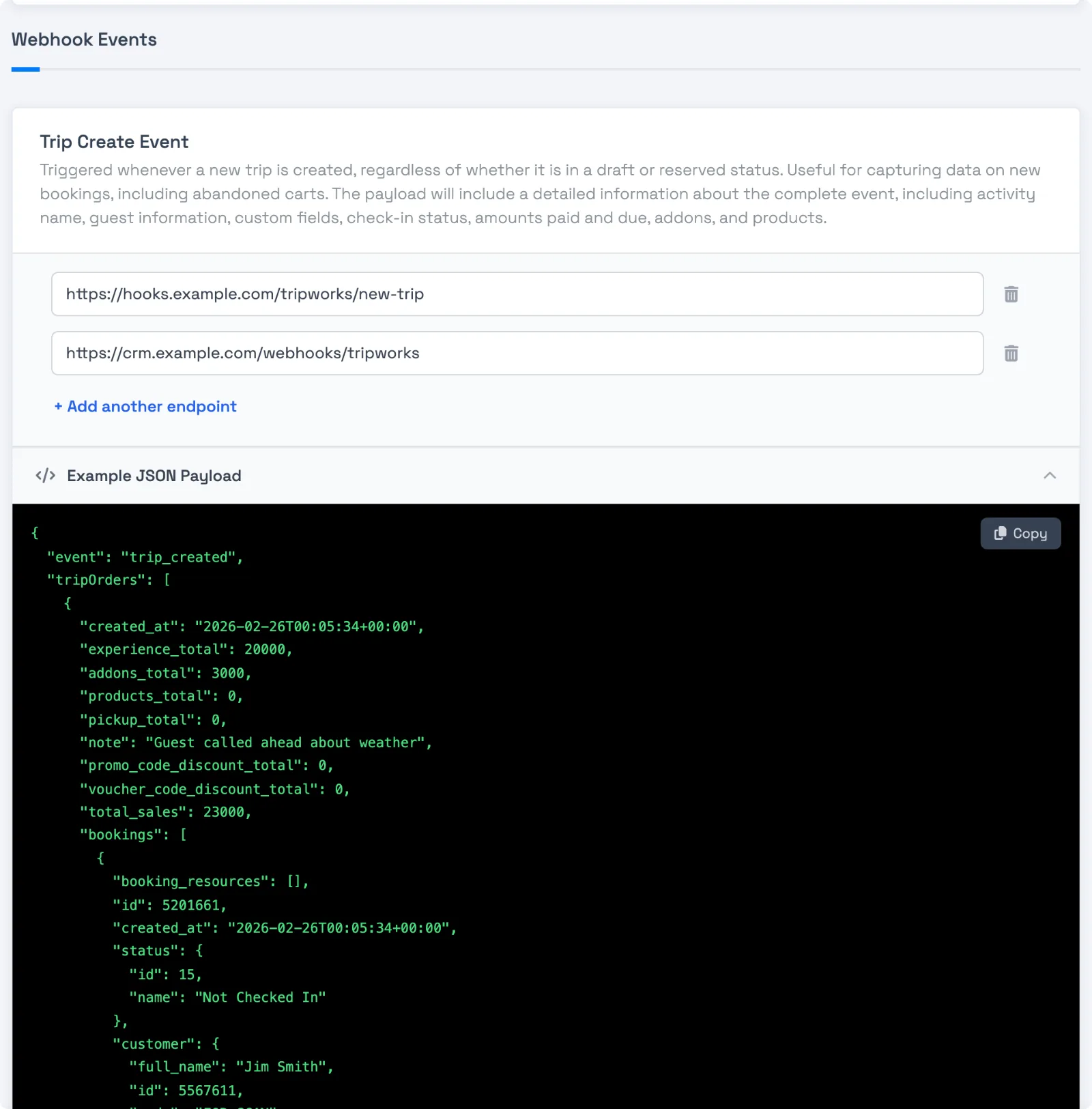
Every event on the setup screen has an Example JSON Payload panel. Open it to see the shape of that event, and select Copy to paste it into your own tests. The examples use made-up guests and amounts, so they're safe to share with a developer or paste into a mock server.
Events and when they fire
The value in the payload's event field is the exact identifier below (an underscore slug — the setup page shows friendlier labels).
Event (event value) |
Fires when |
|---|---|
trip_created |
A new trip is created — including drafts and abandoned carts |
trip_reserved |
A trip moves to Reserved (typically the first payment) |
trip_updated |
A trip changes — date/time, guest count, custom fields. Also fires when a guest booking, resource assignment, activity, or reservation note is removed |
trip_cancelled |
A trip is cancelled |
booking_updated |
A guest booking within a trip changes, for example a check-in or a status change |
addon_updated |
An add-on or product is added to or removed from a booking |
note_created |
A reservation note is added to a trip |
note_updated |
A reservation note is edited |
payment_created |
Any payment or refund is processed (fires per payment, including partials) |
waiver_signed |
A customer signs a waiver |
payout |
A payout is sent to your bank account |
customer_create |
A new customer profile (with an email) is created |
customer_update |
A customer profile is modified |
What the payload looks like
Each webhook is a POST with Content-Type: application/json. There's no envelope — the object's fields sit at the top level with an event key merged in, like { "event": "trip_created", "id": …, "customer": {…}, "tripOrders": [ … ] }:
{ "event": "trip_created", "id": 2088161, "confirmation_code": "BOOK-1234" }
A few things to know when you parse it:
-
Money is in integer cents.
"total": 24200means $242.00. -
Trip events nest everything —
tripOrders[](one per activity) each containbookings[](one per guest), with customer, ticket type, custom fields, add-ons, and status. They also carry the reservation's currentnotes[]. -
Removals arrive as
trip_updated. Removing a guest booking, a resource assignment, an activity, or a reservation note sends atrip_updatedwith the trip as it stands after the removal. There's no separate "removed" event, so compare the payload with what you stored to see what's gone. Adding a note sendsnote_createdonly, and editing one sendsnote_updatedonly; neither sendstrip_updated. -
customer_portal_url— a login-free link to the guest's portal — is included on every trip-related event.trip_created,trip_reserved,trip_updated,trip_cancelled,payment_created,note_createdandnote_updated(nested undertrip) include it at all three levels: the root trip, each trip order, and each booking.booking_updatedandaddon_updatedinclude it once, at the booking level only. It's not included onwaiver_signed,payout,customer_create, orcustomer_update.
customer_create
Webhook payload example
{
  "event": "customer_create",
  "id": 5567611,
  "code": "CUST-1A2B",
  "first_name": "Jordan",
  "last_name": "Avery",
  "full_name": "Jordan Avery",
  "email": "jordan@example.com",
  "phone": "+15550100",
  "phone_format_intl": "+1 555-0100",
  "phone_format_164": "+15550100",
  "phone_country_code": "US",
  "mappable_position": "Denver Colorado United States",
  "location_description": "Denver, CO, USA",
  "country": {},
  "is_vip": false,
  "is_opt_in": true,
  "timezone": "America/Denver",
  "created_at": "2026-02-26T00:20:59+00:00"
}
trip_created
trip_reserved, trip_updated, and trip_cancelled share this same trip shape — the event, trip_status, and amounts differ.
Webhook payload example
{
  "event": "trip_created",
  "id": 2088161,
  "confirmation_code": "BOOK-1234",
  "display_name": "Jordan Avery",
  "created_at": "2026-02-26T00:05:34+00:00",
  "reserved_at": "2026-02-26T00:05:57+00:00",
  "sale_date": "2026-02-28T00:00:00+00:00",
  "trip_status": { "slug": "draft", "name": "Draft" },
  "trip_method": { "name": "Walkup", "color": "#3498eb", "slug": "walkup" },
  "customer_portal_url": "https://portal.tripworks.com/t/abc123",
  "customer": {
    "first_name": "Jordan",
    "last_name": "Avery",
    "full_name": "Jordan Avery",
    "email": "jordan@example.com",
    "phone": "+15550100",
    "phone_format_intl": "+1 555-0100"
  },
  "tripOrders": [
    {
      "created_at": "2026-02-26T00:05:34+00:00",
      "experience_total": 20000,
      "addons_total": 3000,
      "products_total": 0,
      "pickup_total": 0,
      "promo_code_total": 0,
      "voucher_code_discount": 0,
      "total_sales": 23000,
      "customer_portal_url": "https://portal.tripworks.com/t/abc123?order=1",
      "experience": {
        "id": 105,
        "name": "Hiking",
        "internal_name": "Hiking",
        "duration": 480,
        "color": "#4e5dc1"
      },
      "experience_timeslot": {
        "label": "11:00 AM",
        "start_time": "2026-02-28T11:00:00+00:00",
        "end_time": "2026-02-28T19:00:00+00:00"
      },
      "status": { "id": 1, "slug": "booked", "name": "Booked" },
      "pax_count": 1,
      "addons_cnt": 2,
      "bookings": [
        {
          "id": 5201661,
          "created_at": "2026-02-26T00:05:34+00:00",
          "status": { "id": 15, "name": "Not Checked In" },
          "is_complimentary": false,
          "customer_portal_url": "https://portal.tripworks.com/t/abc123?booking=1",
          "customer": {
            "first_name": "Jordan",
            "last_name": "Avery",
            "full_name": "Jordan Avery",
            "email": "jordan@example.com",
            "phone": "+15550100"
          },
          "experience_customer_type": {
            "id": 195,
            "name": "Adult",
            "description": "price per person"
          },
          "custom_field_values": [],
          "booking_resources": [],
          "addons": [
            { "id": 371942, "name": "Ultimate Hike", "price": 25000, "experience_addon": { "id": 31, "title": "Ultimate Hike" } },
            { "id": 371943, "name": "Lunch", "price": 1000, "experience_addon": { "id": 6515, "title": "Lunch" } }
          ]
        }
      ]
    }
  ],
  "custom_field_values": [
    { "custom_field": { "internal_name": "Team Color" } },
    { "custom_field": { "internal_name": "Shirts Needed" } }
  ],
  "payments": [],
  "subtotal": 23000,
  "total": 24200,
  "paid": 0,
  "due": 24200,
  "total_sales": 24200,
  "products_cnt": 0,
  "addons_cnt": 2,
  "reseller_commission": 0,
  "session_ip_address": "203.0.113.10",
  "session_browser_name": "Chrome",
  "session_browser_os": "Apple",
  "session_location_label": "Denver, Colorado US",
  "created_by_user_avatar": {
    "id": 58,
    "first_name": "Taylor",
    "last_name": "Reed",
    "full_name": "Taylor Reed",
    "abbrev_name": "Taylor R."
  }
}
note_created
note_updated has the same shape. The note sits at the top level, with the whole trip nested under trip.
Webhook payload example
{
  "event": "note_created",
  "id": 177715,
  "text": "Guest requested a 9am pickup instead of 8am.",
  "created_at": "2026-02-27T15:12:00+00:00",
  "user_avatar": { "id": 42, "full_name": "Jamie Ops" },
  "trip": {
    "id": 2088161,
    "confirmation_code": "BOOK-1234",
    "trip_status": { "slug": "reserved", "name": "Reserved" },
    "customer_portal_url": "https://portal.tripworks.com/t/abc123",
    "customer": { "full_name": "Jordan Avery", "id": 5567611 },
    "tripOrders": [
      {
        "id": 2206774,
        "experience": { "id": 105, "name": "Hiking" },
        "status": { "id": 1, "slug": "booked", "name": "Booked" }
      }
    ]
  }
}
payment_created
A payment (or refund) wraps the trip under a trip key.
Webhook payload example
{
  "event": "payment_created",
  "id": 1277113,
  "created_at": "2026-02-26T00:20:05+00:00",
  "amount": 5000,
  "net_amount": 5000,
  "tip": 0,
  "currency": "USD",
  "is_card_present": false,
  "status": { "id": 6, "name": "Successful" },
  "type": { "id": 1, "name": "Cash" },
  "direction": { "id": 1, "name": "Payment" },
  "owner": {
    "id": 58,
    "first_name": "Taylor",
    "last_name": "Reed",
    "full_name": "Taylor Reed"
  },
  "trip": {
    "id": 2086899,
    "confirmation_code": "BOOK-5678",
    "trip_status": { "slug": "reserved", "name": "Reserved" },
    "customer_portal_url": "https://portal.tripworks.com/t/def456",
    "subtotal": 96000,
    "total": 106377,
    "paid": 5000,
    "due": 101377
  }
}
waiver_signed
Webhook payload example
{
  "event": "waiver_signed",
  "id": 1081786,
  "created_at": "2026-02-26T00:27:50+00:00",
  "full_name": "Jordan Avery",
  "first_name": "Jordan",
  "last_name": "Avery",
  "email": "jordan@example.com",
  "phone": "+15550100",
  "dob": "2006-04-14T00:00:00+00:00",
  "is_waiver_adult": true,
  "experience_name": "Swimming",
  "waiver_type": { "id": 2, "name": "Liability Waiver" },
  "signer_category": "lead",
  "booking_id": 5197289,
  "signed_pdf": "https://cdn-images.tripworks.com/tenants/profiles/example/waivers/example.pdf"
}
Match a customer to their trips
Every embedded customer object carries the customer's stable id and code: the numeric TripWorks customer ID and its short code, such as "id": 5567611, "code": "CUST-1A2B". The customer_create and customer_update events send the same identifiers at their root, so you have a durable key to join a customer event to that customer's trips.
The identifiers appear wherever a customer object is embedded:
- The top-level
customerontrip_created,trip_reserved,trip_updated, andtrip_cancelled, and thecustomernested under eachtripOrders[].bookings[]. - The customer nested under
triponpayment_created,booking_updated, andaddon_updated. - The customer on
waiver_signed.
To connect a customer change to their reservation, take the id (or code) from a customer_update event and match it to customer.id on any trip or booking payload you've received. Because every delivery carries its own copy of the customer's id, the match is unambiguous even for a customer with several trips, and you don't have to match on email or phone, which are editable and can be shared across records.
Examples
-
Find the guest's portal link in a booking event: read
customer_portal_urlon the trip, trip order, or booking, and send it in your own confirmation text. -
Find what was removed from a trip: compare the
trip_updatedpayload with the copy you stored, because removals arrive as updates with the trip as it now stands. -
Find the real dollar amount: divide any money field by 100, so
24200becomes $242.00. -
Find a waiver signer: read the
waiver_signedpayload, then match it to the guest's booking in your own system. -
Find every trip for a customer who just changed: take the
idfromcustomer_updateand match it tocustomer.idon the trips you stored. -
Find a brand new customer: listen for
customer_create, which fires when a profile with an email is created.
Frequently asked questions
Is there an envelope around the payload?
No. The object's fields sit at the top level, with an event key added so you can tell events apart.
Why is a money amount ten or a hundred times too big?
Amounts are in integer cents. Divide by 100, so 24200 is $242.00.
Will new fields be added to payloads over time?
It can happen as TripWorks grows. Write your receiver to ignore fields it doesn't recognize instead of rejecting the whole message.
Which event tells me a guest was removed from a trip?
trip_updated. Removals don't have their own event, so compare the new payload with what you stored.
Does the example on the setup screen match what is really sent?
The examples show the real shape with made-up values. Real events carry your own activities, guests, and amounts, and some optional fields appear only when they apply.
Can I get only some events?
Yes. Add a URL only to the events you want. Events with no URL send nothing.
Related
- Set up webhooks
- How webhook delivery works
- Test and troubleshoot webhooks
Built for attractions, tours & activities
Wire TripWorks into everything else
See how attractions, tours, and activities push bookings, payments, and waivers into their own systems in real time on TripWorks. Book a demo and make the switch.