
Some changes need a choice that only a person can make, so the TripWorks API asks before it acts. Closing a timeslot that already has guests booked, cancelling a day when guests would be messaged, and adding guests to a trip that has voucher codes are all changes like that. Instead of guessing, TripWorks replies with the question, saves nothing, and waits for your answer. This article explains how that exchange works, so your integration can answer by policy or hand the question to a person.
In this article
In this article
- What a decision is, and how it differs from a yes/no confirmation
- The three things a request can return: saved, a preview, or a question
- How to answer a decision and resend the request
- Which decisions you can meet today
- Plain-English examples of how each one is decided
- How to build an integration that handles them
What is a decision?
A decision is a question that TripWorks asks you, about the change you just asked for, because of what it found in your data. You did not ask the question and your code did not plan for it. TripWorks looked at the request, saw something that only you can weigh, and stopped to ask.
For example, you ask to close tomorrow's 9:00 departure, and TripWorks sees 4 guests booked on it. Closing it would leave those guests booked, with nobody messaged and nobody refunded. That is not something TripWorks should decide for you, so it asks.
Each decision has a kind, which says what is being asked, and a context, which describes the choice with a plain-language summary, counts, and what stays the same. You answer under that kind.
How is a decision different from a yes/no confirmation?
A confirmation is the "Are you sure?" box. It appears in the screen you are using, in the same words every time, whatever the change is, and it only protects you from a misclick. The server never knows it was shown, so anyone who calls the API directly never sees it.
A decision comes from TripWorks, after it checks your request against your data. It appears only when the data calls for it: a timeslot with no bookings never asks, and a timeslot with four does. It arrives with the facts you need to answer, such as how many guests and what stays the same. And it cannot be skipped. Whether the request comes from your code, the TripWorks app or an AI assistant, an unanswered decision always comes back as a question.
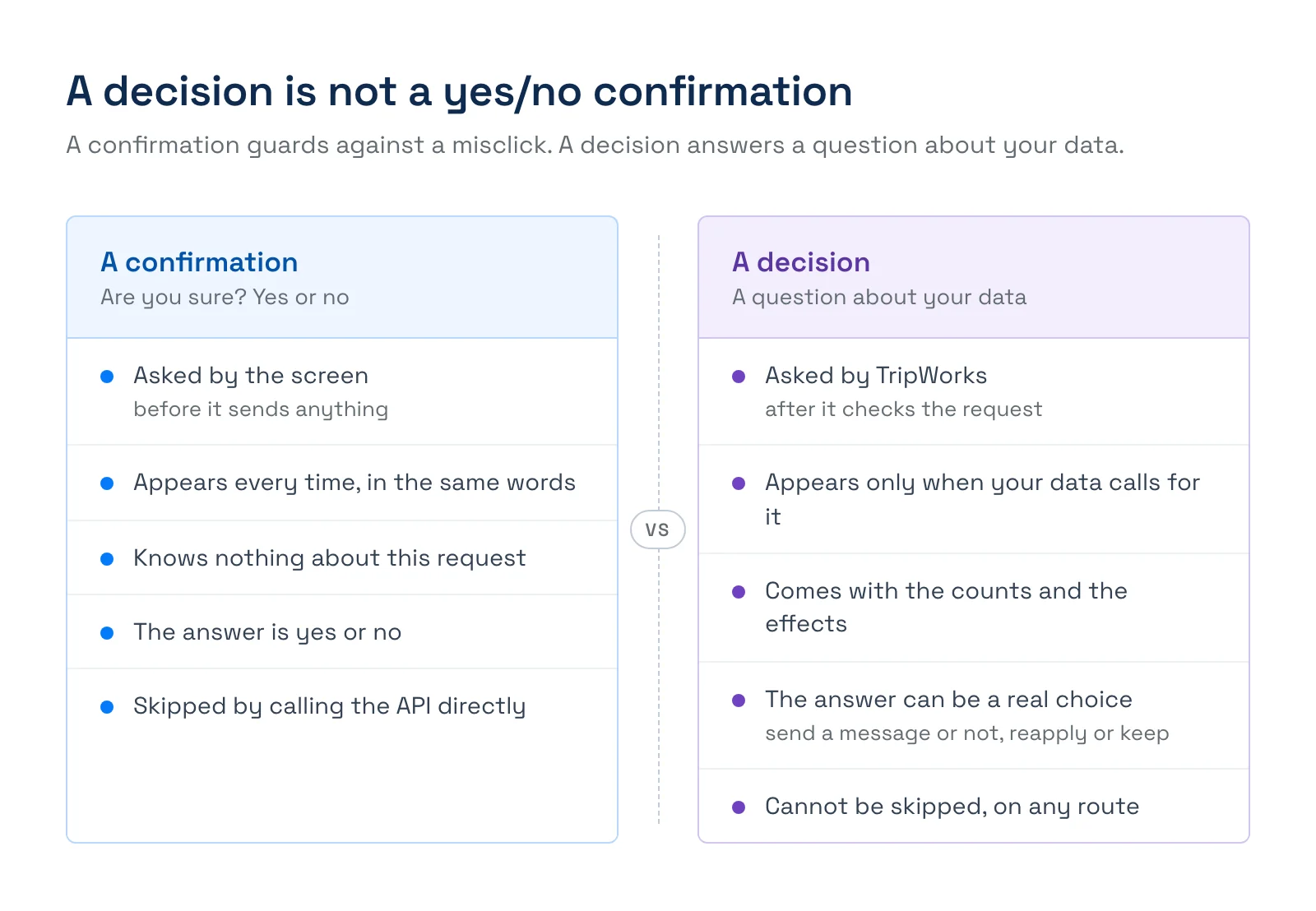
Some decisions are answered with a plain yes, such as {"acknowledge": true}, but they are still decisions, because TripWorks asked only after finding something that needed your yes. Others are a real choice between options: send guests a message or not, and with which template, or reapply a voucher or keep the booking as it is.
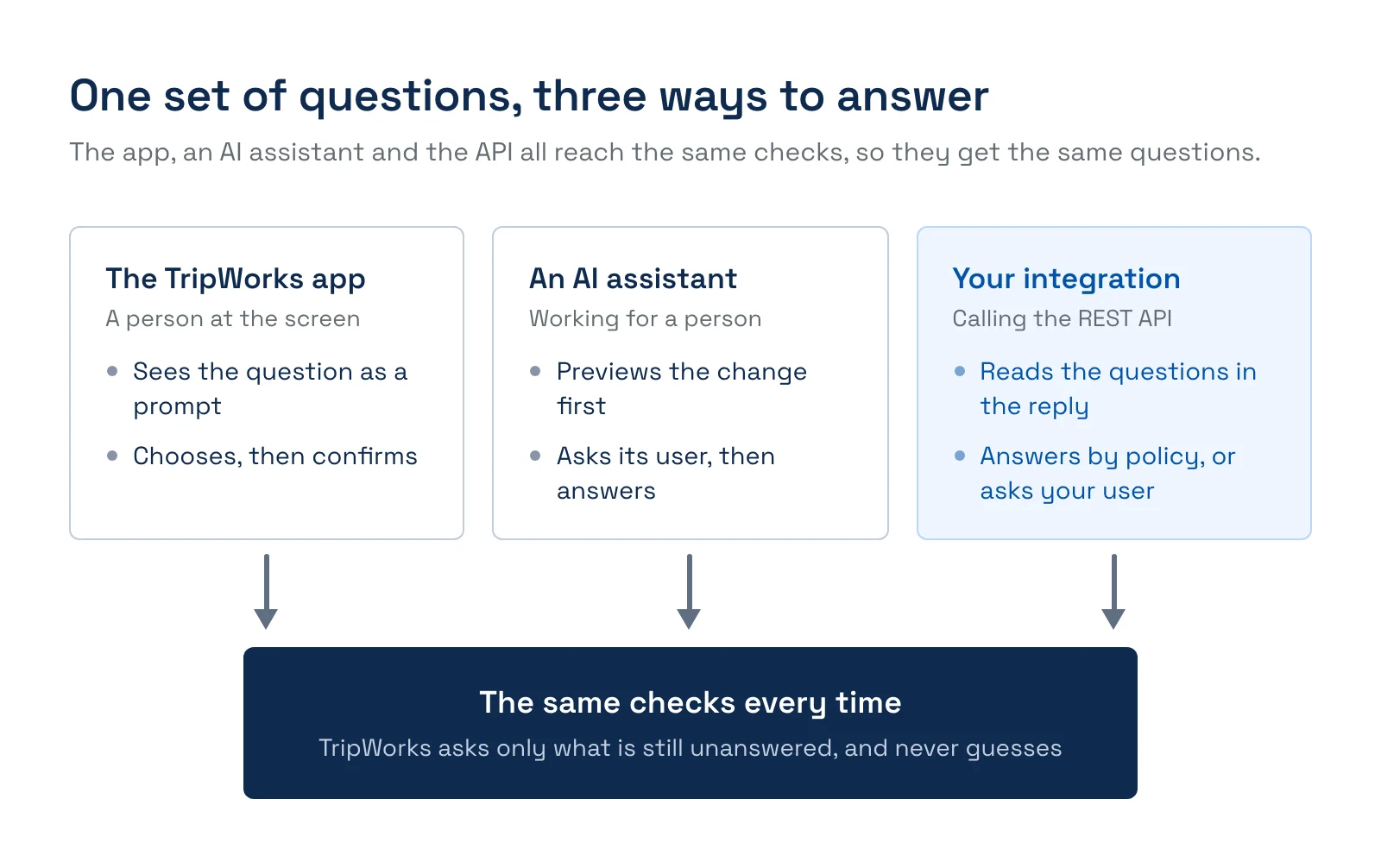
TripWorks never assumes an answer. If a question is unanswered, you always get the question back, whether the request comes from your code, from a person in the TripWorks app, or from an AI assistant working for a person. All three reach the same checks, so they all get the same questions.
What can come back from a request?
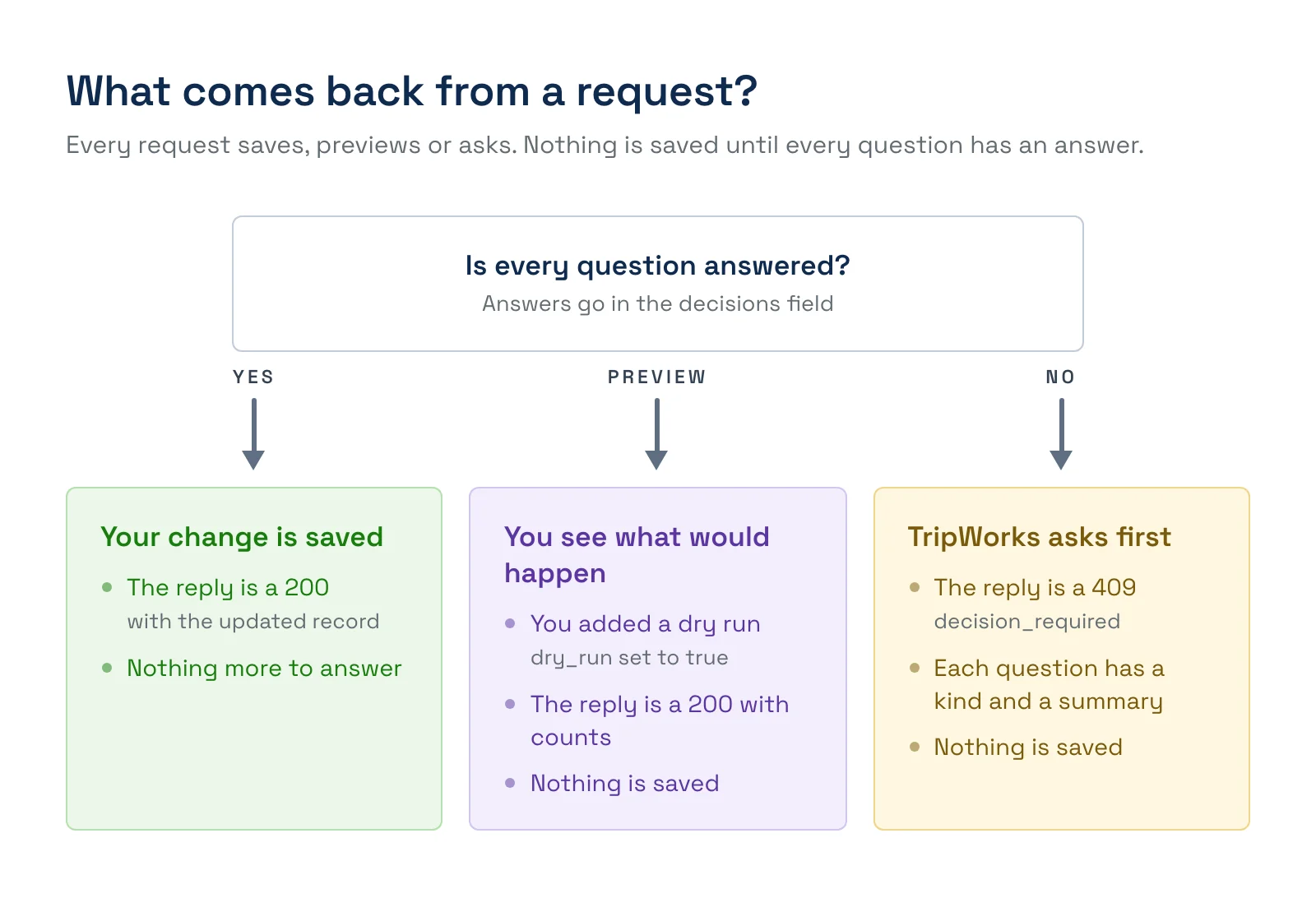
Two things decide what you get back: whether every question has an answer, and whether you added dry_run.
-
Saved. Every question is answered and you did not ask for a dry run. The reply is
200with the updated record. -
Preview. Every question is answered and you sent
"dry_run": true. The reply is200with what would happen, such as counts and consequences. Nothing is saved. -
A question. At least one question is unanswered. The reply is
409with the codedecision_required. Nothing is saved, whether or not you sentdry_run, so a dry run is also a way to learn which questions will come up.
How do you answer a decision?
You answer by sending the same request again, with your answers attached in a decisions object keyed by each question's kind. Answering one question can reveal another, so keep going until the request succeeds. This example closes a timeslot that already has guests booked.
- Send the change as usual.
PATCH /rest/experience-timeslots/{id} { "status": "closed" } - Read the reply. TripWorks found 4 guests on the timeslot, saved nothing, and asked whether you accept the effects.
{ "success": false, "message": "A decision is needed before this can go ahead.", "error": { "code": "decision_required", "decisions": [ { "kind": "restrict_bookings", "context": { "summary": "This timeslot has 4 guests on 1 booking.", "effects": ["Existing bookings stay booked. This does not cancel bookings, message guests or refund anyone."] } } ] } } - Choose an answer, by policy in your code or by asking a person.
- Send the same request again with the answer attached.
PATCH /rest/experience-timeslots/{id}
{
  "status": "closed",
  "decisions": { "restrict_bookings": { "acknowledge": true } }
}
An answer in the wrong shape is refused with 422 validation_failed before anything changes, and the response names the field, such as decisions.restrict_bookings.
If your integration always gives the same answer, send it with the first request. TripWorks accepts an answer before it is asked, so you skip the extra round trip.
Which decisions can you meet?
Every question is answered under its own kind in decisions.
-
restrict_bookings. Asked when a timeslot that has bookings is closed or made private. Existing bookings stay booked, and nobody is messaged or refunded. Answer with{"acknowledge": true}. -
capacity_below_booked. Asked when a capacity is set below the number of guests already booked. The bookings stay, and the timeslot is over capacity until some free up. Answer with{"acknowledge": true}. -
guest_notification. Asked when timeslots that have bookings are cancelled. Answer with{"send": false}, or{"send": true, "template_id": 12, "personalized_note": "..."}to message the guests with one of your templates. Cancelling never refunds anyone. -
voucher_reapply. Asked when guests are added to a trip that has voucher codes. Answer with{"strategy": "REAPPLY", "tripVoucherCodeId": 42}or{"strategy": "KEEP_AS_IS"}.
New decisions can be added over time. Treat an unfamiliar kind as a question you cannot answer automatically, and pass it to a person instead of guessing.
How are decisions made in practice?
A decision is a business choice, so the right answer depends on what you are trying to do. These are situations operators run into, what TripWorks asks, and how you might answer. The details differ, but the pattern is always the same: TripWorks finds something that needs your call, asks, and waits.
A river is flooded, so tomorrow's 9:00 kayak departure has to close. You send the change to close the timeslot, and TripWorks finds 4 guests booked on it. It asks restrict_bookings: do you accept that closing only stops new bookings? The 4 guests stay booked, nobody is messaged, and nobody is refunded. If all you wanted was to stop more people booking, answer yes and you are done. If you wanted those guests moved or told, closing is only the first step. Cancel the timeslot next, which raises a second question.
The whole day is cancelled for a storm. You send a cancel for the day, and TripWorks finds 31 guests across 9 trips. It asks guest_notification: should those guests be messaged? Answer {"send": true, "template_id": 12} with your weather template, and they all hear from you. Answer {"send": false} if you have already called them or your own system sends the message. Either way, TripWorks does not refund anyone. Refunds go through payments.
A boat is in the shop, so the 2:00 departure drops from 20 seats to 12, but 15 are already booked. TripWorks asks capacity_below_booked, because saving that number leaves the departure over capacity. Those 15 guests stay booked, and nobody else can book until some free up. Answer yes if you are happy to run it overbooked while you move a few guests, or change the capacity to 15 or more and the question never comes up.
A group adds two more guests to a trip that already used a voucher. TripWorks asks voucher_reapply: should the voucher cover the new guests as well? Answer REAPPLY if the voucher was for the whole party, or KEEP_AS_IS if the new guests are paying full price.
You run an automated schedule that closes holiday departures every year. Nobody is watching when it runs, so the decision is made once, in your code. Send restrict_bookings with the first request, because your policy is to close the departure and handle the booked guests yourself. If a question you did not plan for ever comes back, stop and send it to a person.
You are building a screen for your dispatchers. Show the question's summary in plain words, such as "This timeslot has 4 guests on 1 booking", with a Confirm button. When the dispatcher confirms, send their answer and resend the request. The TripWorks app does the same thing with a confirmation prompt.
A good rule of thumb: answer automatically when the choice is always the same for your business, and ask a person when it depends on the guests, the weather or the day.
How should your integration handle decisions?
-
Branch on the code. Read
error.code, not the message. The wording can change, anddecision_requireddoes not. - Loop, with a cap. Resend until the request succeeds, and stop after a few rounds. Log the request ID of each round.
-
Keep the choice in one place. A single function can always acknowledge, apply a rule, or show the
summaryto a person. -
Preview before you commit. Send
dry_runwith your answers to see the counts first. - Answer up front when your policy is fixed. It saves a round trip.
-
Treat a
422as a bug in your request. The response names the field that failed.
let decisions = {};
for (let round = 0; round < 5; round++) {
  const res = await patch(`/rest/experience-timeslots/${id}`, { status: "closed", decisions });
  if (res.status !== 409) return res; // saved, or a different error
  for (const d of res.body.error.decisions) {
    decisions[d.kind] = await choose(d); // your policy, or a person
  }
}
throw new Error("Still asking after 5 rounds. Log the request ID.");
Examples
-
Stop and ask a person. Show the question's
summaryto a dispatcher with a Confirm button, then send their answer. - Decide once, in code. For an automated job that always makes the same choice, send the answer with the first request.
-
Preview a big change. Send the request with
dry_runset totrueand read the counts before you commit. - Avoid the question. Make a change that does not need one, such as a capacity at or above the guests already booked, and it saves straight away.
-
Pass on what you do not recognize. When an unfamiliar
kindcomes back, stop and send it to a person. -
Test your handling. Use
dry_runto see which questions a change raises, without creating or changing anything.
Frequently asked questions
Why does the API return 409 instead of just doing it?
Because the change has a consequence that only you can accept, such as leaving guests booked on a closed timeslot. A 409 with decision_required means nothing was changed. It is the API version of the prompt a person sees in the TripWorks app for the same change.
Can I skip the question?
You can answer it before it is asked by sending the answer with your first request, but you cannot leave it out. An unanswered question always comes back as a 409, on every route, so a change that needs a decision can never be saved by accident.
Is it safe to resend a request?
Yes. Nothing is saved until every question has an answer, so resending after a 409 creates no duplicates. TripWorks checks the request from scratch each time, which is also why answering one question can reveal another.
What does dry_run do when a question is unanswered?
It returns the question, with a 409, exactly as a real request would. That makes a dry run a quick way to learn which decisions a change will raise. Once your answers are attached, the dry run replies 200 with what would happen and saves nothing.
What happens if my answer is in the wrong shape?
The request is refused with 422 validation_failed before anything changes. The response names the field, such as decisions.guest_notification, so you can correct the answer and resend.
Do the app and an AI assistant see the same questions?
Yes. The questions come from the same checks, so a person in the TripWorks app, an AI assistant working for a person, and your integration are all asked the same thing. The app shows it as a prompt, and an assistant asks the person it works for.
Does one answer cover a whole batch?
When a single request changes many records, the question is asked once for the whole request and your answer covers all of it. If you send the changes as separate requests, each one asks for itself.
Where do I see the questions for each endpoint?
In the API reference, which lists the decisions an endpoint can return, the answers it accepts, and the 409 reply. Open the endpoint and look under its responses.
Related
- Handle errors in the REST API
- Get started with the REST API
- Build integrations that stay fast and efficient
- How API keys and access work
Built for attractions, tours & activities
Build on top of your booking data
See how attractions, tours, and activities connect their booking data to the tools they already use with TripWorks. Book a demo and make the switch.