
Your company information is the branding and contact detail that shows up across your booking site and every customer communication. Setting it once keeps everything consistent — the name guests see, the details on their confirmations, and the look of your emails.
In this article
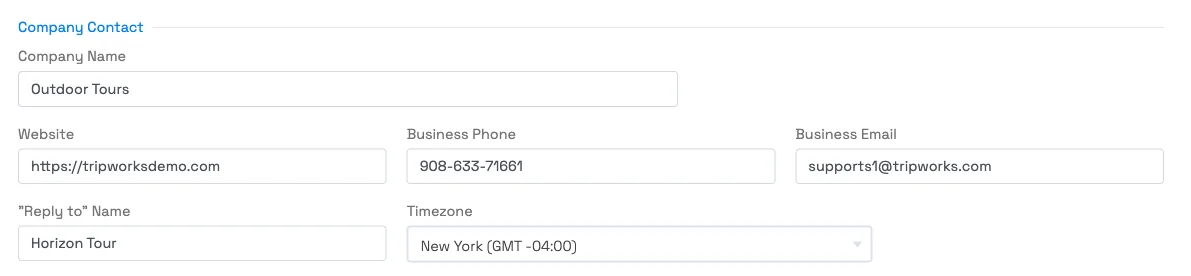
Edit your company information
- Go to Setup General.
- In the Company Contact section, edit Company Name — this is the business name guests see. You can also update Business Phone, Business Email, Website, and your "Reply to" Name.
- Click Update.
Your new company name appears immediately on receipts, confirmation and reminder emails, and your booking widget. (Editing company settings requires the Set Up Company permission.) For the email address guests see messages come from, see Can I change the from address on my emails?
Changing your Company Name here does not change what shows on your customers' card/bank statements (the statement descriptor). That's set once when your account is created and can only be updated by TripWorks support — so if your business name (or DBA) changes, contact us to update the statement descriptor too.
Change your currency or locale
You can't change your account's currency or locale (date, time, and language format) yourself, and the same goes for turning on multiple languages. TripWorks sets these. Ask your account manager to change the currency, locale, or languages on your account.
Frequently asked questions
Where does my company information appear?
Across your booking site and customer communications — confirmations, reminders, and other emails — so your branding and contact details stay consistent.
Our business name (DBA) changed — how do I update it?
Update the Company Name field under Setup → Company & policies → Company Info & Branding → General and save — it changes immediately on receipts, emails, and your booking widget. One extra step: the name on customers' card statements is set separately and can only be changed by TripWorks support, so contact us to update that too.
Will changing my company name update what shows on a customer's card statement?
No. The statement descriptor (what appears on the guest's bank/card statement) is set when your account is created and isn't editable in Setup. Contact TripWorks support to change it.
Can I change my account's web address or legal details myself?
Your customer-facing Company Name and contact details are self-serve. Your account's URL/subdomain and legal address aren't editable in Setup — reach out to TripWorks support for those.
How do I change the email address messages come from?
That's a separate setting — see Can I change the from address on my emails?
Related
Built for attractions, tours & activities
Your brand, everywhere guests see it
See how attractions, tours, and activities present their brand on TripWorks. Book a demo and make the switch.